> ## Documentation Index
> Fetch the complete documentation index at: https://docs.jelou.ai/llms.txt
> Use this file to discover all available pages before exploring further.
# External AI agent
> Connect an AI agent that already lives outside Jelou as a node in your flow.
The **External AI agent** node connects to your flow an AI agent that already lives outside Jelou. Jelou keeps the channel, security and the log of every turn; your agent decides the reply.
The node is being rolled out gradually; if you don't see it on the canvas, ask your Jelou account executive to turn it on.
## How to add the node
Both kinds of AI agent are added from the same entry point: the **AI Agent** item in the builder's toolbar. Its behavior changes depending on how you use it:
* **Click**: adds a normal AI Agent node: Jelou's own AI agent.
* **Hover**: opens a selector of **external AI agent** providers. Picking a provider adds an **External AI agent** node preconfigured for that provider.
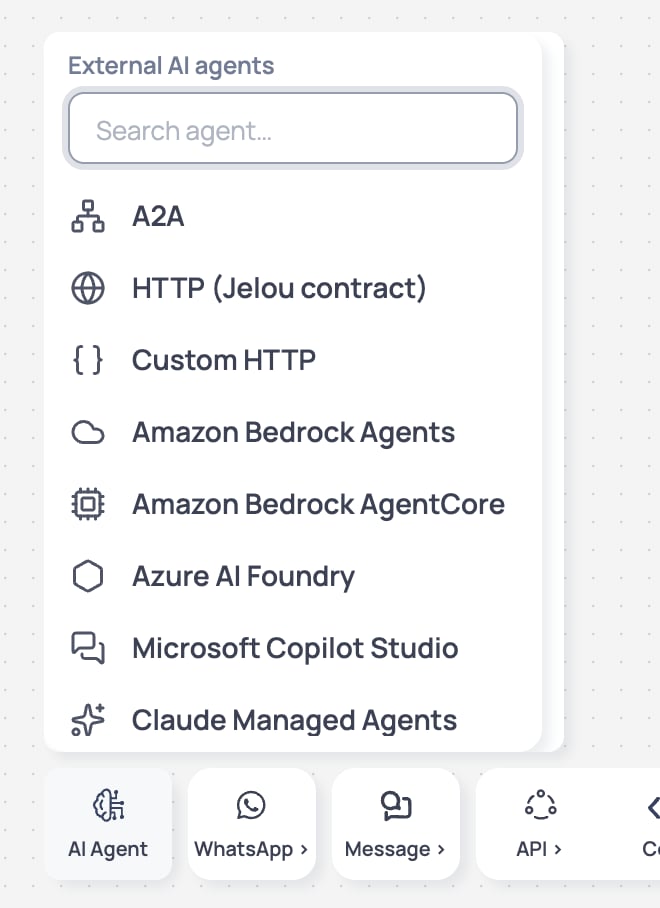 This selector works the same way as the payment gateway picker in the [Payments](/en/guides/integraciones/pagos/personalizadas/usar-en-brain-studio) node: you pick the provider first and the node arrives with its fields already organized.
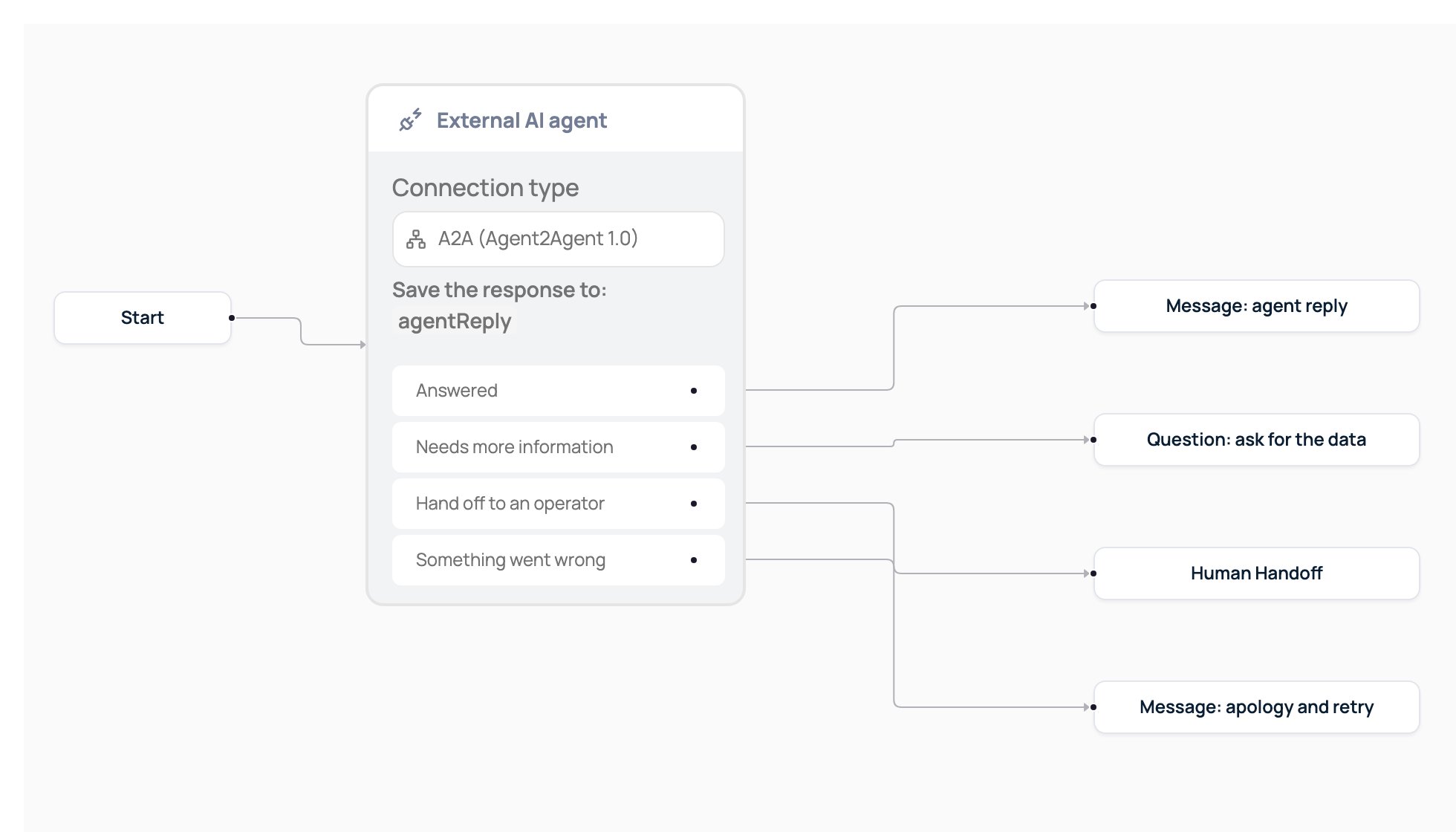
Once added, the External AI agent node connects to the rest of your flow through its four outputs, same as any other node:
This selector works the same way as the payment gateway picker in the [Payments](/en/guides/integraciones/pagos/personalizadas/usar-en-brain-studio) node: you pick the provider first and the node arrives with its fields already organized.
Once added, the External AI agent node connects to the rest of your flow through its four outputs, same as any other node:
 ## AI Agent or external AI agent
Choose based on where the agent lives. To build one inside Jelou, use the **AI Agent** node ([general guide](/en/guides/agentes-ia)).
| | AI Agent | External AI agent |
| :- | :- | :- |
| **The agent** | You build and tune it in Jelou. | Already exists and runs in production outside Jelou. |
| **Where the logic lives** | In the node's prompt and tools. | In your system or your vendor's. |
| **Model** | You choose it in the node. | Your agent defines it; the node doesn't know it. |
| **Changes** | You make them in the builder. | You make them on your platform; in Jelou you only update the connection. |
| **Security** | Jelou screens the model's answers. | Your agent applies its own; Jelou also screens its answers. |
## Available providers
Each provider asks for its own fields, taken directly from its console, and validates them as you type. Credentials are selected by the **name of the organization secret** that stores them; the secret's value is never shown or saved in the flow.
| Provider | What you need in Jelou | Where to find it in the provider's console |
| :- | :- | :- |
| **Amazon Bedrock (Agents)** | AWS region, agent ID, alias ID | Bedrock → Agents → your agent: the agent ID and alias ID appear in the overview; the region is your AWS console's region. |
| **Amazon Bedrock AgentCore** | Agent runtime ARN, server protocol (HTTP or A2A) | Bedrock AgentCore → Runtimes → your runtime: the full ARN and the `ProtocolConfiguration.serverProtocol` (HTTP or A2A) appear in its detail view. |
| **Microsoft Copilot Studio** | Regional Direct Line URL or token endpoint | Copilot Studio → your agent → Channels → Direct Line: the regional URL is in `regionalchannelsettings`; if you use token exchange, the token endpoint comes from the Direct Line channel configured with "Secret" turned off. |
| **Azure AI Foundry** | Project endpoint and the agent (by ID or by name, depending on the API generation) | AI Foundry → your project → Overview: the project endpoint. The agent is identified by `agentId` (classic generation, Assistants-style) or `agentName` (Foundry generation, via the Responses API), never both. |
| **Google Vertex AI Agent Runtime** (formerly Agent Engine) | Agent resource name | Vertex AI → Agent Engine → your agent: the full resource name (`projects/.../locations/.../reasoningEngines/...`). Agents deployed with the A2A template use the A2A provider instead of this one. |
| **Google Dialogflow CX** | Agent name and language code | Dialogflow CX → your agent → settings: the full name (`projects/.../locations/.../agents/...`). The language code is used when the conversation carries no locale of its own. |
| **Claude Managed Agents** | Agent ID, environment ID | Claude Managed Agents console: the agent ID (`agent_...`) and environment ID (`env_...`) of the agent you published. |
| **Salesforce Agentforce** | Agent ID (18 characters), your org's My Domain URL | Setup → Agentforce Agents: the `BotDefinition` Id. The URL must be your My Domain URL (`https://yourorg.my.salesforce.com`), never the `lightning.force.com` one. Only agents that aren't of type "Agentforce (Default)" are supported. |
| **OpenAI (Responses API)** | Prompt ID (format `pmpt_...`) | OpenAI platform → Prompts: the ID of the reusable prompt that packages instructions, model and tools. You can optionally pin a prompt version. |
| **LangGraph** | Deployment URL and assistant ID | LangGraph Platform (LangSmith Deployments) → your deployment: the deployment URL and the assistant ID (UUID recommended, or the graph name). |
| **Dify** (preset over custom HTTP) | Workspace URL and credential | Dify → your app → API Access: the base URL and the workspace's API key. Jelou calls `POST /v1/chat-messages` for you. |
| **n8n** (preset over custom HTTP) | Webhook URL | n8n → your workflow → Webhook node: the production webhook URL. |
| **A2A (Agent-to-Agent)** | Agent Card URL | Your A2A agent's server: the public URL where it publishes its Agent Card (`.well-known/agent-card.json` or the path you define). |
| **HTTP (Jelou turn contract)** | Agent URL | Your own server: the endpoint that already implements the Jelou turn contract (see the section below). |
| **Custom HTTP** | Agent URL, request body and response paths | Your own server: any endpoint that accepts JSON, even if it doesn't speak the Jelou turn contract. |
## One task or several turns
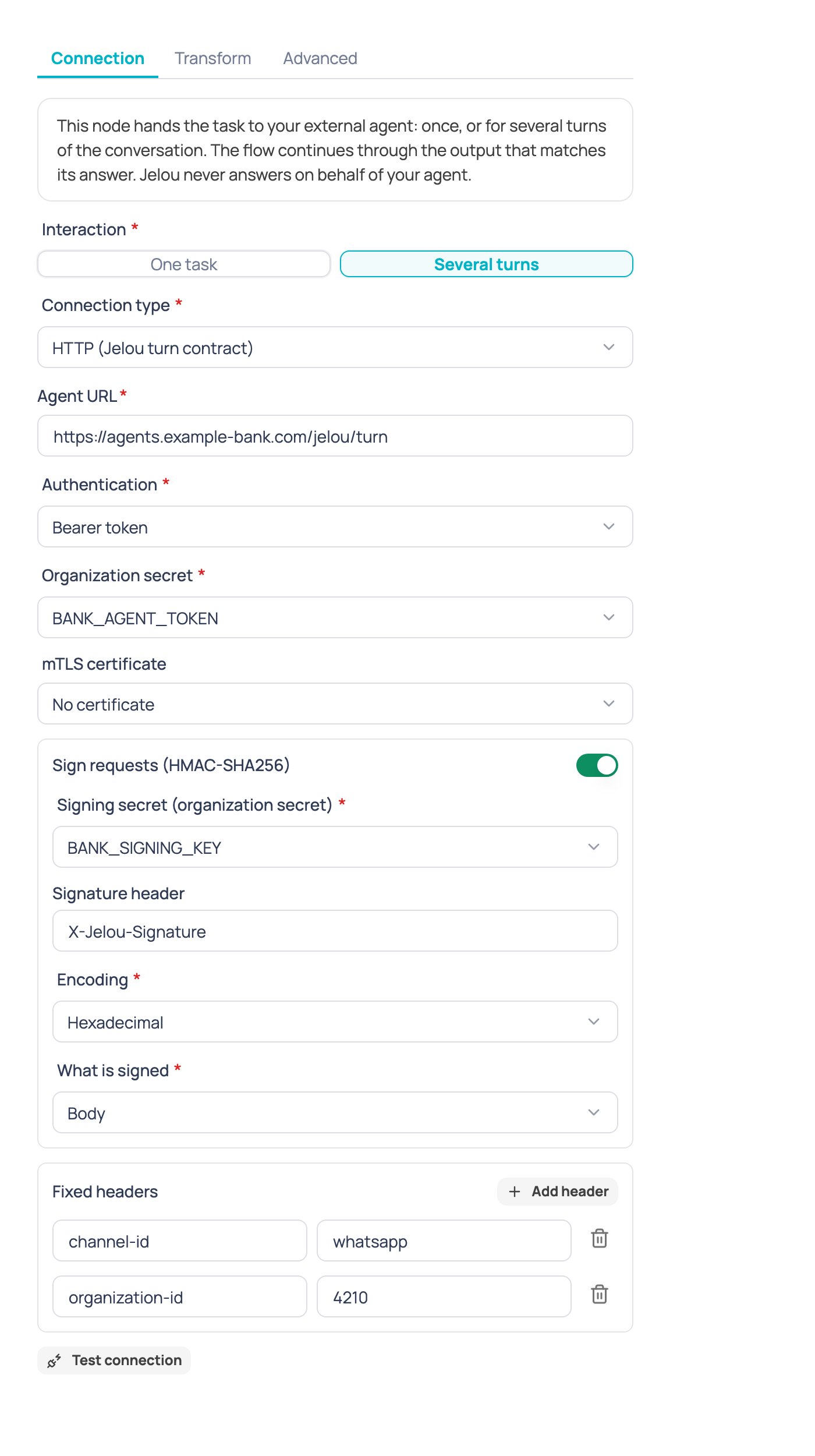
When you configure the node, you choose how it interacts with your agent:
* **One task**: the node sends the task once, receives the answer and exits the node.
* **Several turns**: the node keeps the conversation going with the agent, message by message, until the agent ends it or hands it off. While the agent answers without ending the conversation, the node doesn't take any output: it delivers the messages to the user and waits for their next message to continue with the agent.
## AI Agent or external AI agent
Choose based on where the agent lives. To build one inside Jelou, use the **AI Agent** node ([general guide](/en/guides/agentes-ia)).
| | AI Agent | External AI agent |
| :- | :- | :- |
| **The agent** | You build and tune it in Jelou. | Already exists and runs in production outside Jelou. |
| **Where the logic lives** | In the node's prompt and tools. | In your system or your vendor's. |
| **Model** | You choose it in the node. | Your agent defines it; the node doesn't know it. |
| **Changes** | You make them in the builder. | You make them on your platform; in Jelou you only update the connection. |
| **Security** | Jelou screens the model's answers. | Your agent applies its own; Jelou also screens its answers. |
## Available providers
Each provider asks for its own fields, taken directly from its console, and validates them as you type. Credentials are selected by the **name of the organization secret** that stores them; the secret's value is never shown or saved in the flow.
| Provider | What you need in Jelou | Where to find it in the provider's console |
| :- | :- | :- |
| **Amazon Bedrock (Agents)** | AWS region, agent ID, alias ID | Bedrock → Agents → your agent: the agent ID and alias ID appear in the overview; the region is your AWS console's region. |
| **Amazon Bedrock AgentCore** | Agent runtime ARN, server protocol (HTTP or A2A) | Bedrock AgentCore → Runtimes → your runtime: the full ARN and the `ProtocolConfiguration.serverProtocol` (HTTP or A2A) appear in its detail view. |
| **Microsoft Copilot Studio** | Regional Direct Line URL or token endpoint | Copilot Studio → your agent → Channels → Direct Line: the regional URL is in `regionalchannelsettings`; if you use token exchange, the token endpoint comes from the Direct Line channel configured with "Secret" turned off. |
| **Azure AI Foundry** | Project endpoint and the agent (by ID or by name, depending on the API generation) | AI Foundry → your project → Overview: the project endpoint. The agent is identified by `agentId` (classic generation, Assistants-style) or `agentName` (Foundry generation, via the Responses API), never both. |
| **Google Vertex AI Agent Runtime** (formerly Agent Engine) | Agent resource name | Vertex AI → Agent Engine → your agent: the full resource name (`projects/.../locations/.../reasoningEngines/...`). Agents deployed with the A2A template use the A2A provider instead of this one. |
| **Google Dialogflow CX** | Agent name and language code | Dialogflow CX → your agent → settings: the full name (`projects/.../locations/.../agents/...`). The language code is used when the conversation carries no locale of its own. |
| **Claude Managed Agents** | Agent ID, environment ID | Claude Managed Agents console: the agent ID (`agent_...`) and environment ID (`env_...`) of the agent you published. |
| **Salesforce Agentforce** | Agent ID (18 characters), your org's My Domain URL | Setup → Agentforce Agents: the `BotDefinition` Id. The URL must be your My Domain URL (`https://yourorg.my.salesforce.com`), never the `lightning.force.com` one. Only agents that aren't of type "Agentforce (Default)" are supported. |
| **OpenAI (Responses API)** | Prompt ID (format `pmpt_...`) | OpenAI platform → Prompts: the ID of the reusable prompt that packages instructions, model and tools. You can optionally pin a prompt version. |
| **LangGraph** | Deployment URL and assistant ID | LangGraph Platform (LangSmith Deployments) → your deployment: the deployment URL and the assistant ID (UUID recommended, or the graph name). |
| **Dify** (preset over custom HTTP) | Workspace URL and credential | Dify → your app → API Access: the base URL and the workspace's API key. Jelou calls `POST /v1/chat-messages` for you. |
| **n8n** (preset over custom HTTP) | Webhook URL | n8n → your workflow → Webhook node: the production webhook URL. |
| **A2A (Agent-to-Agent)** | Agent Card URL | Your A2A agent's server: the public URL where it publishes its Agent Card (`.well-known/agent-card.json` or the path you define). |
| **HTTP (Jelou turn contract)** | Agent URL | Your own server: the endpoint that already implements the Jelou turn contract (see the section below). |
| **Custom HTTP** | Agent URL, request body and response paths | Your own server: any endpoint that accepts JSON, even if it doesn't speak the Jelou turn contract. |
## One task or several turns
When you configure the node, you choose how it interacts with your agent:
* **One task**: the node sends the task once, receives the answer and exits the node.
* **Several turns**: the node keeps the conversation going with the agent, message by message, until the agent ends it or hands it off. While the agent answers without ending the conversation, the node doesn't take any output: it delivers the messages to the user and waits for their next message to continue with the agent.
 ### Example: one task
```
User: I want to know the status of my order EJ-48213
Agent: Your order EJ-48213 is on its way and arrives tomorrow before 6:00 PM.
```
The node receives the answer, delivers it to the user and exits through **Answered**. There's no second round with the agent: any later message from the user no longer goes through this node.
### Example: several turns
```
User: I want a refund for my last purchase
Agent: Sure, to verify your refund request I need the order number.
Could you share it?
[the node delivers the message to the user and waits for their reply]
User: My order number is EJ-48213
Agent: Done, I found your order EJ-48213. The $45.00 refund was approved
and will show up in 3 to 5 business days.
```
The node stays active between the first and second messages: it doesn't take any output until the agent ends the conversation. Only then does it exit through **Answered**.
## Node outputs
The External AI agent node has four outputs:
| Output | Fires when |
| :- | :- |
| **Answered** | In one task, the agent answered. In several turns, the agent ended the conversation. |
| **Needs more information** | Only in **one task**: the agent paused to wait for an action or additional input. In **several turns** this is treated as a normal answer and the node keeps waiting for the user; it's not an output in that mode. |
| **Hand off to an operator** | The agent asked to hand the conversation to a human, after delivering its messages. |
| **Something went wrong** | The agent failed, rejected the credential, returned an invalid response, or the session expired from a timeout. |
### Example: one task
```
User: I want to know the status of my order EJ-48213
Agent: Your order EJ-48213 is on its way and arrives tomorrow before 6:00 PM.
```
The node receives the answer, delivers it to the user and exits through **Answered**. There's no second round with the agent: any later message from the user no longer goes through this node.
### Example: several turns
```
User: I want a refund for my last purchase
Agent: Sure, to verify your refund request I need the order number.
Could you share it?
[the node delivers the message to the user and waits for their reply]
User: My order number is EJ-48213
Agent: Done, I found your order EJ-48213. The $45.00 refund was approved
and will show up in 3 to 5 business days.
```
The node stays active between the first and second messages: it doesn't take any output until the agent ends the conversation. Only then does it exit through **Answered**.
## Node outputs
The External AI agent node has four outputs:
| Output | Fires when |
| :- | :- |
| **Answered** | In one task, the agent answered. In several turns, the agent ended the conversation. |
| **Needs more information** | Only in **one task**: the agent paused to wait for an action or additional input. In **several turns** this is treated as a normal answer and the node keeps waiting for the user; it's not an output in that mode. |
| **Hand off to an operator** | The agent asked to hand the conversation to a human, after delivering its messages. |
| **Something went wrong** | The agent failed, rejected the credential, returned an invalid response, or the session expired from a timeout. |
 Connect each output to whatever should happen in your flow. A typical pattern:
* **Answered** → the agent's message was already delivered; continue the flow or end it.
* **Needs more information** → a question node that collects the missing piece and calls the agent again.
* **Hand off to an operator** → your handoff node to the Inbox.
* **Something went wrong** → an apology message and, if it applies, a retry or a handoff to an operator.
## The "Save the answer in" variable
Every External AI agent node has a **Save the answer in** field (`agentReply` by default) where the agent's answer is written. You can reference it in later nodes of the flow with the usual variable syntax, for example `{{$context.agentReply}}` in a message node or a condition.
If the agent also sends structured data (for example through custom HTTP's data path, or a `variables_set` signal), that data is written as individual context variables of the flow, available to any later node.
## Authentication and organization secrets
Each provider supports one or more credential schemes, depending on what its API accepts:
| Scheme | What the secret holds |
| :- | :- |
| `api_key_header` | A value sent in a header with a configurable name. |
| `bearer` | A token sent as `Authorization: Bearer ...`. |
| `oauth2_client_credentials` | The client secret; Jelou exchanges a token with your OAuth2 endpoint before each call (or reuses one that's still valid). |
| `aws_sigv4_keys` | A JSON object `{accessKeyId, secretAccessKey, sessionToken?}`; Jelou signs the request with SigV4. |
| `aws_sigv4_role` | Doesn't hold a key: Jelou assumes the AWS role you point to, using an external id stored as a secret. |
| `google_service_account` | The service account's full JSON key. |
| `direct_line_secret` | Copilot Studio's Direct Line channel secret. |
| `mtls` | Combines with your company's mTLS certificate (see below); it's independent of the other schemes. |
| `none` | No credential; only valid when your agent doesn't require authentication. |
In every case, **the node only stores the organization secret's name**, never its value. The secret is resolved at call time and is never shown or saved in the flow.
## Enterprise options for custom HTTP
When your agent uses **HTTP (Jelou turn contract)** or **custom HTTP**, your company may have access to additional options:
Connect each output to whatever should happen in your flow. A typical pattern:
* **Answered** → the agent's message was already delivered; continue the flow or end it.
* **Needs more information** → a question node that collects the missing piece and calls the agent again.
* **Hand off to an operator** → your handoff node to the Inbox.
* **Something went wrong** → an apology message and, if it applies, a retry or a handoff to an operator.
## The "Save the answer in" variable
Every External AI agent node has a **Save the answer in** field (`agentReply` by default) where the agent's answer is written. You can reference it in later nodes of the flow with the usual variable syntax, for example `{{$context.agentReply}}` in a message node or a condition.
If the agent also sends structured data (for example through custom HTTP's data path, or a `variables_set` signal), that data is written as individual context variables of the flow, available to any later node.
## Authentication and organization secrets
Each provider supports one or more credential schemes, depending on what its API accepts:
| Scheme | What the secret holds |
| :- | :- |
| `api_key_header` | A value sent in a header with a configurable name. |
| `bearer` | A token sent as `Authorization: Bearer ...`. |
| `oauth2_client_credentials` | The client secret; Jelou exchanges a token with your OAuth2 endpoint before each call (or reuses one that's still valid). |
| `aws_sigv4_keys` | A JSON object `{accessKeyId, secretAccessKey, sessionToken?}`; Jelou signs the request with SigV4. |
| `aws_sigv4_role` | Doesn't hold a key: Jelou assumes the AWS role you point to, using an external id stored as a secret. |
| `google_service_account` | The service account's full JSON key. |
| `direct_line_secret` | Copilot Studio's Direct Line channel secret. |
| `mtls` | Combines with your company's mTLS certificate (see below); it's independent of the other schemes. |
| `none` | No credential; only valid when your agent doesn't require authentication. |
In every case, **the node only stores the organization secret's name**, never its value. The secret is resolved at call time and is never shown or saved in the flow.
## Enterprise options for custom HTTP
When your agent uses **HTTP (Jelou turn contract)** or **custom HTTP**, your company may have access to additional options:
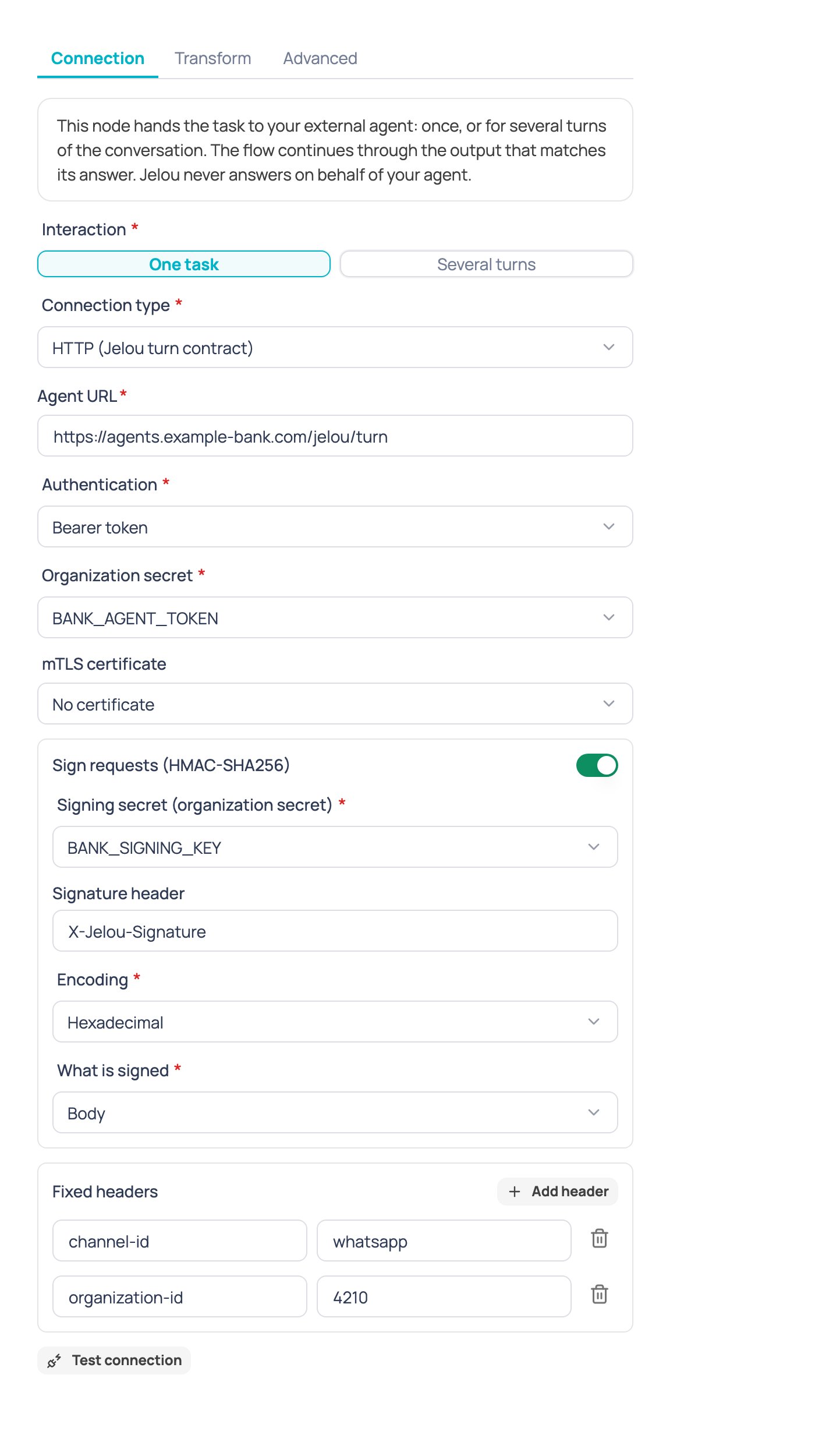 | Option | What it's for |
| :- | :- |
| **Request signing (HMAC)** | Signs every request with a shared secret, so your agent can verify it came from Jelou. |
| **Static headers** | Adds fixed headers your agent expects on every call. Sensitive headers like `authorization`, `cookie`, `host` or `x-jelou-signature` aren't allowed, nor values with variables (`{{...}}`). Up to 10 headers. |
| **Pre-request and post-response scripts** | Runs a script before sending the request or after receiving the response, in the same secure sandbox the API node uses. |
| **OAuth** | Authentication via OAuth2 client credentials. |
| **mTLS** | Mutual TLS with your company's client certificate, independent of the credential: you can combine OAuth and mTLS at the same time. |
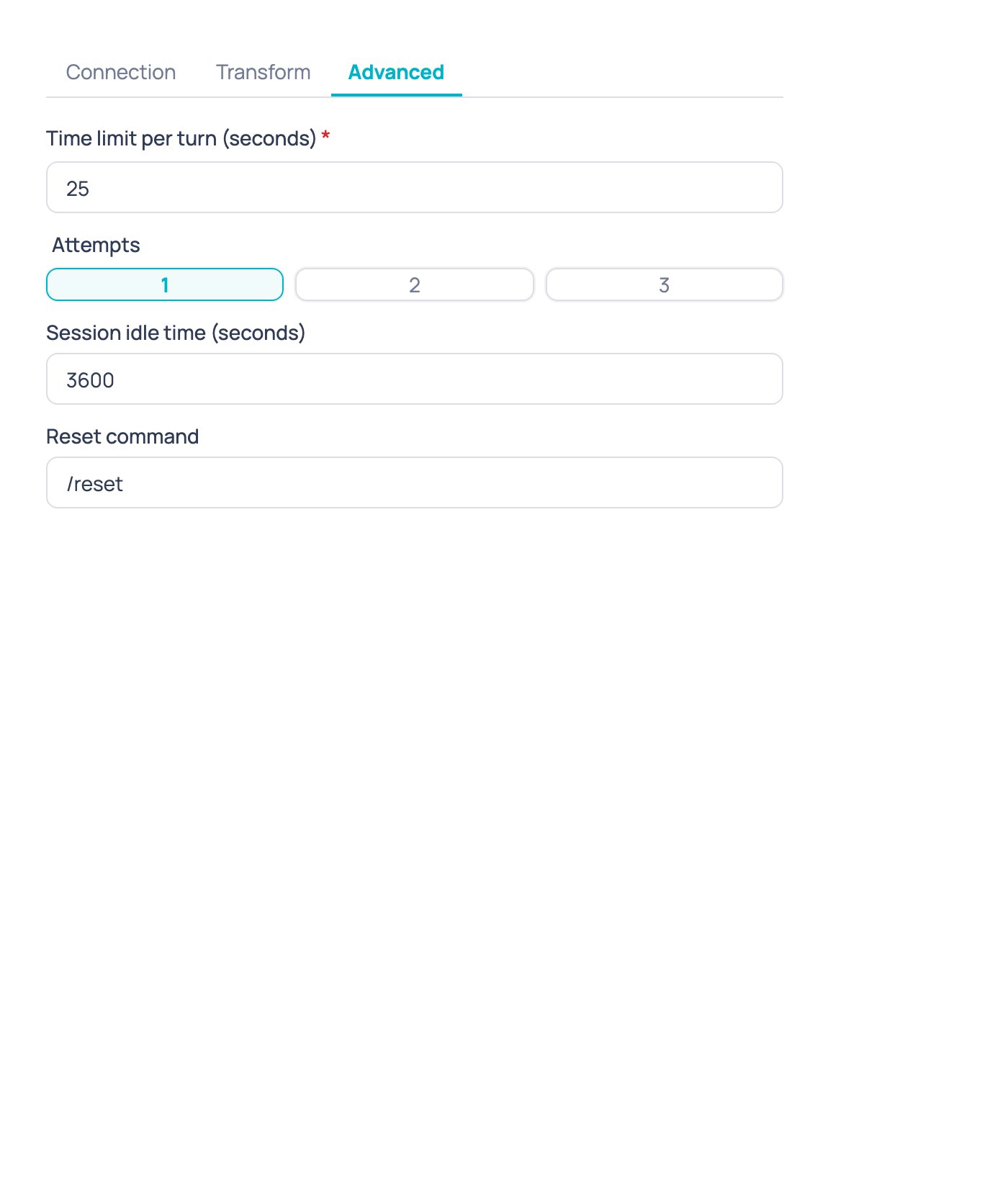
| **Retries** | Up to 3 attempts; only timeouts, rate limits and server errors are retried, never a rejected request. |
| **Turn timeout** | How long the node waits for the agent's answer before taking the error output. Default 25 seconds, up to a maximum of 120 seconds. |
| Option | What it's for |
| :- | :- |
| **Request signing (HMAC)** | Signs every request with a shared secret, so your agent can verify it came from Jelou. |
| **Static headers** | Adds fixed headers your agent expects on every call. Sensitive headers like `authorization`, `cookie`, `host` or `x-jelou-signature` aren't allowed, nor values with variables (`{{...}}`). Up to 10 headers. |
| **Pre-request and post-response scripts** | Runs a script before sending the request or after receiving the response, in the same secure sandbox the API node uses. |
| **OAuth** | Authentication via OAuth2 client credentials. |
| **mTLS** | Mutual TLS with your company's client certificate, independent of the credential: you can combine OAuth and mTLS at the same time. |
| **Retries** | Up to 3 attempts; only timeouts, rate limits and server errors are retried, never a rejected request. |
| **Turn timeout** | How long the node waits for the agent's answer before taking the error output. Default 25 seconds, up to a maximum of 120 seconds. |
 These options are available on Enterprise plans. If you don't see them on your node, ask your Jelou account executive to check your plan.
### HMAC signing: what's signed and how to verify it
When you turn on request signing, Jelou computes an HMAC-SHA256 over the exact request body (the same bytes sent) using the secret you choose, and sends it in a header:
| Field | Default value | Notes |
| :- | :- | :- |
| Header | `X-Jelou-Signature` | Configurable. |
| Encoding | Hexadecimal | Also supports Base64. |
| What's signed | Just the body (`body`) | Also supports `timestamp.body`, which signs `"{timestamp}.{body}"` and adds the Unix timestamp in a second header you name. |
Your own server can verify the signature like this (Node.js, body-only variant):
```js theme={null}
const crypto = require("crypto");
function isValidJelouSignature(rawBody, signatureHeader, sharedSecret) {
const expected = crypto
.createHmac("sha256", sharedSecret)
.update(rawBody, "utf8")
.digest("hex");
const a = Buffer.from(signatureHeader || "", "utf8");
const b = Buffer.from(expected, "utf8");
return a.length === b.length && crypto.timingSafeEqual(a, b);
}
// rawBody must be the raw body exactly as it arrived, before parsing JSON
const valid = isValidJelouSignature(rawBody, req.headers["x-jelou-signature"], SHARED_SECRET);
```
Always verify against the request's **raw** body, before your framework parses it into JSON. Re-serializing the parsed JSON can change property order or spacing and make the signature not match even though the content is the same.
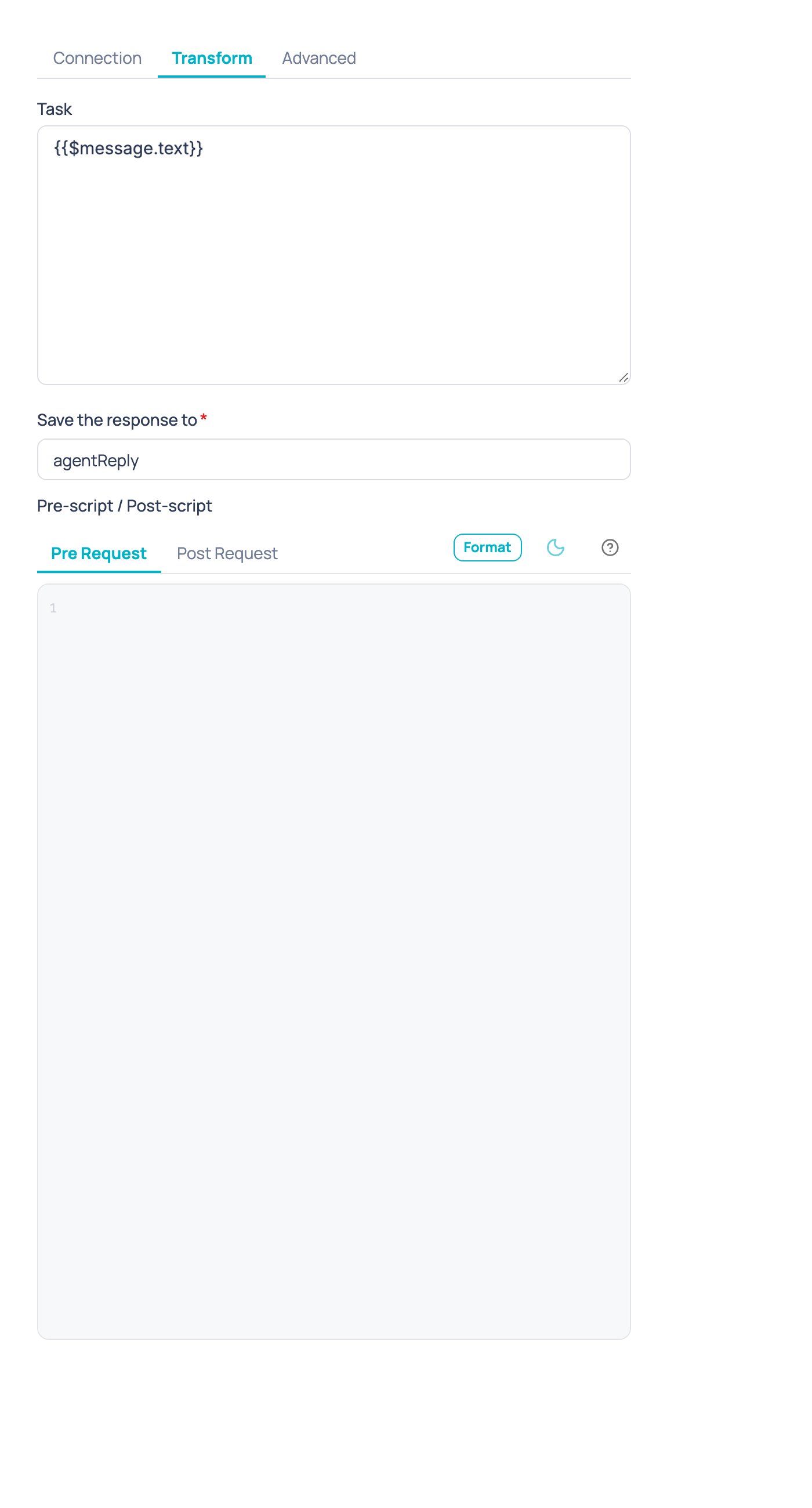
The **Task** field accepts variables. To send the user's message to the agent, use `{{$message.text}}`: it holds the text of the message that reached the flow. `{{$input.message}}` is not a message variable: `$input` only holds the data your flow collected (for example, with an Input node), so it comes out empty when the node runs from a chat message.
### Pre-request and post-response scripts
Scripts run in the same secure sandbox the API node uses, and only apply to HTTP providers. They're configured in the node's **Transform** tab, next to the task that's sent and the variable where the answer is saved:
These options are available on Enterprise plans. If you don't see them on your node, ask your Jelou account executive to check your plan.
### HMAC signing: what's signed and how to verify it
When you turn on request signing, Jelou computes an HMAC-SHA256 over the exact request body (the same bytes sent) using the secret you choose, and sends it in a header:
| Field | Default value | Notes |
| :- | :- | :- |
| Header | `X-Jelou-Signature` | Configurable. |
| Encoding | Hexadecimal | Also supports Base64. |
| What's signed | Just the body (`body`) | Also supports `timestamp.body`, which signs `"{timestamp}.{body}"` and adds the Unix timestamp in a second header you name. |
Your own server can verify the signature like this (Node.js, body-only variant):
```js theme={null}
const crypto = require("crypto");
function isValidJelouSignature(rawBody, signatureHeader, sharedSecret) {
const expected = crypto
.createHmac("sha256", sharedSecret)
.update(rawBody, "utf8")
.digest("hex");
const a = Buffer.from(signatureHeader || "", "utf8");
const b = Buffer.from(expected, "utf8");
return a.length === b.length && crypto.timingSafeEqual(a, b);
}
// rawBody must be the raw body exactly as it arrived, before parsing JSON
const valid = isValidJelouSignature(rawBody, req.headers["x-jelou-signature"], SHARED_SECRET);
```
Always verify against the request's **raw** body, before your framework parses it into JSON. Re-serializing the parsed JSON can change property order or spacing and make the signature not match even though the content is the same.
The **Task** field accepts variables. To send the user's message to the agent, use `{{$message.text}}`: it holds the text of the message that reached the flow. `{{$input.message}}` is not a message variable: `$input` only holds the data your flow collected (for example, with an Input node), so it comes out empty when the node runs from a chat message.
### Pre-request and post-response scripts
Scripts run in the same secure sandbox the API node uses, and only apply to HTTP providers. They're configured in the node's **Transform** tab, next to the task that's sent and the variable where the answer is saved:
 **Pre-request script:** `$context.get("agentRequest")` holds `{ task, sessionId, body, headers }`. The script can change `agentRequest.body` or `agentRequest.headers` before Jelou sends the request. For example, to wrap the body in your company's own envelope:
```js theme={null}
const request = $context.get("agentRequest");
$context.set("agentRequest.body", {
header: {
channel: "whatsapp",
company: "Banco Ejemplo",
},
data: request.body,
});
```
**Post-response script:** `$context.get("agentResponse")` holds `{ status, body }`. The script must leave in `agentResponse.body` the object the response mapping then reads (the `textPath`, `dataPath`, `sessionIdPath` paths, etc.).
```js theme={null}
const response = $context.get("agentResponse");
$context.set("agentResponse.body", response.body.data);
```
An error thrown by the script fails the turn through the node's error output. Script changes never touch the flow's own variables: they only change what Jelou sends or reads for this call.
## Reply later (acknowledges, replies later)
Some external agents don't answer inside the same call: they acknowledge that they received the message and send their answer later, on their own. For that case, the **External AI agent** node has an optional mode. It is off by default, so an existing node behaves exactly as before.
The **How the agent replies** field appears on the **Connection** tab when the connection type is **HTTP (Jelou turn contract)** or **Custom HTTP** and the interaction is **Several turns**. It has two options:
* **In the same response** (default): the agent answers inside the same call, as before.
* **Acknowledges, replies later**: the agent acknowledges with any 2xx response. Jelou delivers nothing from the acknowledgement body and leaves the node waiting for the user's next message, with the same session inactivity time. That message is forwarded to the agent within the same execution.
**Pre-request script:** `$context.get("agentRequest")` holds `{ task, sessionId, body, headers }`. The script can change `agentRequest.body` or `agentRequest.headers` before Jelou sends the request. For example, to wrap the body in your company's own envelope:
```js theme={null}
const request = $context.get("agentRequest");
$context.set("agentRequest.body", {
header: {
channel: "whatsapp",
company: "Banco Ejemplo",
},
data: request.body,
});
```
**Post-response script:** `$context.get("agentResponse")` holds `{ status, body }`. The script must leave in `agentResponse.body` the object the response mapping then reads (the `textPath`, `dataPath`, `sessionIdPath` paths, etc.).
```js theme={null}
const response = $context.get("agentResponse");
$context.set("agentResponse.body", response.body.data);
```
An error thrown by the script fails the turn through the node's error output. Script changes never touch the flow's own variables: they only change what Jelou sends or reads for this call.
## Reply later (acknowledges, replies later)
Some external agents don't answer inside the same call: they acknowledge that they received the message and send their answer later, on their own. For that case, the **External AI agent** node has an optional mode. It is off by default, so an existing node behaves exactly as before.
The **How the agent replies** field appears on the **Connection** tab when the connection type is **HTTP (Jelou turn contract)** or **Custom HTTP** and the interaction is **Several turns**. It has two options:
* **In the same response** (default): the agent answers inside the same call, as before.
* **Acknowledges, replies later**: the agent acknowledges with any 2xx response. Jelou delivers nothing from the acknowledgement body and leaves the node waiting for the user's next message, with the same session inactivity time. That message is forwarded to the agent within the same execution.
 With **Custom HTTP**, the **Reply text path** is no longer required in this mode, because no text from the body is delivered.
### When the conversation ends
On the **Advanced** tab, these two optional fields appear only in this mode:
* **Field that ends the conversation**: the path of the field in the acknowledgement body, for example `status`, `data.state` or `items[0].s` (up to 200 characters).
* **Values that end the conversation**: 1 to 20 distinct values, separated by commas. It accepts text, integers and true or false. When the field holds one of them, the conversation ends and the flow continues through the **Answered** output.
With **Custom HTTP**, the **Reply text path** is no longer required in this mode, because no text from the body is delivered.
### When the conversation ends
On the **Advanced** tab, these two optional fields appear only in this mode:
* **Field that ends the conversation**: the path of the field in the acknowledgement body, for example `status`, `data.state` or `items[0].s` (up to 200 characters).
* **Values that end the conversation**: 1 to 20 distinct values, separated by commas. It accepts text, integers and true or false. When the field holds one of them, the conversation ends and the flow continues through the **Answered** output.
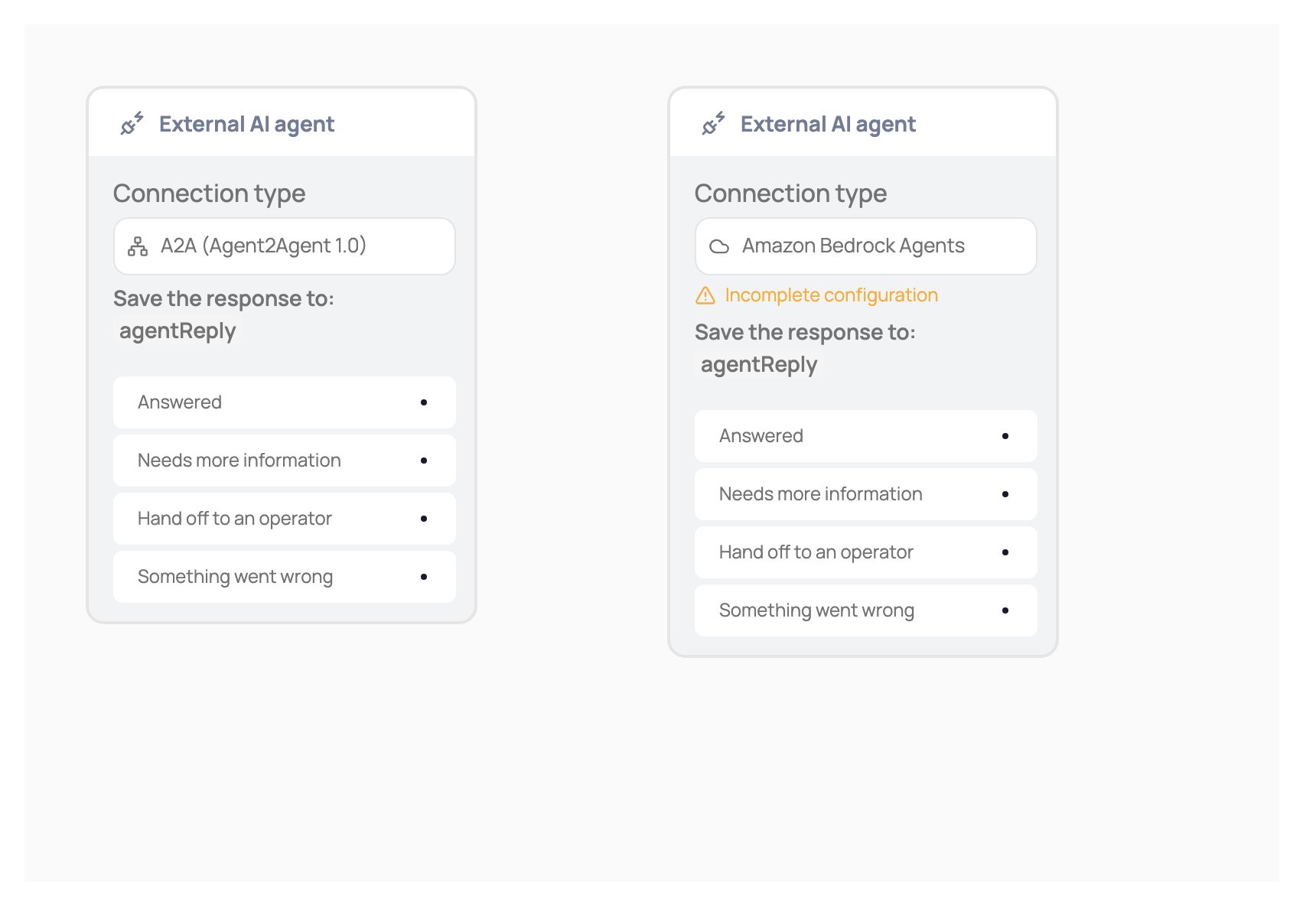
 ### Outputs you must connect
* Always connect the **Something went wrong** output: it is the one the node takes when the wait expires without the user writing. Without that connection you can't publish the flow.
* Connect the **Answered** output only if you defined the field that ends the conversation. Without those fields it isn't used.
* The **Hand off to an operator** output is not required.
The node shows a warning on the canvas while a needed connection is missing.
When the wait expires, the flow continues through **Something went wrong** and Jelou sends the user no message. Connect that output to a silent **End**, with no error message.
## Non-text messages
When the user sends an image, audio, a document, a WhatsApp Flow response, a button, a list or a location, the agent no longer receives an empty task. The task arrives as `[type] caption` (or just `[type]`), and the request includes an `input.inbound` object with the type, text, caption, file type and message id.
Sensitive data is not sent by default. On the **Transform** tab, the **Sensitive non-text message data the agent receives** field lets you choose which to add:
* **File URL**
* **Button or list reply**
* **WhatsApp Flow response**
* **Location**
Check only what your agent needs: they can contain personal information. This applies to any connection type. Plain text and titled buttons are sent exactly as before.
### Outputs you must connect
* Always connect the **Something went wrong** output: it is the one the node takes when the wait expires without the user writing. Without that connection you can't publish the flow.
* Connect the **Answered** output only if you defined the field that ends the conversation. Without those fields it isn't used.
* The **Hand off to an operator** output is not required.
The node shows a warning on the canvas while a needed connection is missing.
When the wait expires, the flow continues through **Something went wrong** and Jelou sends the user no message. Connect that output to a silent **End**, with no error message.
## Non-text messages
When the user sends an image, audio, a document, a WhatsApp Flow response, a button, a list or a location, the agent no longer receives an empty task. The task arrives as `[type] caption` (or just `[type]`), and the request includes an `input.inbound` object with the type, text, caption, file type and message id.
Sensitive data is not sent by default. On the **Transform** tab, the **Sensitive non-text message data the agent receives** field lets you choose which to add:
* **File URL**
* **Button or list reply**
* **WhatsApp Flow response**
* **Location**
Check only what your agent needs: they can contain personal information. This applies to any connection type. Plain text and titled buttons are sent exactly as before.
 ## Signature prefix
Some agents expect the HMAC signature with text in front of it, for example `sha256=` followed by the value. Under **Sign requests**, the **Signature prefix (e.g. sha256=)** field adds that literal text before the signature value. It accepts 1 to 32 characters: letters, digits and `_ = . : / + -`; spaces and templates are not allowed. The timestamp header is never prefixed. It applies to **HTTP (Jelou turn contract)** and **Custom HTTP**, and on every retry.
## OAuth2 token over mTLS
If your agent uses **OAuth2 client credentials** and requires the client certificate to request the token too, choose an **mTLS certificate** and turn on **Also request the token with the mTLS certificate**. The token request goes over the same certificate as the agent call. The token URL must still be https. The switch appears only with that authentication and a chosen certificate; if you remove the certificate, it turns off. When off, the token is requested as usual.
## The Jelou turn contract
When you pick **HTTP (Jelou turn contract)**, your server receives and answers with a fixed shape Jelou already knows how to read, with no manual path mapping needed. This is what Jelou actually sent and received in a real test against an agent server, with the HMAC signature redacted:
```json Request Jelou sends theme={null}
{
"method": "POST",
"headers": {
"content-type": "application/json",
"accept": "application/json",
"channel-id": "whatsapp",
"organization-id": "org-001",
"x-jelou-signature": ""
},
"body": {
"event": "message",
"endpoint": "agent",
"text": "I want a refund for my last purchase",
"session": "",
"user": "usr_9f3ka2"
}
}
```
```json Answer the agent returns theme={null}
{
"data": {
"reply": "Sure, to verify your refund request I need the order number. Could you share it?",
"session": "sess_ej3nc9dk2m"
}
}
```
On the second round of the same conversation, the agent already knows the order number and the node delivers the conversation as ended:
```json Agent's second answer theme={null}
{
"data": {
"reply": "Done, I found your order EJ-48213. The $45.00 refund was approved and will show up in 3 to 5 business days.",
"session": "sess_ej3nc9dk2m"
}
}
```
If your agent doesn't speak exactly this contract, use **custom HTTP**: there you define the shape of the body that gets sent and the paths where Jelou should read the answer text, the structured data and the session id, in the node's **Transform** tab.
## Test connection
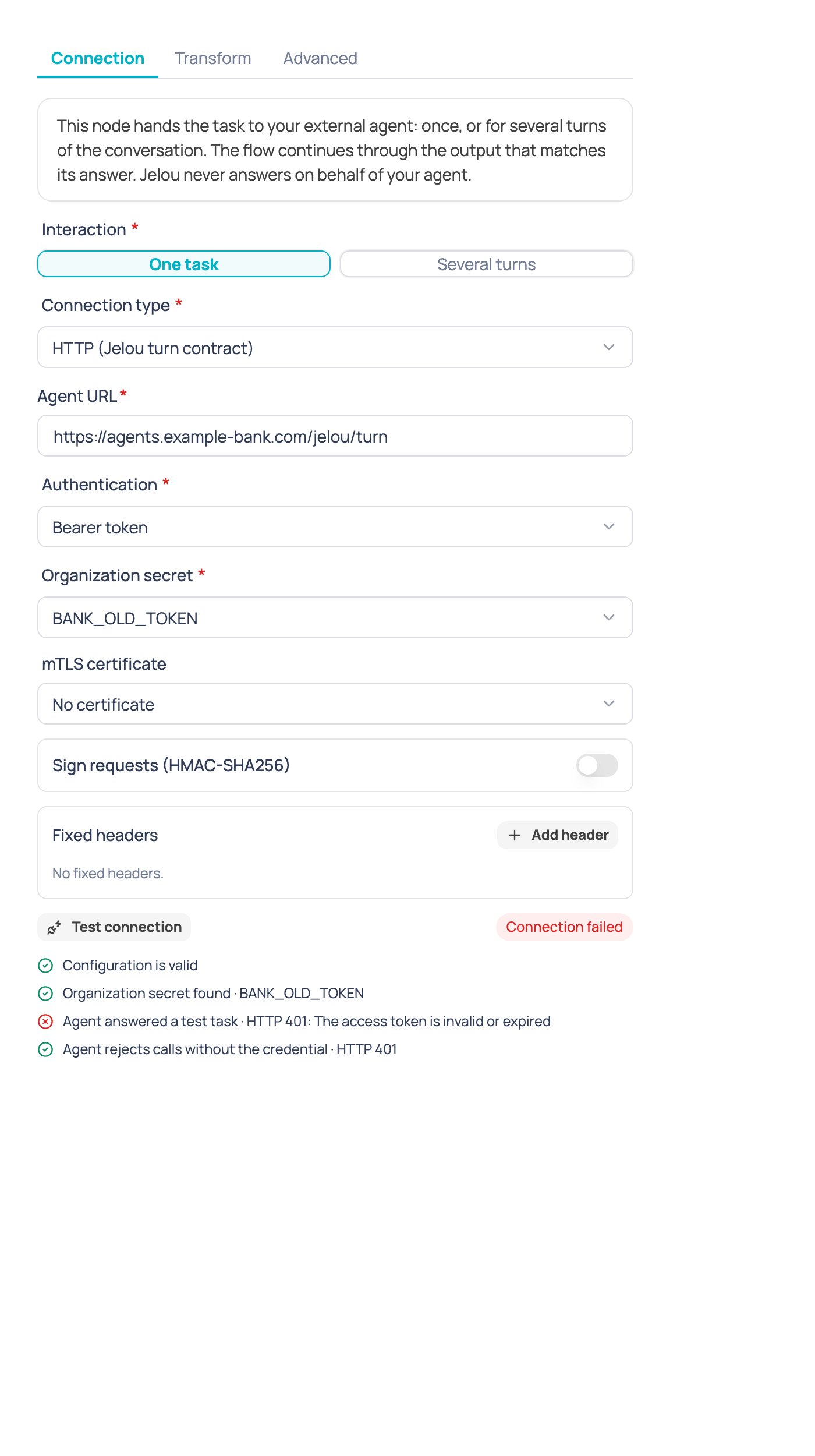
Before publishing your flow, use the **Test connection** button on the node's Connection tab to check that everything is configured correctly, without waiting for a real user to trigger the node. The test runs a chain of checks, stopping at the first one that fails:
| Check | What it verifies |
| :- | :- |
| Contract | The node's configuration satisfies the expected schema. |
| Provider | The chosen provider type is available. |
| mTLS certificate | If you configured mTLS, that the certificate loads and belongs to your company. |
| Secret | The referenced organization secret exists and can be read. |
| Token / access | The credential actually issues access (for example, that the OAuth2 exchange or AWS signing work). |
| Agent Card (A2A only) | The Agent Card is reachable and declares an HTTPS interface compatible with the configured credential. |
| Rejects anonymous | The agent refuses a call without the credential (where the scheme applies). |
| Answers a task | The agent answers a test task within the contract, within the timeout. |
| Session (several turns only) | The agent issues a session id for the next turn. |
If every check passes, you see a confirmation:
## Signature prefix
Some agents expect the HMAC signature with text in front of it, for example `sha256=` followed by the value. Under **Sign requests**, the **Signature prefix (e.g. sha256=)** field adds that literal text before the signature value. It accepts 1 to 32 characters: letters, digits and `_ = . : / + -`; spaces and templates are not allowed. The timestamp header is never prefixed. It applies to **HTTP (Jelou turn contract)** and **Custom HTTP**, and on every retry.
## OAuth2 token over mTLS
If your agent uses **OAuth2 client credentials** and requires the client certificate to request the token too, choose an **mTLS certificate** and turn on **Also request the token with the mTLS certificate**. The token request goes over the same certificate as the agent call. The token URL must still be https. The switch appears only with that authentication and a chosen certificate; if you remove the certificate, it turns off. When off, the token is requested as usual.
## The Jelou turn contract
When you pick **HTTP (Jelou turn contract)**, your server receives and answers with a fixed shape Jelou already knows how to read, with no manual path mapping needed. This is what Jelou actually sent and received in a real test against an agent server, with the HMAC signature redacted:
```json Request Jelou sends theme={null}
{
"method": "POST",
"headers": {
"content-type": "application/json",
"accept": "application/json",
"channel-id": "whatsapp",
"organization-id": "org-001",
"x-jelou-signature": ""
},
"body": {
"event": "message",
"endpoint": "agent",
"text": "I want a refund for my last purchase",
"session": "",
"user": "usr_9f3ka2"
}
}
```
```json Answer the agent returns theme={null}
{
"data": {
"reply": "Sure, to verify your refund request I need the order number. Could you share it?",
"session": "sess_ej3nc9dk2m"
}
}
```
On the second round of the same conversation, the agent already knows the order number and the node delivers the conversation as ended:
```json Agent's second answer theme={null}
{
"data": {
"reply": "Done, I found your order EJ-48213. The $45.00 refund was approved and will show up in 3 to 5 business days.",
"session": "sess_ej3nc9dk2m"
}
}
```
If your agent doesn't speak exactly this contract, use **custom HTTP**: there you define the shape of the body that gets sent and the paths where Jelou should read the answer text, the structured data and the session id, in the node's **Transform** tab.
## Test connection
Before publishing your flow, use the **Test connection** button on the node's Connection tab to check that everything is configured correctly, without waiting for a real user to trigger the node. The test runs a chain of checks, stopping at the first one that fails:
| Check | What it verifies |
| :- | :- |
| Contract | The node's configuration satisfies the expected schema. |
| Provider | The chosen provider type is available. |
| mTLS certificate | If you configured mTLS, that the certificate loads and belongs to your company. |
| Secret | The referenced organization secret exists and can be read. |
| Token / access | The credential actually issues access (for example, that the OAuth2 exchange or AWS signing work). |
| Agent Card (A2A only) | The Agent Card is reachable and declares an HTTPS interface compatible with the configured credential. |
| Rejects anonymous | The agent refuses a call without the credential (where the scheme applies). |
| Answers a task | The agent answers a test task within the contract, within the timeout. |
| Session (several turns only) | The agent issues a session id for the next turn. |
If every check passes, you see a confirmation:
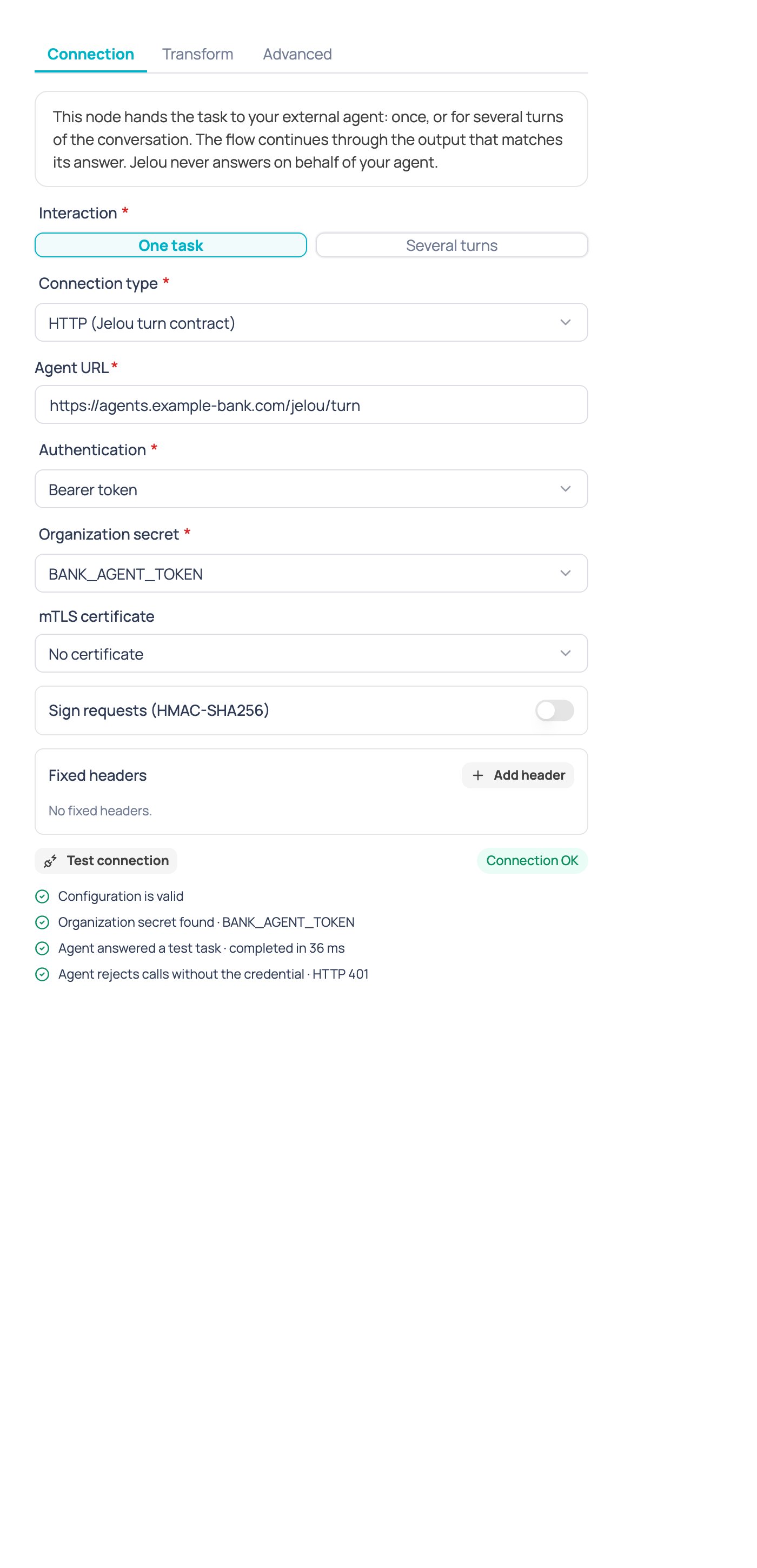 If one fails, Jelou tells you which one and why, so you can fix the configuration before publishing. For example, when the agent rejects the credential:
 ## Security
* **Credentials never leave your organization's secrets.** The node only stores the secret's name; its value is never shown or saved in the flow.
* **HTTPS only.** Jelou doesn't call internal or private addresses.
* **Your agent's answers go through Jelou's same security checks** as an AI Agent's answers, before they reach the user: they're screened like any other outbound message, with nothing extra to configure on the node.
## Troubleshooting
Check **Test connection** first: it almost always points to whether the problem is the certificate, the secret, the token or the agent itself. The most common causes are an expired or revoked credential, a URL that stopped responding, or an agent answer that isn't valid JSON or is missing the field expected at the configured path.
The node waits at most the configured **turn timeout** (25 seconds by default, up to 120 as a maximum). If your agent needs more time, raise the limit in the Advanced tab; if the agent fails intermittently, check **retries**: they only apply to timeouts, rate limits (HTTP 429) and server errors (5xx), never a request the agent explicitly rejected.
Always verify against the request's raw body, before parsing the JSON (see the HMAC signing section above). Also confirm you're using the same secret, the same encoding (hexadecimal or Base64), and, if you turned on `timestamp.body`, that you're signing `"{timestamp}.{body}"` and not just the body.
That's expected: that output only exists in **one task** mode. In **several turns**, when the agent needs an extra piece of information it simply asks for it as a normal message and the node keeps waiting for the user's reply, without taking any output.
The node is being rolled out gradually. Ask your Jelou account executive to turn it on for your company.
These options are available on Enterprise plans. Ask your Jelou account executive to check your plan.
## Availability
The External AI agent node is being rolled out gradually. If you don't see it on your project's canvas, contact your Jelou account executive to request its activation.
General configuration of the AI Agent node.
This documentation is built and hosted on [Mintlify](https://mintlify.com), a developer documentation platform.
## Security
* **Credentials never leave your organization's secrets.** The node only stores the secret's name; its value is never shown or saved in the flow.
* **HTTPS only.** Jelou doesn't call internal or private addresses.
* **Your agent's answers go through Jelou's same security checks** as an AI Agent's answers, before they reach the user: they're screened like any other outbound message, with nothing extra to configure on the node.
## Troubleshooting
Check **Test connection** first: it almost always points to whether the problem is the certificate, the secret, the token or the agent itself. The most common causes are an expired or revoked credential, a URL that stopped responding, or an agent answer that isn't valid JSON or is missing the field expected at the configured path.
The node waits at most the configured **turn timeout** (25 seconds by default, up to 120 as a maximum). If your agent needs more time, raise the limit in the Advanced tab; if the agent fails intermittently, check **retries**: they only apply to timeouts, rate limits (HTTP 429) and server errors (5xx), never a request the agent explicitly rejected.
Always verify against the request's raw body, before parsing the JSON (see the HMAC signing section above). Also confirm you're using the same secret, the same encoding (hexadecimal or Base64), and, if you turned on `timestamp.body`, that you're signing `"{timestamp}.{body}"` and not just the body.
That's expected: that output only exists in **one task** mode. In **several turns**, when the agent needs an extra piece of information it simply asks for it as a normal message and the node keeps waiting for the user's reply, without taking any output.
The node is being rolled out gradually. Ask your Jelou account executive to turn it on for your company.
These options are available on Enterprise plans. Ask your Jelou account executive to check your plan.
## Availability
The External AI agent node is being rolled out gradually. If you don't see it on your project's canvas, contact your Jelou account executive to request its activation.
General configuration of the AI Agent node.
This documentation is built and hosted on [Mintlify](https://mintlify.com), a developer documentation platform.