> ## Documentation Index
> Fetch the complete documentation index at: https://docs.jelou.ai/llms.txt
> Use this file to discover all available pages before exploring further.
# Message grouping
> Group an agent's consecutive messages into a single message for the customer, separated by line breaks, and cut down notifications and billable messages.
When an agent types several ideas in a row, the customer gets one block of content instead of several separate notifications.
The feature is configured at the **company** level. Companies that do not turn it on keep the current behavior, with no changes.
## When to use this feature
Grouping helps when your agents tend to send several consecutive messages within the same conversation. Turning it on lets you:
* **Reduce the notifications** the customer receives.
* **Lower the billable messages** per conversation.
* **Keep the conversation cleaner** and easier to read.
* **Hold together** several messages that are part of the same reply.
## How it works
When an agent sends their first message, the system opens a **time window**. Every text message they send inside that window is collected and, once the window closes, goes out to the customer as a single message with line breaks.
For example, the agent sends **three messages in a row**:
```text Message 1 theme={null}
Hi, how are you?
```
```text Message 2 theme={null}
I can help you with your request.
```
```text Message 3 theme={null}
To continue, I need to verify a few details.
```
And the customer receives **a single message** with that same content:
```text What the customer receives theme={null}
Hi, how are you?
I can help you with your request.
To continue, I need to verify a few details.
```
The window starts with the **first message** and has a fixed duration. The system does **not** restart the wait time each time a new message arrives, so the block never waits indefinitely.
## Configuration
Open **Inbox** or **Monitoring** and, in the shortcuts on the right-hand side of the screen, go to **Message grouping**.
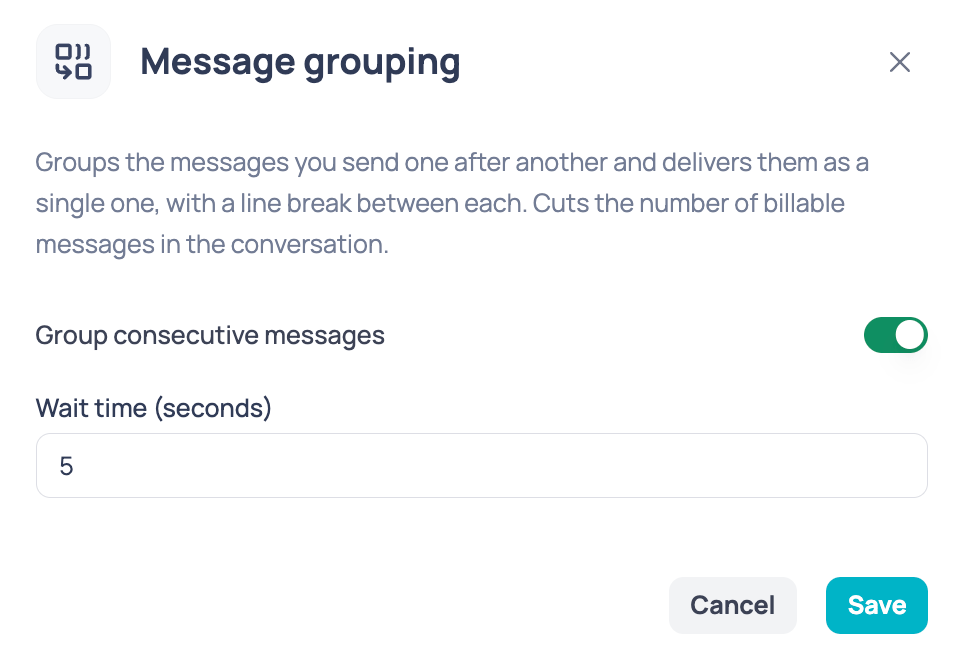 Switch **Group consecutive messages** on. From then on, your agents' back-to-back messages are grouped according to the configured time.
In **Wait time (seconds)** you set how long the system waits before sending the block to the customer, and therefore how long the window that collects messages lasts.
It accepts values between **1 and 20 seconds**.
Click **Save**. The setting applies to the whole company.
## Which messages are grouped
The agent's **consecutive text messages** become part of the same block as long as they fall inside the configured window. Other message types do not wait for the window to end:
| Message type | Behavior |
| ------------------------------------ | ----------------------------------------------------- |
| Consecutive text messages | Collected and sent together when the window closes. |
| Images and other attachments | Sent **immediately**, without waiting for the window. |
| Replies or quotes to another message | Sent **immediately**, without waiting for the window. |
The system preserves the corresponding order of the messages sent.
## What the agent sees
Switch **Group consecutive messages** on. From then on, your agents' back-to-back messages are grouped according to the configured time.
In **Wait time (seconds)** you set how long the system waits before sending the block to the customer, and therefore how long the window that collects messages lasts.
It accepts values between **1 and 20 seconds**.
Click **Save**. The setting applies to the whole company.
## Which messages are grouped
The agent's **consecutive text messages** become part of the same block as long as they fall inside the configured window. Other message types do not wait for the window to end:
| Message type | Behavior |
| ------------------------------------ | ----------------------------------------------------- |
| Consecutive text messages | Collected and sent together when the window closes. |
| Images and other attachments | Sent **immediately**, without waiting for the window. |
| Replies or quotes to another message | Sent **immediately**, without waiting for the window. |
The system preserves the corresponding order of the messages sent.
## What the agent sees
 While a message is inside the grouping window, the agent sees a **clock** next to it: the indicator that it is still waiting to go out.
When the block is sent to the customer, the clock turns into a **check**, confirming the message went out correctly.
## What the customer sees
While a message is inside the grouping window, the agent sees a **clock** next to it: the indicator that it is still waiting to go out.
When the block is sent to the customer, the clock turns into a **check**, confirming the message went out correctly.
## What the customer sees
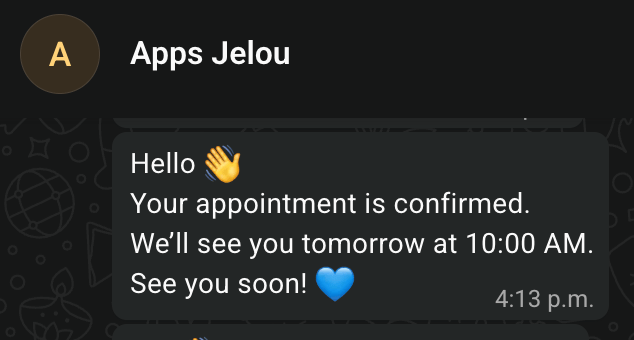 The customer receives the grouped text messages as a single message, with each piece of content on its own line. They stop getting several notifications in a row while the agent writes one reply across multiple messages.