> ## Documentation Index
> Fetch the complete documentation index at: https://docs.jelou.ai/llms.txt
> Use this file to discover all available pages before exploring further.
# Import products
> Bulk-load your catalog with the Excel template: steps, sheets, fields and formats.
Import many products at once by uploading an Excel file (`.xlsx`) that follows the structure of a downloadable template. The import runs in the background and you can track its progress in the same panel.
The import **creates or updates** products by their **SKU**: if the SKU already exists in your store it is updated; otherwise it is created.
## How to import
In [Products](https://apps.jelou.ai/shop-v2/products), click **Import**.
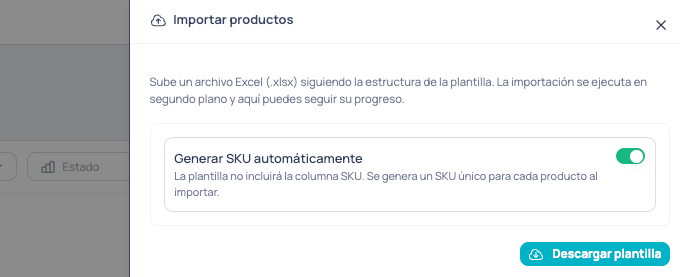
 **Simple upload.** Keep **Generate SKU automatically** on. The template won't include the SKU column and the system assigns a unique SKU to each product. Ideal for uploading products quickly, with no extra configuration.
 **Complete upload.** Turn **Generate SKU automatically** off so the SKU column and the **optional sheets** (Variations, Features, Modifiers) appear. Enable the ones you need for a more detailed upload.
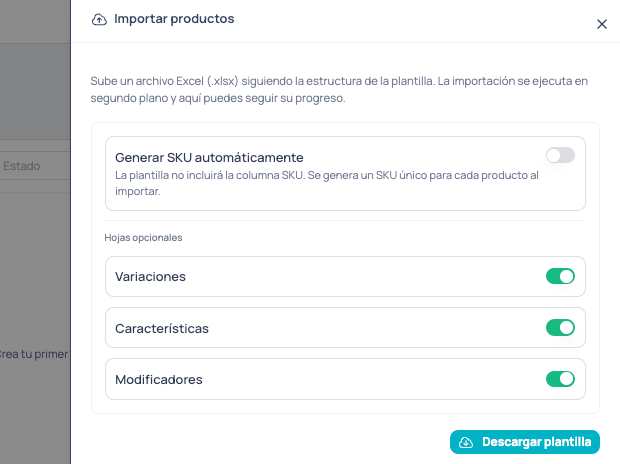 Optional sheets link to each product by its **SKU**, so they require the SKU column. Enabling them turns off automatic generation.
Press **Download template** (available in Spanish or English). The file is generated based on the options you chose.
Complete the data using the **Instructions** sheet and the **comments** on each column. See the [template structure](#the-excel-template) below.
Drag or select your `.xlsx` and confirm. The import runs in the background and you'll see created/updated products and, if any, per-row errors.
## The Excel template
The first sheet, **Instructions**, summarizes what each sheet is for and includes a **color reference**. On the other sheets, each header is **colored** by whether it's required and has a **comment** (hover over it) explaining what to enter.
| Header color | Meaning |
| ------------ | ------------------------------------------------------------------------- |
| 🔴 Red | **Required** — must have a value. |
| ⚪ Gray | **Optional** — can be left empty. |
| 🟡 Amber | **Conditional** — required only in some cases (depends on another field). |
The **Products** sheet is always required. Optional sheets only appear if you enabled them when downloading the template, and they reference products by the **SKU** on the Products sheet.
### Important formats
* **Numbers and prices:** a dot or a comma decimal is accepted (`24.99` or `24,99`).
* **Booleans** (yes/no): `TRUE` or `FALSE`.
* **Lists** (categories, images): separate multiple values with semicolons (`;`). E.g. `Apparel;Shirts`.
* **Stock type:** `limited` or `unlimited`. **Discount type:** `value` or `percentage`.
### Sheet: Products
Base data for each product. This is the only required sheet.
| Column | Requirement | Description |
| -------------------- | ----------- | ------------------------------------------------------------------------------- |
| `sku` | Required\* | Unique product code. \*Only appears if you turned off automatic SKU generation. |
| `name` | Required | Product name. |
| `price` | Required | Unit price. |
| `description` | Optional | Product description. |
| `has_tax` | Optional | Does it have tax? `TRUE`/`FALSE`. |
| `tax` | Conditional | Tax percentage (e.g. 12). Applies when `has_tax` is `TRUE`. |
| `status` | Optional | Is the product active? `TRUE`/`FALSE`. Active by default. |
| `stock_type` | Optional | `limited` or `unlimited`. |
| `stock` | Conditional | Available quantity. Required when `stock_type` is `limited`. |
| `discount_type` | Optional | `value` or `percentage`. |
| `discount` | Conditional | Discount amount or percentage. Requires `discount_type`. |
| `branch_code` | Optional | Code of an existing branch. |
| `branch_name` | Conditional | Branch name. Required when the branch code is new. |
| `categories` | Optional | One or more categories separated by `;`. |
| `images` | Optional | Image URLs separated by `;`. |
| `product_url` | Optional | Public product URL. |
| `note_enabled` | Optional | Allow a customer note? `TRUE`/`FALSE`. |
| `note_label` | Conditional | Note label text. Applies when `note_enabled` is `TRUE`. |
| `replace_variations` | Optional | `TRUE` replaces the product's existing variations. |
### Sheet: Variations
Variations of a product (size, color, etc.). Each row links to the product by `product_sku`.
| Column | Requirement | Description |
| ------------------- | ----------- | ------------------------------------------------------------ |
| `product_sku` | Required | Parent product SKU (must exist on the Products sheet). |
| `variation_sku` | Required | Unique variation SKU. |
| `price` | Required | Variation price. |
| `stock_type` | Optional | `limited` or `unlimited`. |
| `stock` | Conditional | Available quantity. Required when `stock_type` is `limited`. |
| `attribute_1_name` | Optional | Attribute 1 name (e.g. Size). |
| `attribute_1_value` | Conditional | Attribute 1 value. Required when attribute 1 name is set. |
| `attribute_2_name` | Optional | Attribute 2 name (e.g. Color). |
| `attribute_2_value` | Conditional | Attribute 2 value. Required when attribute 2 name is set. |
| `attribute_3_name` | Optional | Attribute 3 name. |
| `attribute_3_value` | Conditional | Attribute 3 value. Required when attribute 3 name is set. |
| `images` | Optional | Image URLs separated by `;`. |
### Sheet: Features
Informational product attributes, in label/value format.
| Column | Requirement | Description |
| ------------- | ----------- | ----------------------------------------------- |
| `product_sku` | Required | Product SKU (must exist on the Products sheet). |
| `label` | Required | Feature label (e.g. Brand). |
| `value` | Required | Feature value (e.g. Apple). |
### Sheet: ModifierGroups
Groups of modifiers for a product (e.g. Toppings, Size).
| Column | Requirement | Description |
| ---------------- | ----------- | ---------------------------------------------------------------------- |
| `product_sku` | Required | Product SKU (must exist on the Products sheet). |
| `group_code` | Required | Unique group code within the product; referenced from ModifierOptions. |
| `name` | Required | Group display name. |
| `min_quantity` | Optional | Minimum options to choose. Defaults to 0. |
| `max_quantity` | Optional | Maximum options to choose. Defaults to 1. |
| `max_per_option` | Optional | Maximum quantity per option. |
| `is_required` | Optional | Is the group required? `TRUE`/`FALSE`. |
| `position` | Optional | Display order. |
### Sheet: ModifierOptions
Options inside each modifier group.
| Column | Requirement | Description |
| -------------------- | ----------- | ---------------------------------------------------------------------------- |
| `product_sku` | Required | Product SKU (must exist on the Products sheet). |
| `group_code` | Required | Code of the group it belongs to (must match `group_code` on ModifierGroups). |
| `code` | Required | Unique option code. |
| `name` | Required | Option display name (e.g. Pepperoni). |
| `price` | Optional | Additional price for the option (0 if left empty). |
| `image_url` | Optional | Option image URL. |
| `position` | Optional | Display order. |
| `status` | Optional | Is the option active? `TRUE`/`FALSE`. Active by default. |
| `linked_product_sku` | Optional | SKU of a product linked to this option. |
## Tracking and errors
After you upload the file, the import runs in the background. The panel shows progress and, when finished, a summary of **created**, **updated** and **skipped** products. If any row had problems, you'll see a table with the **sheet**, **row**, **SKU** and **reason**, so you can fix and re-upload only what's needed.
To manage the catalog from the interface, see [Shop Admin](/en/guides/integraciones/e-commerce/shop-admin).
Optional sheets link to each product by its **SKU**, so they require the SKU column. Enabling them turns off automatic generation.
Press **Download template** (available in Spanish or English). The file is generated based on the options you chose.
Complete the data using the **Instructions** sheet and the **comments** on each column. See the [template structure](#the-excel-template) below.
Drag or select your `.xlsx` and confirm. The import runs in the background and you'll see created/updated products and, if any, per-row errors.
## The Excel template
The first sheet, **Instructions**, summarizes what each sheet is for and includes a **color reference**. On the other sheets, each header is **colored** by whether it's required and has a **comment** (hover over it) explaining what to enter.
| Header color | Meaning |
| ------------ | ------------------------------------------------------------------------- |
| 🔴 Red | **Required** — must have a value. |
| ⚪ Gray | **Optional** — can be left empty. |
| 🟡 Amber | **Conditional** — required only in some cases (depends on another field). |
The **Products** sheet is always required. Optional sheets only appear if you enabled them when downloading the template, and they reference products by the **SKU** on the Products sheet.
### Important formats
* **Numbers and prices:** a dot or a comma decimal is accepted (`24.99` or `24,99`).
* **Booleans** (yes/no): `TRUE` or `FALSE`.
* **Lists** (categories, images): separate multiple values with semicolons (`;`). E.g. `Apparel;Shirts`.
* **Stock type:** `limited` or `unlimited`. **Discount type:** `value` or `percentage`.
### Sheet: Products
Base data for each product. This is the only required sheet.
| Column | Requirement | Description |
| -------------------- | ----------- | ------------------------------------------------------------------------------- |
| `sku` | Required\* | Unique product code. \*Only appears if you turned off automatic SKU generation. |
| `name` | Required | Product name. |
| `price` | Required | Unit price. |
| `description` | Optional | Product description. |
| `has_tax` | Optional | Does it have tax? `TRUE`/`FALSE`. |
| `tax` | Conditional | Tax percentage (e.g. 12). Applies when `has_tax` is `TRUE`. |
| `status` | Optional | Is the product active? `TRUE`/`FALSE`. Active by default. |
| `stock_type` | Optional | `limited` or `unlimited`. |
| `stock` | Conditional | Available quantity. Required when `stock_type` is `limited`. |
| `discount_type` | Optional | `value` or `percentage`. |
| `discount` | Conditional | Discount amount or percentage. Requires `discount_type`. |
| `branch_code` | Optional | Code of an existing branch. |
| `branch_name` | Conditional | Branch name. Required when the branch code is new. |
| `categories` | Optional | One or more categories separated by `;`. |
| `images` | Optional | Image URLs separated by `;`. |
| `product_url` | Optional | Public product URL. |
| `note_enabled` | Optional | Allow a customer note? `TRUE`/`FALSE`. |
| `note_label` | Conditional | Note label text. Applies when `note_enabled` is `TRUE`. |
| `replace_variations` | Optional | `TRUE` replaces the product's existing variations. |
### Sheet: Variations
Variations of a product (size, color, etc.). Each row links to the product by `product_sku`.
| Column | Requirement | Description |
| ------------------- | ----------- | ------------------------------------------------------------ |
| `product_sku` | Required | Parent product SKU (must exist on the Products sheet). |
| `variation_sku` | Required | Unique variation SKU. |
| `price` | Required | Variation price. |
| `stock_type` | Optional | `limited` or `unlimited`. |
| `stock` | Conditional | Available quantity. Required when `stock_type` is `limited`. |
| `attribute_1_name` | Optional | Attribute 1 name (e.g. Size). |
| `attribute_1_value` | Conditional | Attribute 1 value. Required when attribute 1 name is set. |
| `attribute_2_name` | Optional | Attribute 2 name (e.g. Color). |
| `attribute_2_value` | Conditional | Attribute 2 value. Required when attribute 2 name is set. |
| `attribute_3_name` | Optional | Attribute 3 name. |
| `attribute_3_value` | Conditional | Attribute 3 value. Required when attribute 3 name is set. |
| `images` | Optional | Image URLs separated by `;`. |
### Sheet: Features
Informational product attributes, in label/value format.
| Column | Requirement | Description |
| ------------- | ----------- | ----------------------------------------------- |
| `product_sku` | Required | Product SKU (must exist on the Products sheet). |
| `label` | Required | Feature label (e.g. Brand). |
| `value` | Required | Feature value (e.g. Apple). |
### Sheet: ModifierGroups
Groups of modifiers for a product (e.g. Toppings, Size).
| Column | Requirement | Description |
| ---------------- | ----------- | ---------------------------------------------------------------------- |
| `product_sku` | Required | Product SKU (must exist on the Products sheet). |
| `group_code` | Required | Unique group code within the product; referenced from ModifierOptions. |
| `name` | Required | Group display name. |
| `min_quantity` | Optional | Minimum options to choose. Defaults to 0. |
| `max_quantity` | Optional | Maximum options to choose. Defaults to 1. |
| `max_per_option` | Optional | Maximum quantity per option. |
| `is_required` | Optional | Is the group required? `TRUE`/`FALSE`. |
| `position` | Optional | Display order. |
### Sheet: ModifierOptions
Options inside each modifier group.
| Column | Requirement | Description |
| -------------------- | ----------- | ---------------------------------------------------------------------------- |
| `product_sku` | Required | Product SKU (must exist on the Products sheet). |
| `group_code` | Required | Code of the group it belongs to (must match `group_code` on ModifierGroups). |
| `code` | Required | Unique option code. |
| `name` | Required | Option display name (e.g. Pepperoni). |
| `price` | Optional | Additional price for the option (0 if left empty). |
| `image_url` | Optional | Option image URL. |
| `position` | Optional | Display order. |
| `status` | Optional | Is the option active? `TRUE`/`FALSE`. Active by default. |
| `linked_product_sku` | Optional | SKU of a product linked to this option. |
## Tracking and errors
After you upload the file, the import runs in the background. The panel shows progress and, when finished, a summary of **created**, **updated** and **skipped** products. If any row had problems, you'll see a table with the **sheet**, **row**, **SKU** and **reason**, so you can fix and re-upload only what's needed.
To manage the catalog from the interface, see [Shop Admin](/en/guides/integraciones/e-commerce/shop-admin).