> ## Documentation Index
> Fetch the complete documentation index at: https://docs.jelou.ai/llms.txt
> Use this file to discover all available pages before exploring further.

# Payment with external confirmation

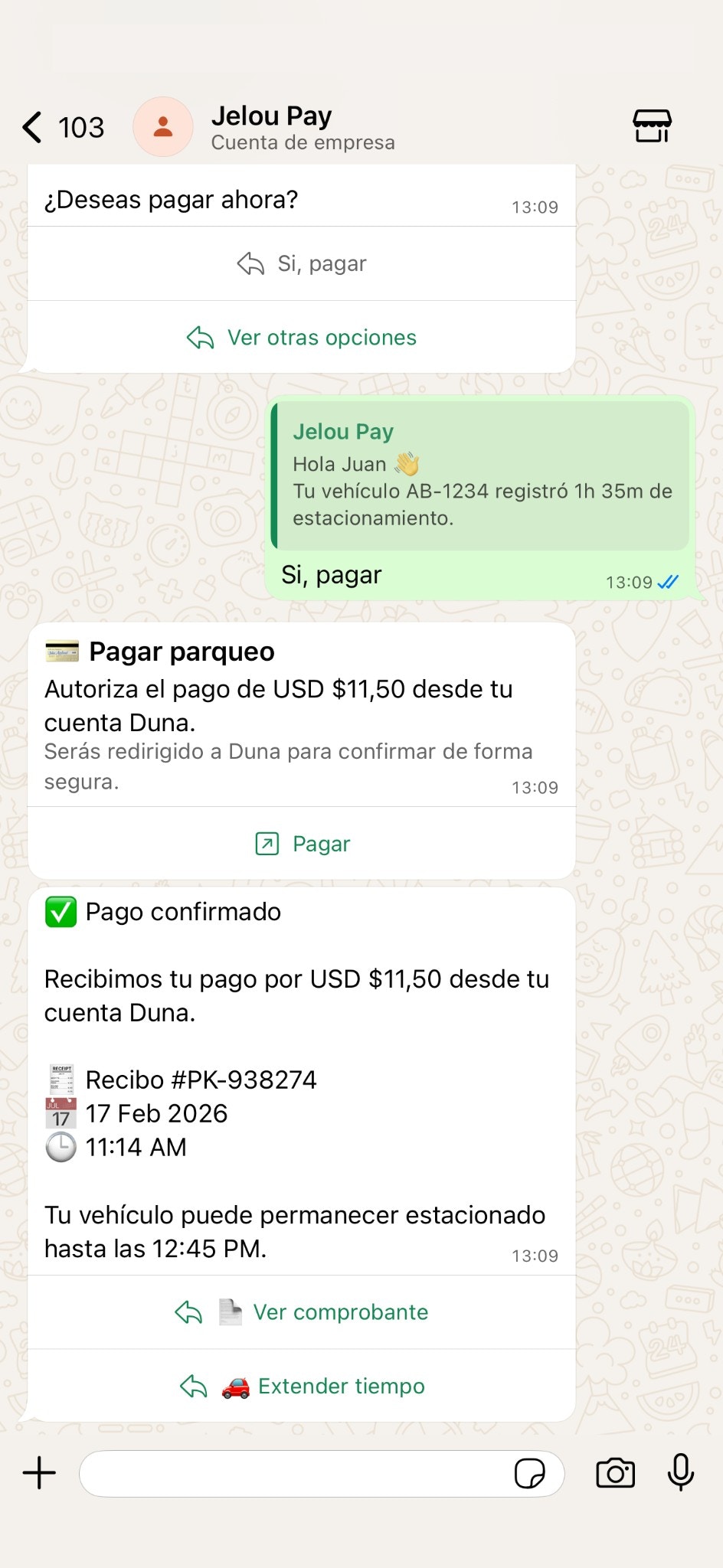
> Initiate the payment in the conversation and confirm outside WhatsApp. Brain Studio continues the flow when it receives the official status from the provider.

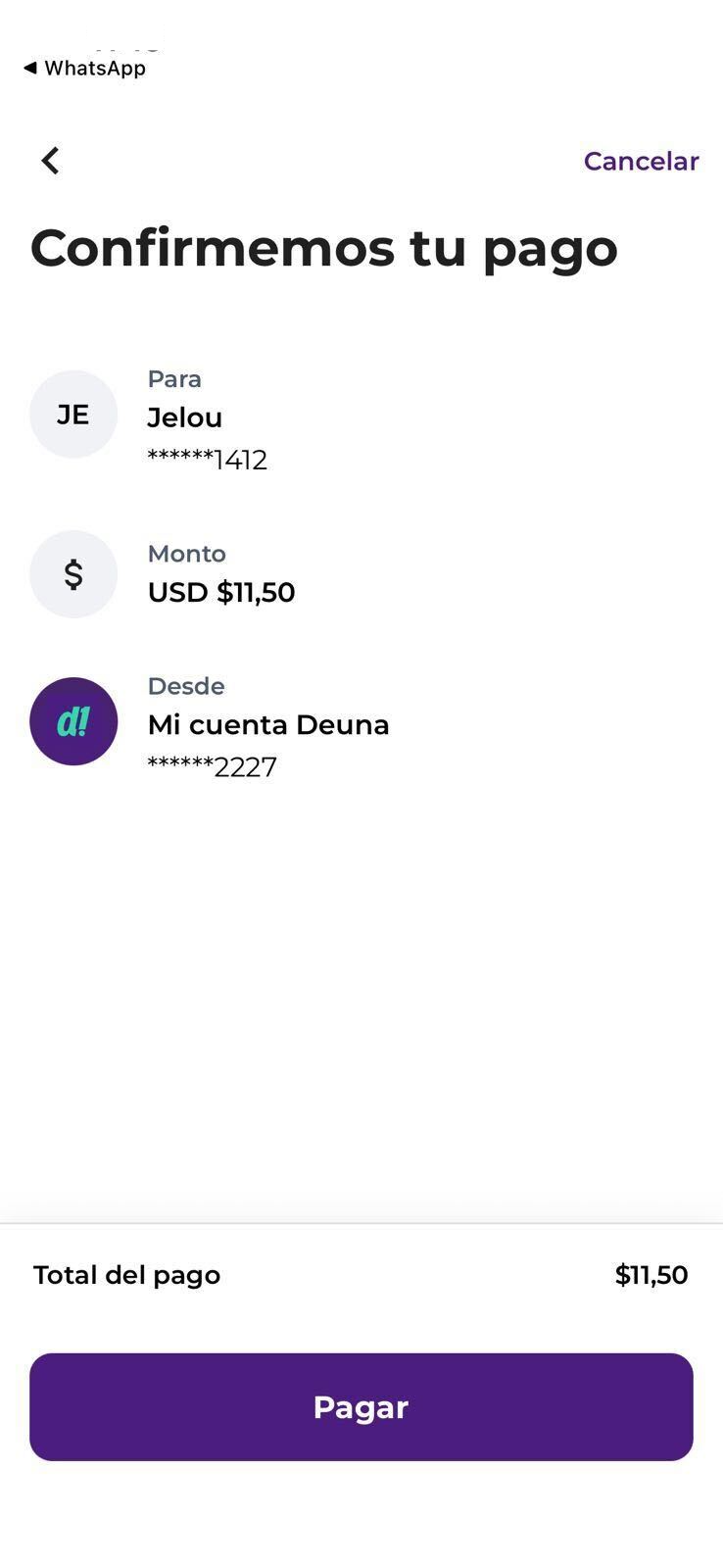
The **payment with external confirmation** starts in the conversation, but the confirmation occurs outside WhatsApp.

The user completes the transaction in an external app, and Brain Studio continues the flow only when it receives the **official payment status** from the provider. This experience applies when there is no native in-chat capture or embedded WebView checkout.

***

## What it looks like for the payer

<div className="grid md:grid-cols-2 gap-8">
  <Frame caption="Conversational flow in WhatsApp">
    <div className="mx-auto" style={{ width: '280px' }}>
      <img src="https://mintcdn.com/jelouai/nCvuucLdA-_D8bXJ/assets/images/integraciones/pagos/deuna-confirmacion-1.png?fit=max&auto=format&n=nCvuucLdA-_D8bXJ&q=85&s=382fac51be1d3acb41e10e16029b8d9f" alt="Example of a conversational flow with external payment confirmation in WhatsApp" className="w-full rounded-xl" width="944" height="2048" data-path="assets/images/integraciones/pagos/deuna-confirmacion-1.png" />
    </div>
  </Frame>

  <Frame caption="Confirmation in the Deuna app">
    <div className="mx-auto" style={{ width: '280px' }}>
      <img src="https://mintcdn.com/jelouai/nCvuucLdA-_D8bXJ/assets/images/integraciones/pagos/deuna-confirmacion-2.png?fit=max&auto=format&n=nCvuucLdA-_D8bXJ&q=85&s=9d1015e61b9e07e778b7cb1bbc7b0e94" alt="Payment confirmation screen in the Deuna app" className="w-full rounded-xl" width="738" height="1600" data-path="assets/images/integraciones/pagos/deuna-confirmacion-2.png" />
    </div>
  </Frame>
</div>

***

## Scope of this experience

* Initiates the payment from a button or link within the conversation.
* The user confirms the transaction in an **external provider app**.
* The provider sends the official payment status.
* Brain Studio continues the flow based on that status.
* Does not capture card data in chat.
* Does not open a WebView inside WhatsApp.

Your flow must explicitly handle the returned statuses (pending → confirmed / rejected).

***

## Prerequisites

To implement external confirmation you need:

* Install a compatible provider from **Marketplace** (**BYOK** model).
* Configure valid provider credentials.
* Model status handling within your flow or agent.

***

## Available provider

<CardGroup cols={3}>
  <Card
    title="Deuna"
    href="/guides/integraciones/pagos/proveedores/deuna/como-funciona"
    icon={
  <svg
    className="h-6 w-6"
    width="24"
    height="24"
    viewBox="0 0 24 24"
    fill="none"
    xmlns="http://www.w3.org/2000/svg"
    xmlnsXlink="http://www.w3.org/1999/xlink"
  >
    <image
      xlinkHref="/assets/images/providers/deuna.svg"
      width="24"
      height="24"
      x="0"
      y="0"
      preserveAspectRatio="xMidYMid meet"
    />
  </svg>
}
  />
</CardGroup>