> ## Documentation Index
> Fetch the complete documentation index at: https://docs.jelou.ai/llms.txt
> Use this file to discover all available pages before exploring further.
# Create a custom gateway
> Configure the 6-step wizard, step by step, to set up a custom payment provider in Payments.
From **Payments → Integrations**, the **Add gateway** button opens the setup wizard. When creating a new gateway, steps are **linear**: you must complete each one before moving on. Once the gateway exists, you can move freely between steps to edit it.
Before filling the wizard, use the [compatibility prompt](/en/guides/integraciones/pagos/personalizadas/prompt-compatibilidad) with your LLM and your PSP's documentation. You leave with the mapping ready for each step.
## Setup wizard
Set the **Name**, **Slug**, **Description** (optional), **Icon URL** (optional), and **Environment** (**Sandbox** or **Production**).
* **Name** and **Slug** are required.
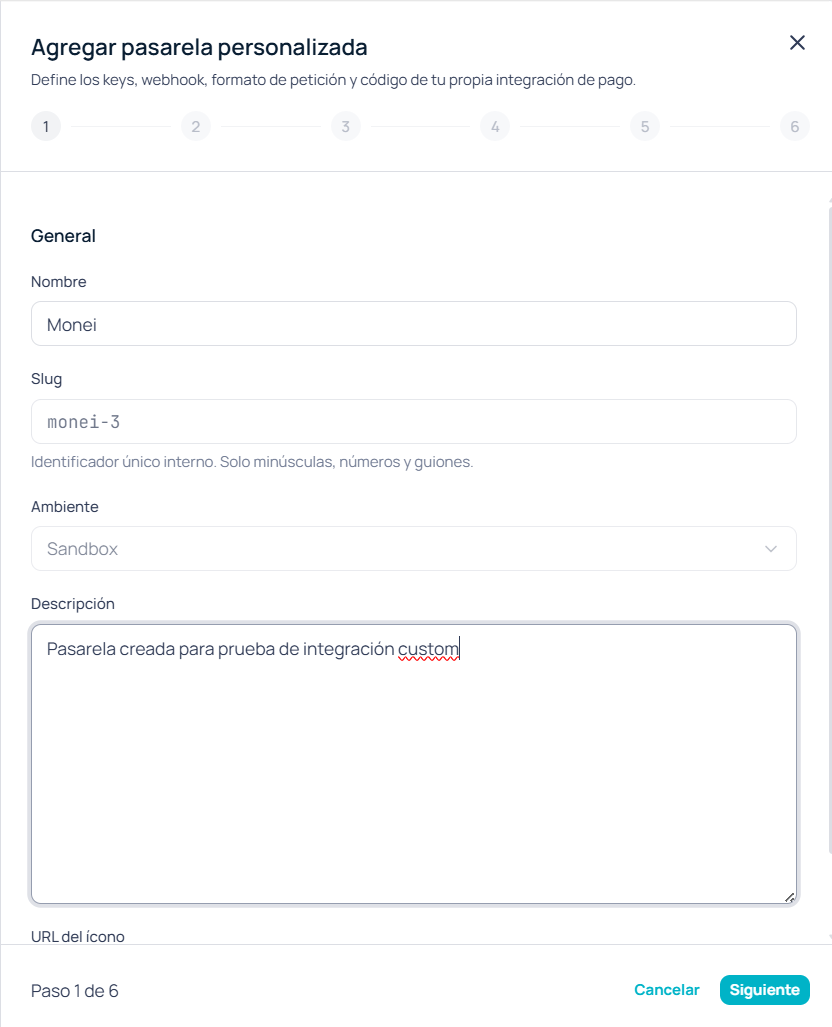 Start in **Sandbox**. Environment can't be changed later: for production you'll create another gateway (or a separate setup) with real keys.
**Slug** and **Environment** can't be edited after the gateway is created.
Declare each secret or API key your PSP needs. For each row you define:
* **Key** — internal placeholder name (for example `apiKey`)
* **Label** — text shown in the UI
* **Type** — **Text** or **Secret**
You must declare at least one credential. Use **Secret** for API keys and tokens: the value stays masked.
Start in **Sandbox**. Environment can't be changed later: for production you'll create another gateway (or a separate setup) with real keys.
**Slug** and **Environment** can't be edited after the gateway is created.
Declare each secret or API key your PSP needs. For each row you define:
* **Key** — internal placeholder name (for example `apiKey`)
* **Label** — text shown in the UI
* **Type** — **Text** or **Secret**
You must declare at least one credential. Use **Secret** for API keys and tokens: the value stays masked.
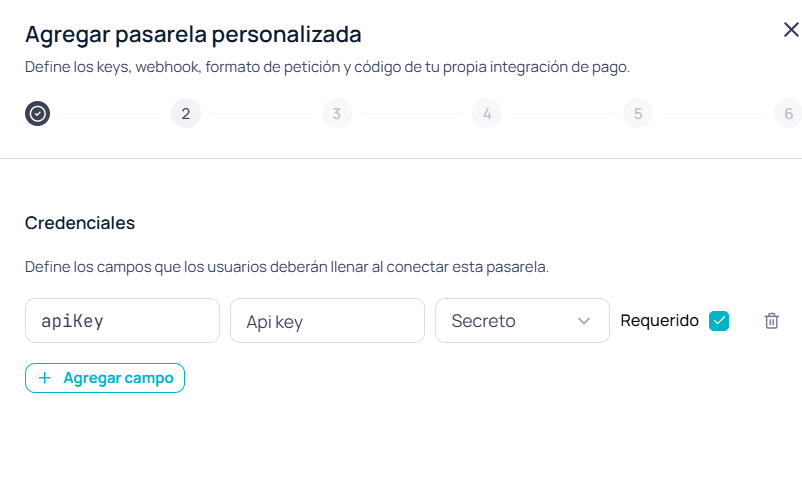 Here you only **declare** which keys exist (like the fields in a BYOK form). You paste the real values later, in **Connect**.
You can't mark a credential as required from this screen. If you need that behavior, coordinate with your technical team.
Here you define how Jelou calls the PSP to create a charge and, optionally, how to handle the customer's return.
**Request**
* **Method** (GET, POST, PUT, or PATCH) and **URL** of the charge-creation endpoint
* **Headers** — for example `Authorization: Bearer {{myCredential}}`
* **Body template** — request JSON with `{{...}}` placeholders (see [Variables and placeholders](/en/guides/integraciones/pagos/personalizadas/variables-y-placeholders))
* **Payment link path** and **Transaction id path** — path in the response JSON where the checkout URL and transaction id live (for example `data.checkout_url`)
Here you only **declare** which keys exist (like the fields in a BYOK form). You paste the real values later, in **Connect**.
You can't mark a credential as required from this screen. If you need that behavior, coordinate with your technical team.
Here you define how Jelou calls the PSP to create a charge and, optionally, how to handle the customer's return.
**Request**
* **Method** (GET, POST, PUT, or PATCH) and **URL** of the charge-creation endpoint
* **Headers** — for example `Authorization: Bearer {{myCredential}}`
* **Body template** — request JSON with `{{...}}` placeholders (see [Variables and placeholders](/en/guides/integraciones/pagos/personalizadas/variables-y-placeholders))
* **Payment link path** and **Transaction id path** — path in the response JSON where the checkout URL and transaction id live (for example `data.checkout_url`)
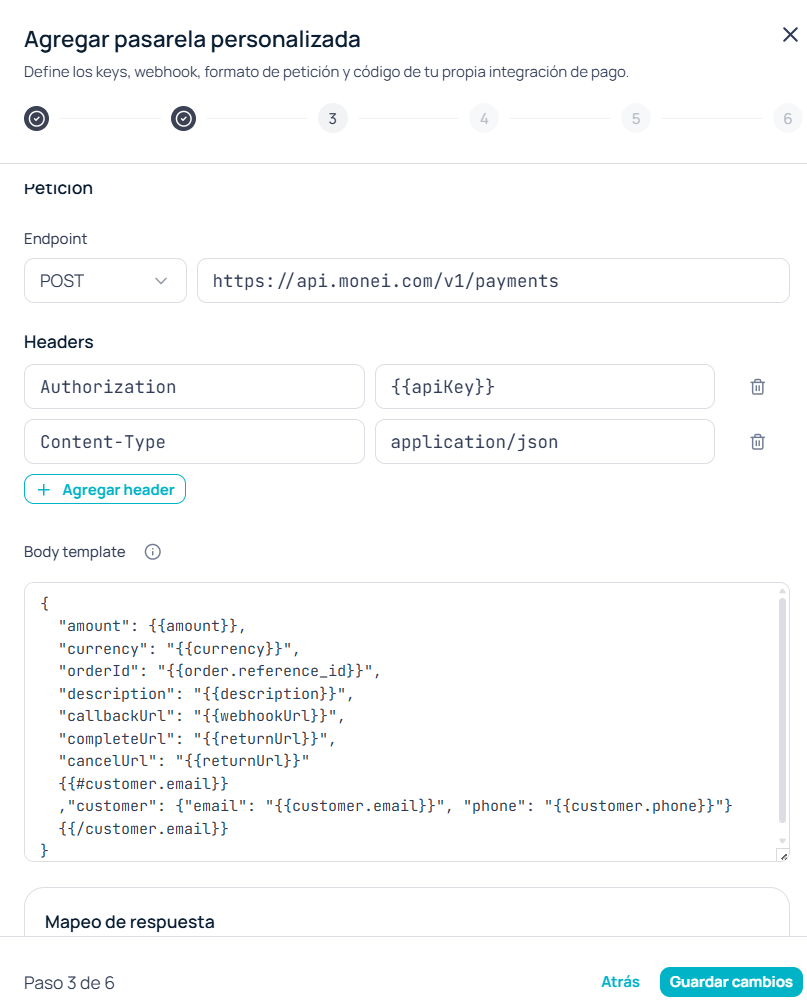 **URL** and **Body template** are required. Every `{{...}}` must match a declared credential or a recognized placeholder.
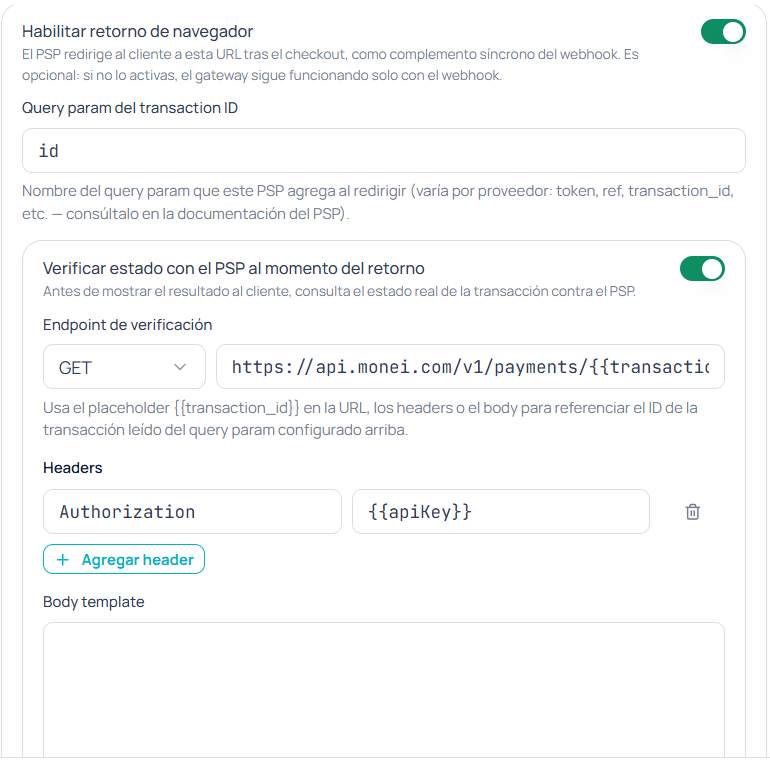
**Return (optional)**
* **Transaction id parameter** — query param the PSP adds when redirecting after checkout
* **Check status with the PSP on return** — active status lookup (method, URL, headers, paths, and mapping to **Success / Failed / None**)
**URL** and **Body template** are required. Every `{{...}}` must match a declared credential or a recognized placeholder.
**Return (optional)**
* **Transaction id parameter** — query param the PSP adds when redirecting after checkout
* **Check status with the PSP on return** — active status lookup (method, URL, headers, paths, and mapping to **Success / Failed / None**)
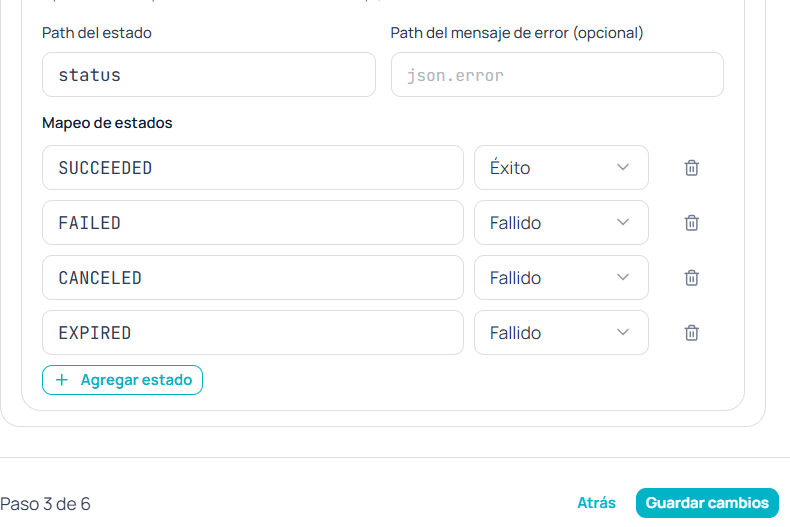 Confirming this step creates or updates the gateway. **Slug** and **Environment** are locked in. If creation fails, the wizard blocks progress.
The selector may show **DELETE**, but only GET, POST, PUT, or PATCH are accepted. Choosing DELETE causes the save to fail.
Available after the previous step is saved. Enter the **real values** for each declared credential—your PSP's secrets, not their names.
Confirming this step creates or updates the gateway. **Slug** and **Environment** are locked in. If creation fails, the wizard blocks progress.
The selector may show **DELETE**, but only GET, POST, PUT, or PATCH are accepted. Choosing DELETE causes the save to fail.
Available after the previous step is saved. Enter the **real values** for each declared credential—your PSP's secrets, not their names.
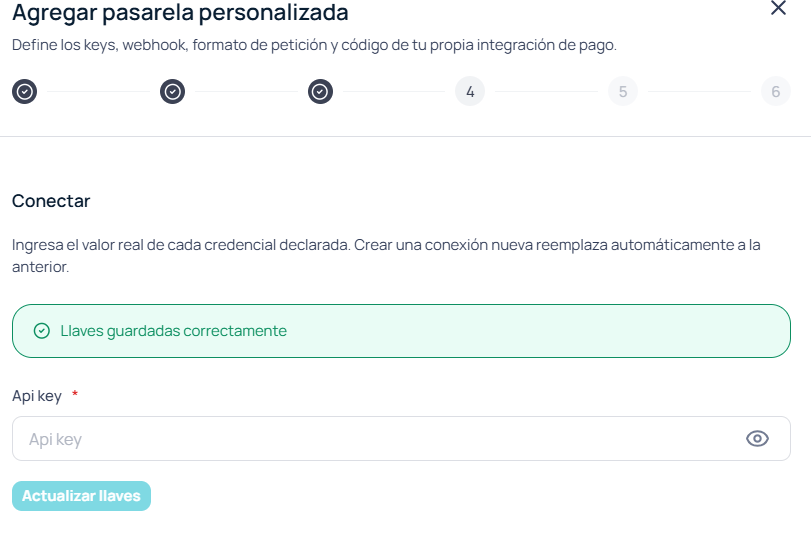 In **Sandbox**, paste the PSP's test keys. In **Production**, the real keys. Without this step, the gateway can't authenticate with the provider.
Configure how to interpret inbound notifications from the PSP:
* Enable or disable the webhook with **Enabled**. If you disable it, the wizard skips to Finish.
* **Signature header** (optional) — header where the PSP sends its HMAC signature
* **Event name path** and **Transaction id path** — paths inside the payload
* **Events table** — map each PSP event to **Success**, **Failed**, or **None**
In **Sandbox**, paste the PSP's test keys. In **Production**, the real keys. Without this step, the gateway can't authenticate with the provider.
Configure how to interpret inbound notifications from the PSP:
* Enable or disable the webhook with **Enabled**. If you disable it, the wizard skips to Finish.
* **Signature header** (optional) — header where the PSP sends its HMAC signature
* **Event name path** and **Transaction id path** — paths inside the payload
* **Events table** — map each PSP event to **Success**, **Failed**, or **None**
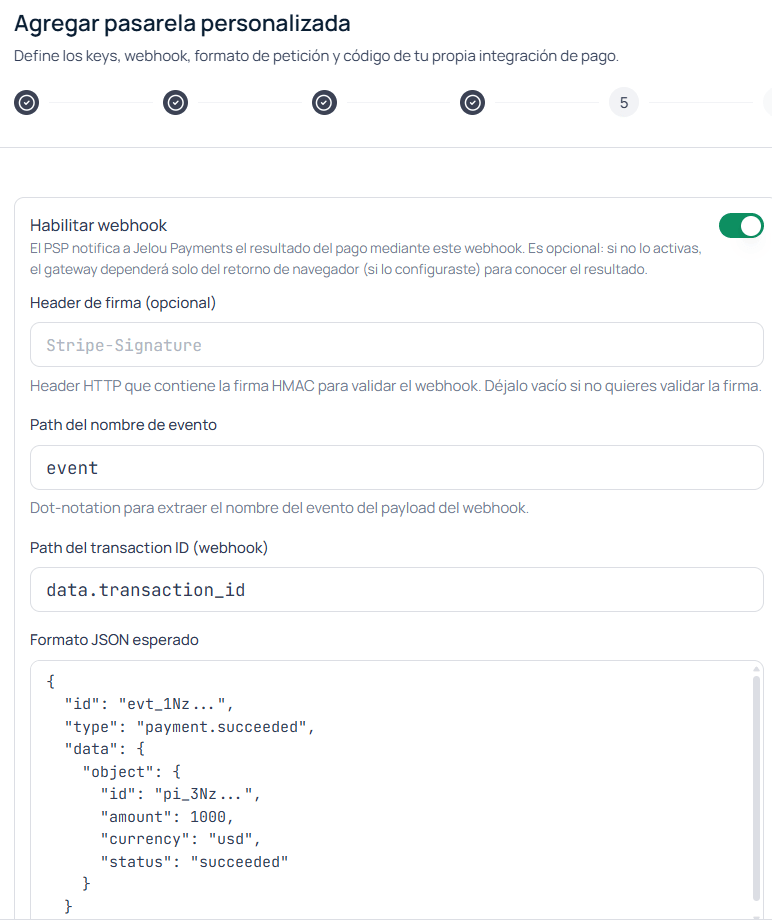 The **Expected JSON format** field is only a visual reference—it isn't sent to the backend.
Only appears if the webhook is enabled. Copy the **Webhook URL** the wizard generates, configure it in your PSP's dashboard, and generate or rotate the **HMAC secret**.
* Available algorithms: **SHA256**, **SHA384**, or **SHA512**
* A custom secret must be at least **16 characters**
The **Expected JSON format** field is only a visual reference—it isn't sent to the backend.
Only appears if the webhook is enabled. Copy the **Webhook URL** the wizard generates, configure it in your PSP's dashboard, and generate or rotate the **HMAC secret**.
* Available algorithms: **SHA256**, **SHA384**, or **SHA512**
* A custom secret must be at least **16 characters**
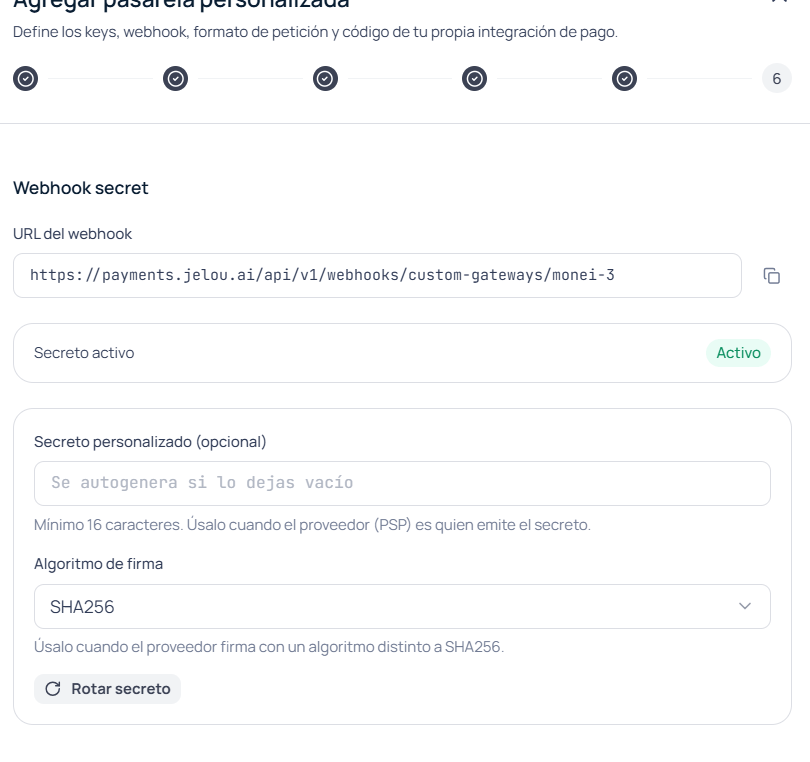 Finishing this step closes the wizard.
Before using the gateway in production, use **Test** from the Integrations list. See [Test the gateway](/en/guides/integraciones/pagos/personalizadas/probar-pasarela).
## Next steps
Placeholders available for the body, headers, and status check.
Generate a test paylink before going to production.
Finishing this step closes the wizard.
Before using the gateway in production, use **Test** from the Integrations list. See [Test the gateway](/en/guides/integraciones/pagos/personalizadas/probar-pasarela).
## Next steps
Placeholders available for the body, headers, and status check.
Generate a test paylink before going to production.