> ## Documentation Index
> Fetch the complete documentation index at: https://docs.jelou.ai/llms.txt
> Use this file to discover all available pages before exploring further.
# Request contact
> Ask the user to share their contact info and require the phone number before moving on
The **Request contact** node sends a message with the **Share contact info** button so the user can share their WhatsApp contact card. Use it to get the phone number of users who arrive identified only by their username or BSUID, and to hold the flow until you have it.
## Configuration
### General
| Field | Description | Limit |
| :---------- | :-------------------------------------------------------------------------- | :--------------- |
| **Message** | Text that goes with the button and explains why you need the user's details | 1,024 characters |
The button text is fixed: **Share contact info**.
### Advanced
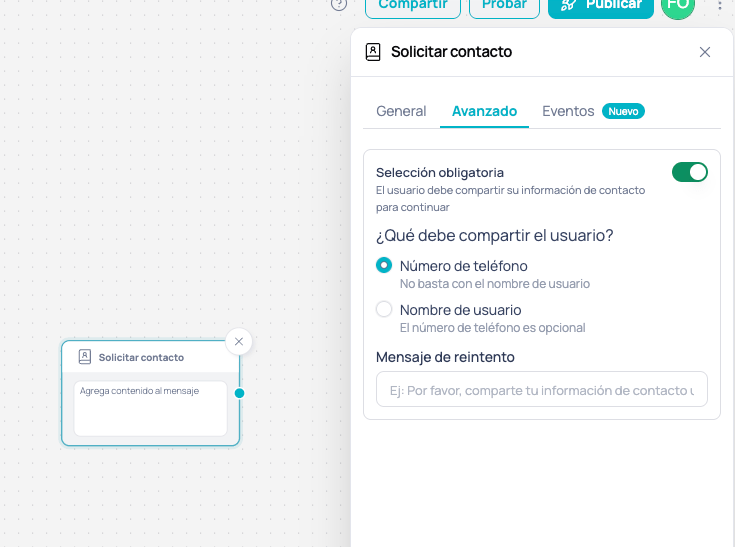 | Field | Description |
| :---------------------------- | :-------------------------------------------------------------------------------------------------------------------------------------------------------------------------------------- |
| **Mandatory selection** | When it's on, the flow waits at this node until the user shares their contact. When it's off, the node sends the message and the flow moves on without waiting for a reply. |
| **What must the user share?** | Sets which reply unblocks the flow. Only shows up when **Mandatory selection** is on. |
| **Retry message** | Text the user gets when their reply doesn't meet the requirement. If you leave it empty, this is sent: *Por favor, comparte tu información de contacto usando el botón para continuar.* |
## What the user must share
WhatsApp lets the user choose which details from their card they share, and the button can't restrict that. That's why the node enforces the requirement, with two mutually exclusive options:
| Option | The flow moves on when | If the user shares only their username |
| :------------------------- | :------------------------------------------------------ | :-------------------------------------------------------- |
| **Phone number** (default) | The reply includes a phone number | They get the **Retry message** and the node keeps waiting |
| **Username** | The user shares their contact, with or without a number | The flow moves on |
With either option, if the user replies with free text instead of tapping the button, they get the **Retry message**. A contact card sent from the attachments menu doesn't unblock the node either: the user has to use the button.
Nodes that already had **Mandatory selection** turned on behave as **Phone number** without you having to reconfigure or republish them.
## Using the captured number
When the user shares their number through the button and didn't have one on record yet, the number is linked to the user and is available in the following nodes of the same execution:
```
Thanks, we saved your number {{$user.phone}}
```
## Use cases
A banking workflow that receives users identified only by BSUID needs the phone number to verify their identity: **Request contact** with **Mandatory selection** and **Phone number** keeps the flow from moving on until it has it, and the **Retry message** tells the user what's missing.
A lead capture workflow wants to save the user's contact without stopping the conversation: **Request contact** with **Username** accepts any shared card and leaves the number optional.
This node only works on WhatsApp channels.
## Next steps
Ask for the user's location with an interactive button
Send a contact card to the user
| Field | Description |
| :---------------------------- | :-------------------------------------------------------------------------------------------------------------------------------------------------------------------------------------- |
| **Mandatory selection** | When it's on, the flow waits at this node until the user shares their contact. When it's off, the node sends the message and the flow moves on without waiting for a reply. |
| **What must the user share?** | Sets which reply unblocks the flow. Only shows up when **Mandatory selection** is on. |
| **Retry message** | Text the user gets when their reply doesn't meet the requirement. If you leave it empty, this is sent: *Por favor, comparte tu información de contacto usando el botón para continuar.* |
## What the user must share
WhatsApp lets the user choose which details from their card they share, and the button can't restrict that. That's why the node enforces the requirement, with two mutually exclusive options:
| Option | The flow moves on when | If the user shares only their username |
| :------------------------- | :------------------------------------------------------ | :-------------------------------------------------------- |
| **Phone number** (default) | The reply includes a phone number | They get the **Retry message** and the node keeps waiting |
| **Username** | The user shares their contact, with or without a number | The flow moves on |
With either option, if the user replies with free text instead of tapping the button, they get the **Retry message**. A contact card sent from the attachments menu doesn't unblock the node either: the user has to use the button.
Nodes that already had **Mandatory selection** turned on behave as **Phone number** without you having to reconfigure or republish them.
## Using the captured number
When the user shares their number through the button and didn't have one on record yet, the number is linked to the user and is available in the following nodes of the same execution:
```
Thanks, we saved your number {{$user.phone}}
```
## Use cases
A banking workflow that receives users identified only by BSUID needs the phone number to verify their identity: **Request contact** with **Mandatory selection** and **Phone number** keeps the flow from moving on until it has it, and the **Retry message** tells the user what's missing.
A lead capture workflow wants to save the user's contact without stopping the conversation: **Request contact** with **Username** accepts any shared card and leaves the number optional.
This node only works on WhatsApp channels.
## Next steps
Ask for the user's location with an interactive button
Send a contact card to the user