> ## Documentation Index
> Fetch the complete documentation index at: https://docs.jelou.ai/llms.txt
> Use this file to discover all available pages before exploring further.
# Tool composition
> Nest reusable logic with the Tool node: anti-recursion safeguards and full traceability.
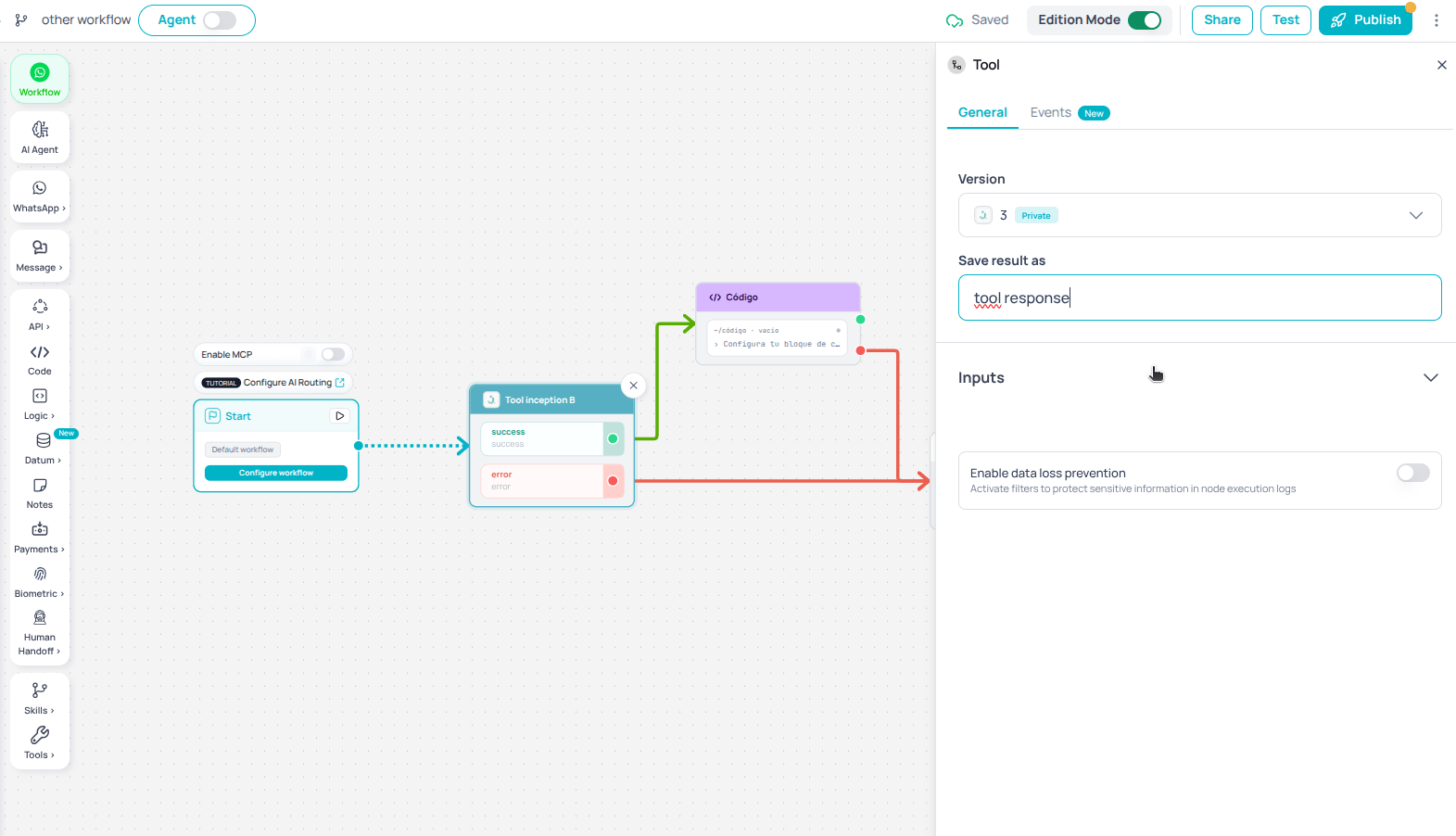
You can use the **Tool** node inside other Tools. Build reusable blocks (validate identity, charge a payment, check stock) and combine them without duplicating canvases.
Available to all companies.
## How to use it
In Brain Studio, go to the **Tools** tab and open the one you want to compose (or create a new one).
The Tools picker appears on the canvas. Drag in the one you need; it is inserted as a node with its `toolId`.
The Tool you are editing **does not appear** in the list — you cannot reference yourself.
Map the child Tool's inputs (memory variables, `$input`, or fixed values). Declared types (**NUMBER**, **BOOLEAN**, **OBJECT**, **ARRAY**) are preserved on invocation; they are not passed as strings.
Publish the parent Tool. On save and publish, the platform rejects self-references and detects cycles (for example, A → B → A).
 ## Anti-recursion safeguards
To prevent infinite loops:
* **No self-reference**: the current one is hidden from the picker, and save blocks any attempt to reference it.
* **Nesting limit**: runtime enforces a maximum depth (default **5** levels). Exceeding it fails the execution in a controlled way.
* **Cycle detection**: when you publish, an analyzer detects cycles between them.
Keep Tools small and single-purpose. Deep nesting makes debugging harder and brings you closer to the depth limit.
## Traceability and debugging
Every child execution gets an `executionId` that is always recorded on the parent, including **timeout**, error, or success outcomes.
From the [Tester](/en/guides/getting-started/tester), on the node use **Debug Tool** to inspect the child's internal execution (nodes, inputs, outputs, and errors) without opening a separate canvas.
## Timeout
Dispatching the child Tool has a **30-second** timeout. Because execution is asynchronous, that limit covers only the dispatch — the moment the platform creates the child execution — not how long the child takes to finish: a child that runs for several minutes does not exhaust this timeout.
If dispatch fails on timeout, the parent Tool takes the error path and its final state includes the child's `executionId` and `status: TIMEOUT`, so you can debug it the same way as a normal error.
## Input types
When mapping inputs to a child, the builder persists the type with the value. The engine coerces by declared type:
| Declared type | Behavior |
| ------------------ | -------------------------------------------- |
| `NUMBER` | Sent as a number (not `"15"`) |
| `BOOLEAN` | Sent as a boolean |
| `OBJECT` / `ARRAY` | Sent as a structure, not a serialized string |
| `STRING` | Sent as text |
This avoids silent bugs when the child Tool expects a numeric ID or an object.
## Best practices
* Prefer generic, reusable Tools as composition building blocks.
* Document each child Tool's inputs and outputs so parent mapping stays clear.
* Test composition in the Tester and use **Debug Tool** at each nested level.
* Keep depth low; if you need many levels, consider flattening the design.
## Anti-recursion safeguards
To prevent infinite loops:
* **No self-reference**: the current one is hidden from the picker, and save blocks any attempt to reference it.
* **Nesting limit**: runtime enforces a maximum depth (default **5** levels). Exceeding it fails the execution in a controlled way.
* **Cycle detection**: when you publish, an analyzer detects cycles between them.
Keep Tools small and single-purpose. Deep nesting makes debugging harder and brings you closer to the depth limit.
## Traceability and debugging
Every child execution gets an `executionId` that is always recorded on the parent, including **timeout**, error, or success outcomes.
From the [Tester](/en/guides/getting-started/tester), on the node use **Debug Tool** to inspect the child's internal execution (nodes, inputs, outputs, and errors) without opening a separate canvas.
## Timeout
Dispatching the child Tool has a **30-second** timeout. Because execution is asynchronous, that limit covers only the dispatch — the moment the platform creates the child execution — not how long the child takes to finish: a child that runs for several minutes does not exhaust this timeout.
If dispatch fails on timeout, the parent Tool takes the error path and its final state includes the child's `executionId` and `status: TIMEOUT`, so you can debug it the same way as a normal error.
## Input types
When mapping inputs to a child, the builder persists the type with the value. The engine coerces by declared type:
| Declared type | Behavior |
| ------------------ | -------------------------------------------- |
| `NUMBER` | Sent as a number (not `"15"`) |
| `BOOLEAN` | Sent as a boolean |
| `OBJECT` / `ARRAY` | Sent as a structure, not a serialized string |
| `STRING` | Sent as text |
This avoids silent bugs when the child Tool expects a numeric ID or an object.
## Best practices
* Prefer generic, reusable Tools as composition building blocks.
* Document each child Tool's inputs and outputs so parent mapping stays clear.
* Test composition in the Tester and use **Debug Tool** at each nested level.
* Keep depth low; if you need many levels, consider flattening the design.