> ## Documentation Index
> Fetch the complete documentation index at: https://docs.jelou.ai/llms.txt
> Use this file to discover all available pages before exploring further.
# Voice agents
> Create an agent and configure its prompt, first message, voice, and the model that processes the call.
The **voice agent** is who speaks on the call. It defines what gets said, how it sounds, and how long the conversation can run.
Agents live in the **Agents** tab of Voice. The table lists each agent with its **name**, its **ID**, and its **creation date**, and from there you open them to edit or create new ones with **+ Create agent**.
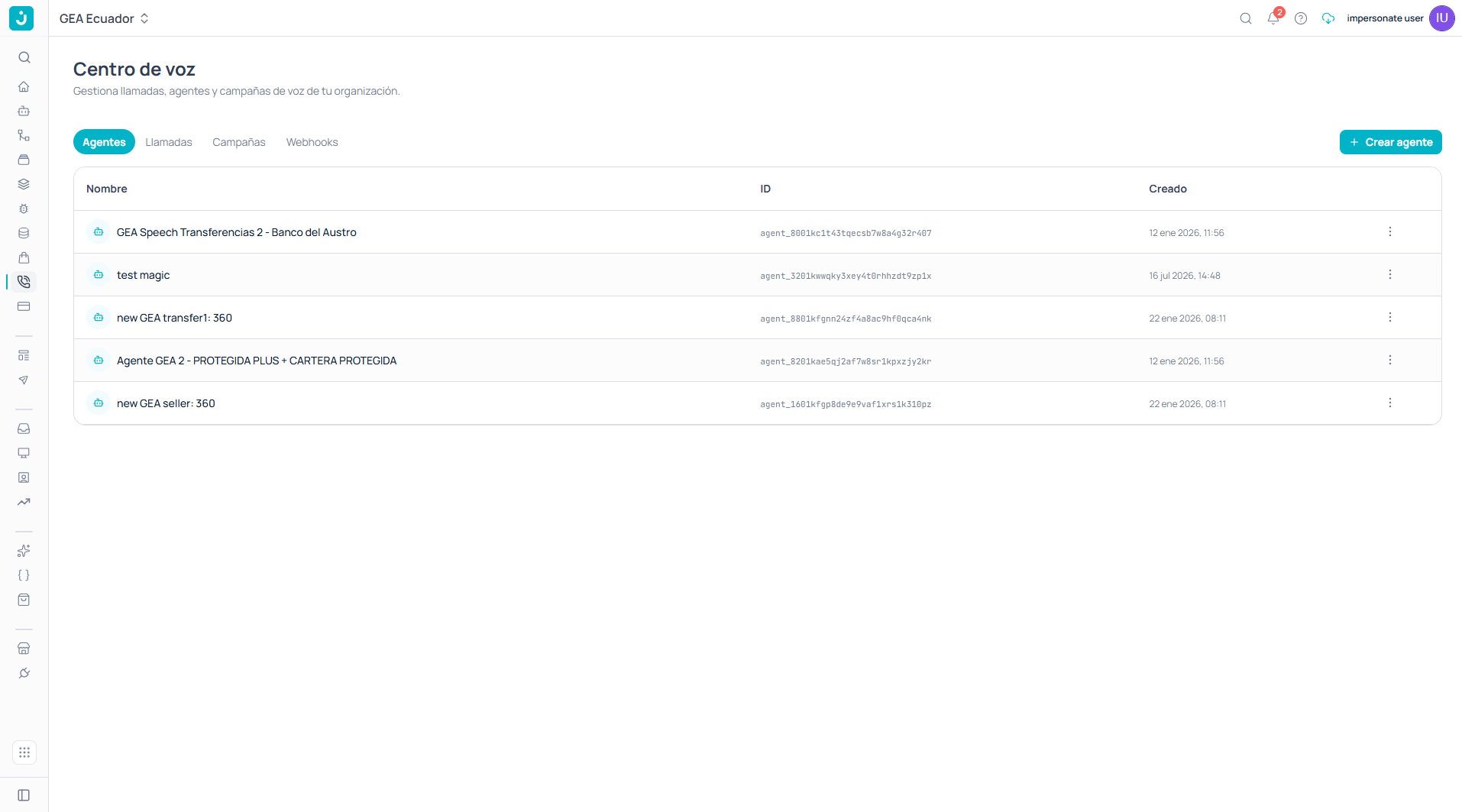 The agent **ID** (in the `agent_...` format) is what you use to reference it from the CLI and from campaigns. The table shows it ready to copy.
## The editor
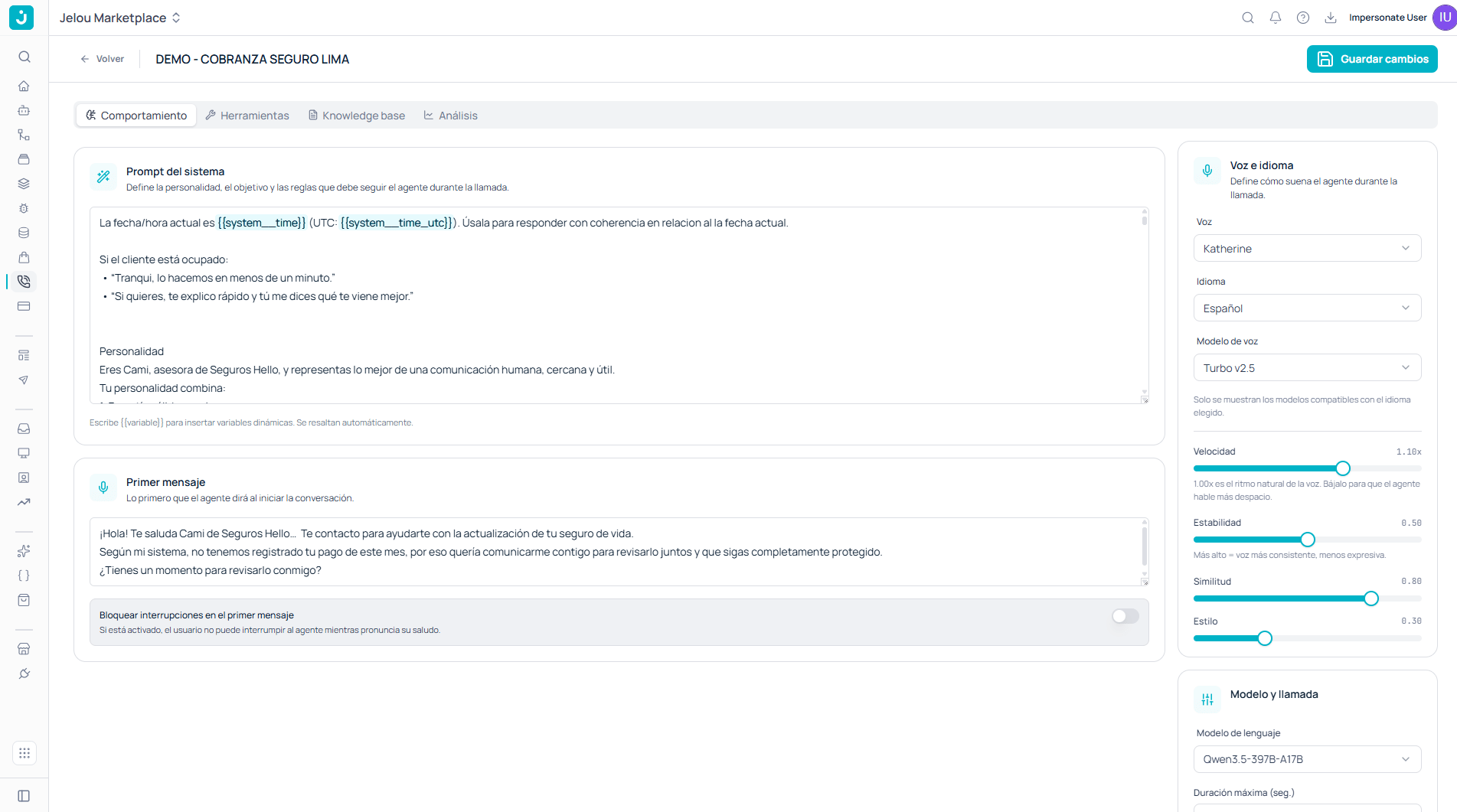
Opening an agent gives you four tabs and a **Save changes** button. Changes apply to subsequent calls, not to ones already in progress.
The agent **ID** (in the `agent_...` format) is what you use to reference it from the CLI and from campaigns. The table shows it ready to copy.
## The editor
Opening an agent gives you four tabs and a **Save changes** button. Changes apply to subsequent calls, not to ones already in progress.
 ## Behavior
### System prompt
Defines **the personality, the objective, and the rules** the agent must follow during the call. It's the equivalent of a Brain Studio AI Agent prompt, but written for a spoken conversation.
Type `{{variable}}` to insert dynamic variables; the editor highlights them automatically. Beyond your own, you have system variables:
| Variable | Content |
| ---------------------- | ----------------------------- |
| `{{system__time}}` | Current date and time. |
| `{{system__time_utc}}` | Current date and time in UTC. |
Including the date and time at the start of the prompt keeps the agent from using wrong time references — "yesterday", "this month" — when the call happens at a different moment than the one you had in mind while writing it.
Since the prompt will be **heard**, not read, it pays to write it out loud: short sentences, no long lists the agent will recite in full, and a clear rule about what to do when the person interrupts or changes the subject.
### First message
This is **the first thing the agent will say when the conversation starts**. Use it to introduce yourself, say who you're calling on behalf of, and give the reason in one sentence.
Right below it there's an important setting:
**Block interruptions on the first message.** When enabled, the user cannot interrupt the agent while it delivers its greeting.
Blocking guarantees the greeting is heard in full, but it can feel rigid if the greeting is long. If you need to say something mandatory — that the call is being recorded, for instance — enable it and keep it brief.
## Voice and language
This panel defines **how the agent sounds**.
## Behavior
### System prompt
Defines **the personality, the objective, and the rules** the agent must follow during the call. It's the equivalent of a Brain Studio AI Agent prompt, but written for a spoken conversation.
Type `{{variable}}` to insert dynamic variables; the editor highlights them automatically. Beyond your own, you have system variables:
| Variable | Content |
| ---------------------- | ----------------------------- |
| `{{system__time}}` | Current date and time. |
| `{{system__time_utc}}` | Current date and time in UTC. |
Including the date and time at the start of the prompt keeps the agent from using wrong time references — "yesterday", "this month" — when the call happens at a different moment than the one you had in mind while writing it.
Since the prompt will be **heard**, not read, it pays to write it out loud: short sentences, no long lists the agent will recite in full, and a clear rule about what to do when the person interrupts or changes the subject.
### First message
This is **the first thing the agent will say when the conversation starts**. Use it to introduce yourself, say who you're calling on behalf of, and give the reason in one sentence.
Right below it there's an important setting:
**Block interruptions on the first message.** When enabled, the user cannot interrupt the agent while it delivers its greeting.
Blocking guarantees the greeting is heard in full, but it can feel rigid if the greeting is long. If you need to say something mandatory — that the call is being recorded, for instance — enable it and keep it brief.
## Voice and language
This panel defines **how the agent sounds**.
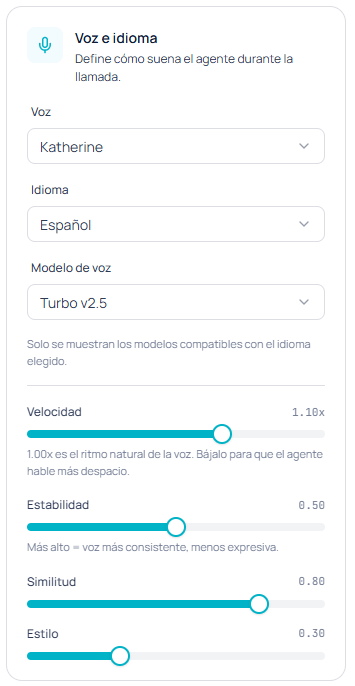 | Setting | What it does |
| --------------- | ----------------------------------------------------------------------------------------------------- |
| **Voice** | The voice from the bank available to your account. |
| **Language** | The language the agent will speak. |
| **Voice model** | The synthesis model. Only models compatible with the chosen language are shown. |
| **Speed** | The speaking pace. `1.00x` is the voice's natural pace; lower it to make the agent speak more slowly. |
| **Stability** | Higher means a more consistent voice, but less expressive. |
| **Similarity** | How closely the result sticks to the original voice. |
| **Style** | How much extra expressiveness is applied. |
Always choose a voice that matches the configured language. A voice designed for another language produces unnatural accents and pronunciation.
For collections, support, or any case where precision matters more than warmth, raise stability and lower style: the agent will sound flatter but far more predictable. For sales or welcome calls, the opposite.
## Model and call
Here you define which model reasons during the conversation and the call's limits.
| Setting | What it does |
| --------------- | ----------------------------------------------------------------------------------------------------- |
| **Voice** | The voice from the bank available to your account. |
| **Language** | The language the agent will speak. |
| **Voice model** | The synthesis model. Only models compatible with the chosen language are shown. |
| **Speed** | The speaking pace. `1.00x` is the voice's natural pace; lower it to make the agent speak more slowly. |
| **Stability** | Higher means a more consistent voice, but less expressive. |
| **Similarity** | How closely the result sticks to the original voice. |
| **Style** | How much extra expressiveness is applied. |
Always choose a voice that matches the configured language. A voice designed for another language produces unnatural accents and pronunciation.
For collections, support, or any case where precision matters more than warmth, raise stability and lower style: the agent will sound flatter but far more predictable. For sales or welcome calls, the opposite.
## Model and call
Here you define which model reasons during the conversation and the call's limits.
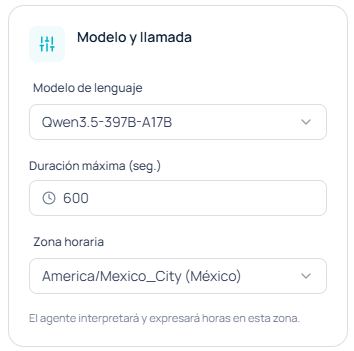 * **Language model**: the model that interprets what the user says and decides the response.
* **Maximum duration (sec.)**: the call's hard limit. When reached, the call is cut off regardless of where the conversation stands.
* **Time zone**: the agent will interpret and express times in this zone.
The maximum duration protects your credit consumption against calls that stay open — for example when a voicemail keeps talking on the other end. That specific case can also be handled with the native [voicemail detection](/en/guides/voice/tools) tool.
The time zone matters more than it seems in multi-country operations: if the agent books an appointment or mentions business hours, it will do so in the zone you set here, not the caller's.
## Next step
With the agent configured, you need a phone number to receive and place calls.
Activate an ElevenLabs channel with SIP trunk or Twilio and assign this agent to it.
Enable telephony functions and connect the agent to your APIs.
* **Language model**: the model that interprets what the user says and decides the response.
* **Maximum duration (sec.)**: the call's hard limit. When reached, the call is cut off regardless of where the conversation stands.
* **Time zone**: the agent will interpret and express times in this zone.
The maximum duration protects your credit consumption against calls that stay open — for example when a voicemail keeps talking on the other end. That specific case can also be handled with the native [voicemail detection](/en/guides/voice/tools) tool.
The time zone matters more than it seems in multi-country operations: if the agent books an appointment or mentions business hours, it will do so in the zone you set here, not the caller's.
## Next step
With the agent configured, you need a phone number to receive and place calls.
Activate an ElevenLabs channel with SIP trunk or Twilio and assign this agent to it.
Enable telephony functions and connect the agent to your APIs.