> ## Documentation Index
> Fetch the complete documentation index at: https://docs.jelou.ai/llms.txt
> Use this file to discover all available pages before exploring further.
# Conversation analysis
> Define evaluation criteria and the structured data extracted from every call.
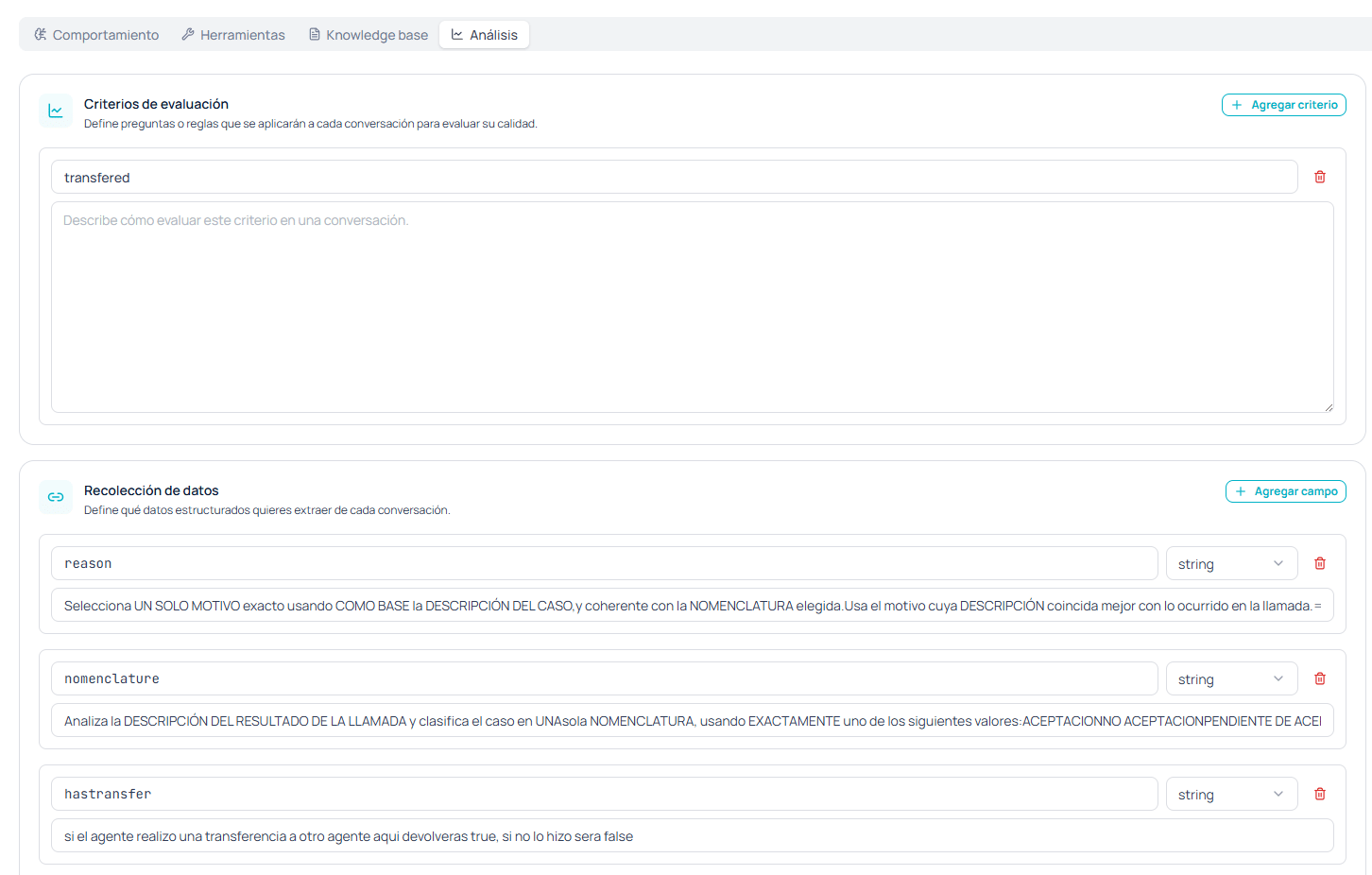
The **Analysis** tab turns every conversation into data you can work with. It has two independent sections: **evaluation criteria**, which judge the quality of the call, and **data collection**, which extracts structured fields from what was said.
 ## Evaluation criteria
These are **questions or rules applied to every conversation to evaluate its quality**. You add them with **+ Add criterion** and each one has two parts:
* A **name** that identifies it.
* A **description** explaining how to evaluate that criterion in a conversation.
They let you systematically answer questions you'd otherwise have to review call by call: whether the agent followed the mandatory script, whether it verified identity before giving out information, whether it mentioned the call was being recorded.
Write each criterion as a question with an answer verifiable in the transcript. "The agent confirmed the document number before giving the balance" can be evaluated; "the agent was friendly" is ambiguous and produces inconsistent results.
## Data collection
Defines **what structured data you want to extract from every conversation**. You add fields with **+ Add field** and each one has three parts:
| Part | What it's for |
| --------------- | ---------------------------------------------------------------------------------------------- |
| **Name** | The field identifier, for example `reason` or `nomenclature`. |
| **Type** | The data type of the extracted value. |
| **Description** | The extraction instructions: what to look for in the conversation and how to decide the value. |
This is the piece that turns calls into something your operation can measure and automate: the reason for contact, the classification of the outcome, whether there was a transfer, whether the customer accepted the offer.
### How to write a field description
The description works as an extraction prompt, and its precision determines the quality of the data.
**Constrain the possible values when the field is a classification.** If you expect one of five categories, list exactly those five in the description. A classification field with open instructions returns variants you can't group afterward.
**Say what to do when the data isn't there.** If the conversation was cut off before reaching the topic, the field needs a predictable value instead of an invention.
**One field, one piece of data.** If you find yourself describing two things in the same field, split it in two.
Data is extracted from the **transcript**, not from a form. A document number or an amount dictated over the phone can be transcribed wrong, so treat these fields as a signal for analysis and not as an authoritative record. If you need the value validated, capture it with an [HTTP tool](/en/guides/voice/tools) that confirms against your systems during the call.
## How the results get used
What you define here is evaluated when each call closes and stays attached to it, alongside its [recording and transcript](/en/guides/voice/calls). If you register a [webhook](/en/guides/voice/webhooks), the end-of-call event is the natural point to move this data into your CRM or data warehouse.
It pays to start with few fields and add more as you learn what questions your operation actually asks. A collection of twenty fields defined up front usually ends with half unused and the other half poorly specified.
## Evaluation criteria
These are **questions or rules applied to every conversation to evaluate its quality**. You add them with **+ Add criterion** and each one has two parts:
* A **name** that identifies it.
* A **description** explaining how to evaluate that criterion in a conversation.
They let you systematically answer questions you'd otherwise have to review call by call: whether the agent followed the mandatory script, whether it verified identity before giving out information, whether it mentioned the call was being recorded.
Write each criterion as a question with an answer verifiable in the transcript. "The agent confirmed the document number before giving the balance" can be evaluated; "the agent was friendly" is ambiguous and produces inconsistent results.
## Data collection
Defines **what structured data you want to extract from every conversation**. You add fields with **+ Add field** and each one has three parts:
| Part | What it's for |
| --------------- | ---------------------------------------------------------------------------------------------- |
| **Name** | The field identifier, for example `reason` or `nomenclature`. |
| **Type** | The data type of the extracted value. |
| **Description** | The extraction instructions: what to look for in the conversation and how to decide the value. |
This is the piece that turns calls into something your operation can measure and automate: the reason for contact, the classification of the outcome, whether there was a transfer, whether the customer accepted the offer.
### How to write a field description
The description works as an extraction prompt, and its precision determines the quality of the data.
**Constrain the possible values when the field is a classification.** If you expect one of five categories, list exactly those five in the description. A classification field with open instructions returns variants you can't group afterward.
**Say what to do when the data isn't there.** If the conversation was cut off before reaching the topic, the field needs a predictable value instead of an invention.
**One field, one piece of data.** If you find yourself describing two things in the same field, split it in two.
Data is extracted from the **transcript**, not from a form. A document number or an amount dictated over the phone can be transcribed wrong, so treat these fields as a signal for analysis and not as an authoritative record. If you need the value validated, capture it with an [HTTP tool](/en/guides/voice/tools) that confirms against your systems during the call.
## How the results get used
What you define here is evaluated when each call closes and stays attached to it, alongside its [recording and transcript](/en/guides/voice/calls). If you register a [webhook](/en/guides/voice/webhooks), the end-of-call event is the natural point to move this data into your CRM or data warehouse.
It pays to start with few fields and add more as you learn what questions your operation actually asks. A collection of twenty fields defined up front usually ends with half unused and the other half poorly specified.