> ## Documentation Index
> Fetch the complete documentation index at: https://docs.jelou.ai/llms.txt
> Use this file to discover all available pages before exploring further.
# Agent tools
> Enable native telephony functions and connect the agent to your APIs with HTTP tools.
**Tools** are the actions the agent can take during a call beyond speaking. They come in two groups: the **native** ones, which are telephony functions already built in, and the **HTTP** ones, which you define so the agent can consume your own APIs.
They're in the **Tools** tab of the agent editor.
 ## Native tools
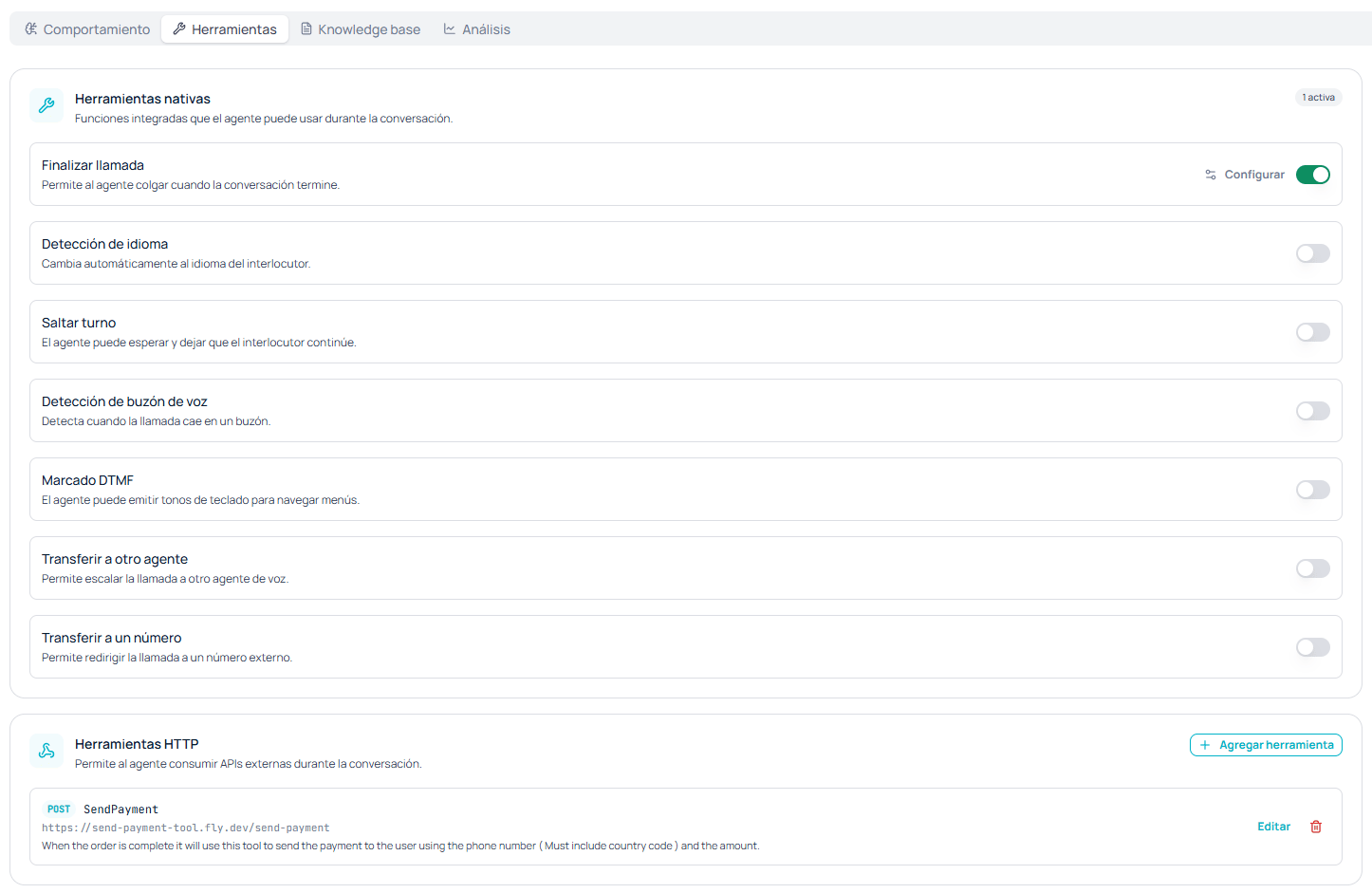
These are built-in functions the agent can use during the conversation. Each one is an independent toggle, and the corner of the section shows how many you have active.
| Tool | What it allows |
| ----------------------------- | --------------------------------------------------- |
| **End call** | The agent to hang up when the conversation is over. |
| **Language detection** | Automatically switching to the caller's language. |
| **Skip turn** | The agent to wait and let the caller continue. |
| **Voicemail detection** | Detecting when the call lands on a voicemail. |
| **DTMF dialing** | The agent to emit keypad tones to navigate menus. |
| **Transfer to another agent** | Escalating the call to another voice agent. |
| **Transfer to a number** | Redirecting the call to an external number. |
**End call** also has a **Configure** option next to its toggle, to tune its behavior in more detail.
### When to enable each one
**End call** is the one you'll almost always want on: without it the agent has no way to close and the call stays open until the maximum duration limit.
**Voicemail detection** saves the most credits on outbound campaigns. Without it, a call that lands on voicemail becomes the agent talking to a recorder until the time runs out.
**Skip turn** helps when the person speaks slowly or takes long pauses to think; without it the agent tends to interrupt or fill the silence.
**DTMF dialing** only makes sense if the agent will have to get through an automated phone menu, for example when transferring to a switchboard that asks for an extension.
**Language detection** is worth it only if you genuinely expect callers in several languages. If your operation is monolingual, leaving it off keeps the agent from switching languages over a transcription misunderstanding.
**Transfer to another agent** and **Transfer to a number** are the two that take the call away from the current agent. Before enabling them, define in the system prompt when they should be used: otherwise the agent may transfer too early and give away cases it could have resolved.
## HTTP tools
These let the agent **consume external APIs during the conversation**: check a balance, validate a document, record an order, or trigger a payment without leaving the call.
The section lists the ones you already have, showing the method, the name, the URL, and the description, with actions to edit or delete them. You create them with **+ Add tool**.
## Native tools
These are built-in functions the agent can use during the conversation. Each one is an independent toggle, and the corner of the section shows how many you have active.
| Tool | What it allows |
| ----------------------------- | --------------------------------------------------- |
| **End call** | The agent to hang up when the conversation is over. |
| **Language detection** | Automatically switching to the caller's language. |
| **Skip turn** | The agent to wait and let the caller continue. |
| **Voicemail detection** | Detecting when the call lands on a voicemail. |
| **DTMF dialing** | The agent to emit keypad tones to navigate menus. |
| **Transfer to another agent** | Escalating the call to another voice agent. |
| **Transfer to a number** | Redirecting the call to an external number. |
**End call** also has a **Configure** option next to its toggle, to tune its behavior in more detail.
### When to enable each one
**End call** is the one you'll almost always want on: without it the agent has no way to close and the call stays open until the maximum duration limit.
**Voicemail detection** saves the most credits on outbound campaigns. Without it, a call that lands on voicemail becomes the agent talking to a recorder until the time runs out.
**Skip turn** helps when the person speaks slowly or takes long pauses to think; without it the agent tends to interrupt or fill the silence.
**DTMF dialing** only makes sense if the agent will have to get through an automated phone menu, for example when transferring to a switchboard that asks for an extension.
**Language detection** is worth it only if you genuinely expect callers in several languages. If your operation is monolingual, leaving it off keeps the agent from switching languages over a transcription misunderstanding.
**Transfer to another agent** and **Transfer to a number** are the two that take the call away from the current agent. Before enabling them, define in the system prompt when they should be used: otherwise the agent may transfer too early and give away cases it could have resolved.
## HTTP tools
These let the agent **consume external APIs during the conversation**: check a balance, validate a document, record an order, or trigger a payment without leaving the call.
The section lists the ones you already have, showing the method, the name, the URL, and the description, with actions to edit or delete them. You create them with **+ Add tool**.
 ### The fields
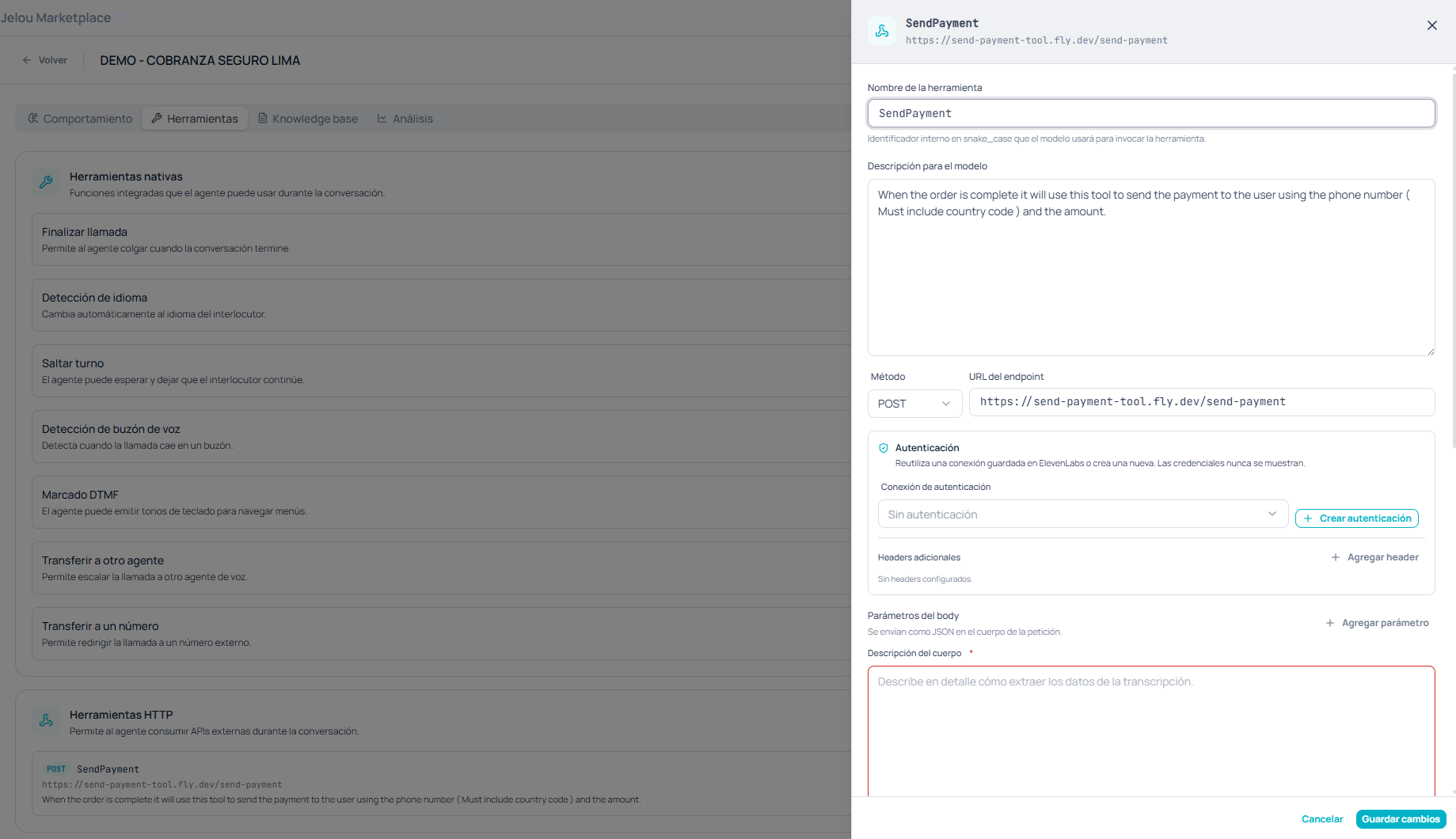
The internal identifier **in snake\_case** the model will use to invoke the tool. It's not text the user hears; it's the name the agent calls it by.
Explains **when** the tool should be used. This text is all the model has to decide whether to invoke it, so it pays to state explicitly which situation it applies to and what data it needs.
The HTTP verb and the address Jelou will send the request to.
Reuse a connection saved in ElevenLabs or create a new one with **Create authentication**. Credentials are never shown once saved.
Extra headers sent with every request, if your API needs them.
Sent as JSON in the request body.
A required field. Describe **in detail how to extract the data from the transcript** to build the request body.
An HTTP tool's quality depends almost entirely on two texts: the **description for the model** and the **body description**. If the agent doesn't invoke the tool when it should, the problem is usually the first; if it invokes it with incomplete or malformed data, the second.
The agent extracts parameters from what it **understood** of the conversation, and a voice transcript can garble digits or proper names. On sensitive operations such as payments or data changes, have the agent read the value back out loud and ask for confirmation before invoking the tool, and validate in your backend before acting.
## Next step
For frequently asked questions, a document usually beats a call to your API.
Define what you want to evaluate and extract from every conversation.
### The fields
The internal identifier **in snake\_case** the model will use to invoke the tool. It's not text the user hears; it's the name the agent calls it by.
Explains **when** the tool should be used. This text is all the model has to decide whether to invoke it, so it pays to state explicitly which situation it applies to and what data it needs.
The HTTP verb and the address Jelou will send the request to.
Reuse a connection saved in ElevenLabs or create a new one with **Create authentication**. Credentials are never shown once saved.
Extra headers sent with every request, if your API needs them.
Sent as JSON in the request body.
A required field. Describe **in detail how to extract the data from the transcript** to build the request body.
An HTTP tool's quality depends almost entirely on two texts: the **description for the model** and the **body description**. If the agent doesn't invoke the tool when it should, the problem is usually the first; if it invokes it with incomplete or malformed data, the second.
The agent extracts parameters from what it **understood** of the conversation, and a voice transcript can garble digits or proper names. On sensitive operations such as payments or data changes, have the agent read the value back out loud and ask for confirmation before invoking the tool, and validate in your backend before acting.
## Next step
For frequently asked questions, a document usually beats a call to your API.
Define what you want to evaluate and extract from every conversation.