
Before you begin
You need:- An active Wompi account
- Access to the Wompi dashboard with permissions to view technical credentials
- Permissions to configure the Events URL
- A decision on whether you will connect Sandbox or Production credentials
Environments in Wompi
Wompi separates credentials by environment:- Sandbox: test environment. Lets you simulate payments without moving real money.
- Production: real environment. Processes transactions with real money.
Part 1 — Prepare Sandbox credentials
In Development → Developers you will find the technical credentials for the test environment and the Events URL field. Use this section to copy the Sandbox keys and secrets, and to save the URL where Wompi will notify changes in transaction statuses.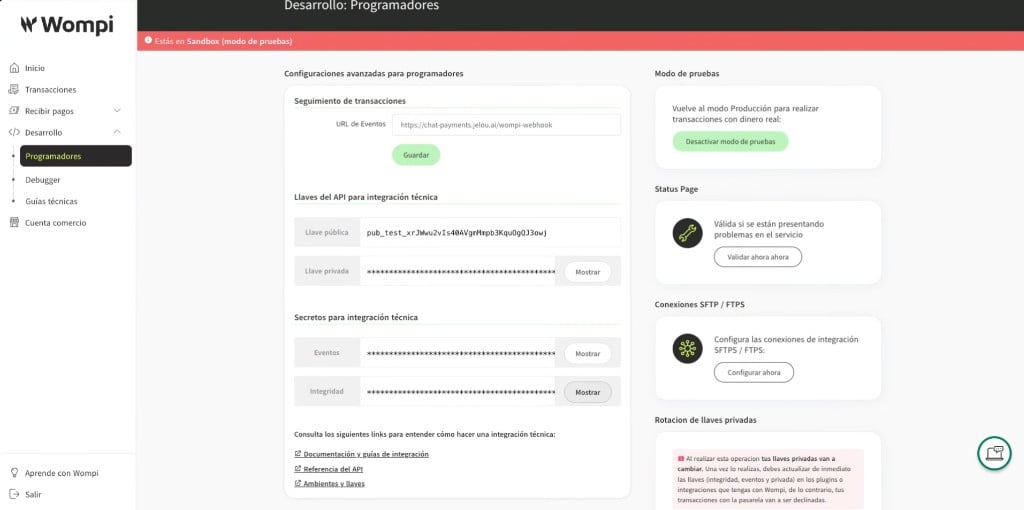
Wompi Dashboard (Sandbox): merchant's technical keys and secrets
Sign in to the Wompi dashboard
Confirm test mode
pub_test_, prv_test_, test_events_, and test_integrity_.Open Development → Developers
Copy Sandbox keys and secrets
Configure the Events URL
Confirm Sandbox configuration
Part 2 — Prepare Production credentials
Production credentials are prepared from the same Development → Developers screen. Confirm that test mode is disabled before copying the keys and secrets. In this environment you must also save the Events URL, so that Brain Studio receives status updates for real payments.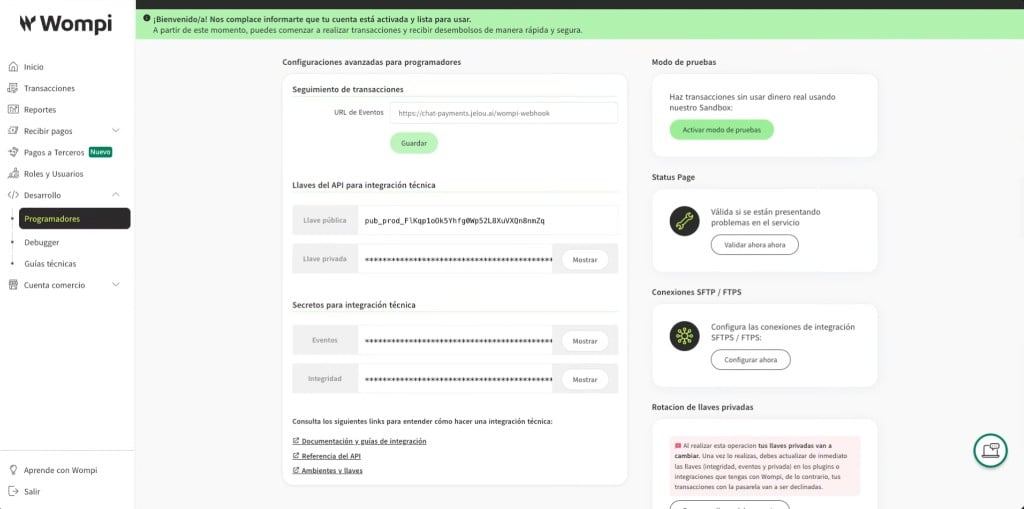
Wompi Dashboard (Production): merchant's technical keys and secrets
Disable test mode
Open Development → Developers
Copy production keys and secrets
- Public key (
pub_prod_...) - Private key (
prv_prod_...) - Events (
prod_events_...) - Integrity (
prod_integrity_...)
Configure the Events URL in Production
Use production credentials in Brain Studio
Use credentials in Brain Studio
When you install Wompi, Brain Studio asks for:- Public key
- Private key
- Events secret
- Integrity
- Applied VAT
Validate credentials by environment
Before pasting credentials in Brain Studio, check the prefixes to confirm that all values belong to the same environment.Sandbox credentials
Sandbox credentials
pub_test_...prv_test_...test_events_...test_integrity_...
Production credentials
Production credentials
pub_prod_...prv_prod_...prod_events_...prod_integrity_...
Troubleshooting
How do I test a payment with Sandbox credentials?
How do I test a payment with Sandbox credentials?
I can't find the technical credentials
I can't find the technical credentials
Brain Studio rejects the credentials
Brain Studio rejects the credentials
pub_test_... key with a prod_events_... secret.The flow doesn't move forward after the payment
The flow doesn't move forward after the payment
I'm testing in Sandbox and want to switch to production
I'm testing in Sandbox and want to switch to production
pub_prod_...prv_prod_...prod_events_...prod_integrity_...
Best practices
Do not mix environments
Do not mix environments
Protect secrets
Protect secrets
Validate events before production
Validate events before production