How it works
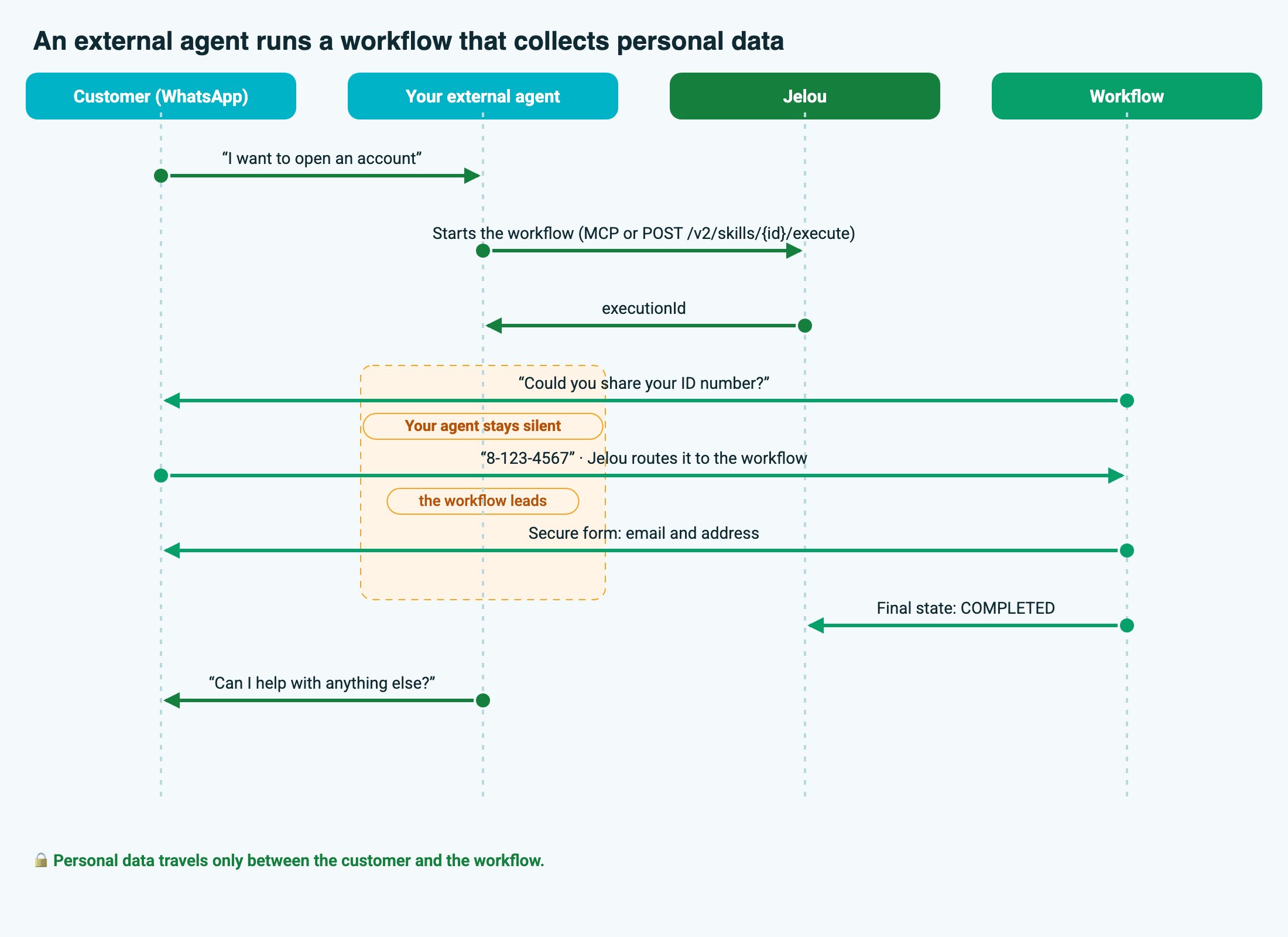
Your agent decides when to run a workflow. The workflow decides what to ask and collects the data.The customer writes to your agent
Your agent starts the workflow
executionId and runs the workflow in the background.The workflow talks to the customer
The workflow ends and the conversation returns to your agent
Choose how to connect
Requirements, from zero
A published workflow
A WhatsApp channel connected to the project
botId.An API key with the right scopes
https://gateway.jelou.ai: that’s where the key’s scopes are enforced. The key goes in the x-api-key header.The identifiers
brainId: the project’s identifier.skillId: the workflow’s identifier (you get it when listing workflows).referenceId: the customer’s WhatsApp identifier, usually their number without+(for example,50712345678).
Get the customer's messages to your agent
Option A: MCP
Connect your agent as an MCP client to your project’s workflow server:x-api-key header. The server exposes:
- One tool per published workflow in the project, with the workflow’s inputs as parameters and a
_contextfield for the customer. workflow_reply, to pass the customer’s answer to the workflow.
Step by step
Start the workflow
_context:Don't repeat the outbox
outbox holds the messages the workflow already delivered to the customer on WhatsApp. Your agent reads them to know what was said, but doesn’t send them again or paraphrase them.Wait for the customer's real answer
status is pending_input, wait for the customer’s next message and pass it through unchanged:referenceId, so you don’t need to send the executionId.Repeat until a final state
claim.conflict, thread_busy), there’s already an execution in progress for that customer. Don’t retry or start another one. Wait for the current one to finish.Option B: REST API
List the project's workflows
id as the skillId. Each workflow’s description is what your agent should read to decide when to use it.Start the workflow
WHATSAPP.API.botId and referenceId, Jelou loads the real customer and the workflow writes to them.+.Let the workflow lead
- don’t reply to the customer’s messages;
- hand them back to Jelou unchanged (see the last step of Requirements);
- keep the
executionIdand mark the conversation as held by a workflow.
Detect when it finishes
{ "executionId", "status", "output" }. output is empty until the execution finishes.Forms (webviews) inside the workflow
Many personal-data workflows open a secure form instead of asking for each field in chat. For example, an account-opening form with email, address and economic activity. Jelou opens the form with the execution’sexecutionId. When the customer submits it, the form returns the result to Jelou and the workflow continues.
Your agent does nothing at this step: it doesn’t intercept the form or forward its data. If the workflow seems stuck in WAITING after sending a form, the customer probably hasn’t completed it yet.
Personal data
Onboarding and account-opening workflows handle sensitive data: ID numbers, email, address, income. The recommended design is for that data to travel only between the customer and the workflow, never through your agent.Don't pass personal data in message
Don't pass personal data in message
Fix identity on the server, not in the model
Fix identity on the server, not in the model
referenceId, the botId and any customer identifier must come from your server’s session, never from what the model writes. If the model could choose the referenceId, it could start a workflow for someone else. In Copilot Studio or Bedrock agents, pass these values from the action’s configuration or the session context, not as parameters the model fills in.Treat the outbox and results as sensitive data
Treat the outbox and results as sensitive data
outbox and an execution’s output can contain customer data. Don’t log them, don’t show them on dashboards and don’t forward them to other systems unless you need to.What your agent sends on its own skips Jelou's filters
What your agent sends on its own skips Jelou's filters
Least privilege on the API key
Least privilege on the API key
workflows:read, workflows:execute, executions:read). Store it as a secret in your platform and rotate it if it’s exposed.Full example: account opening
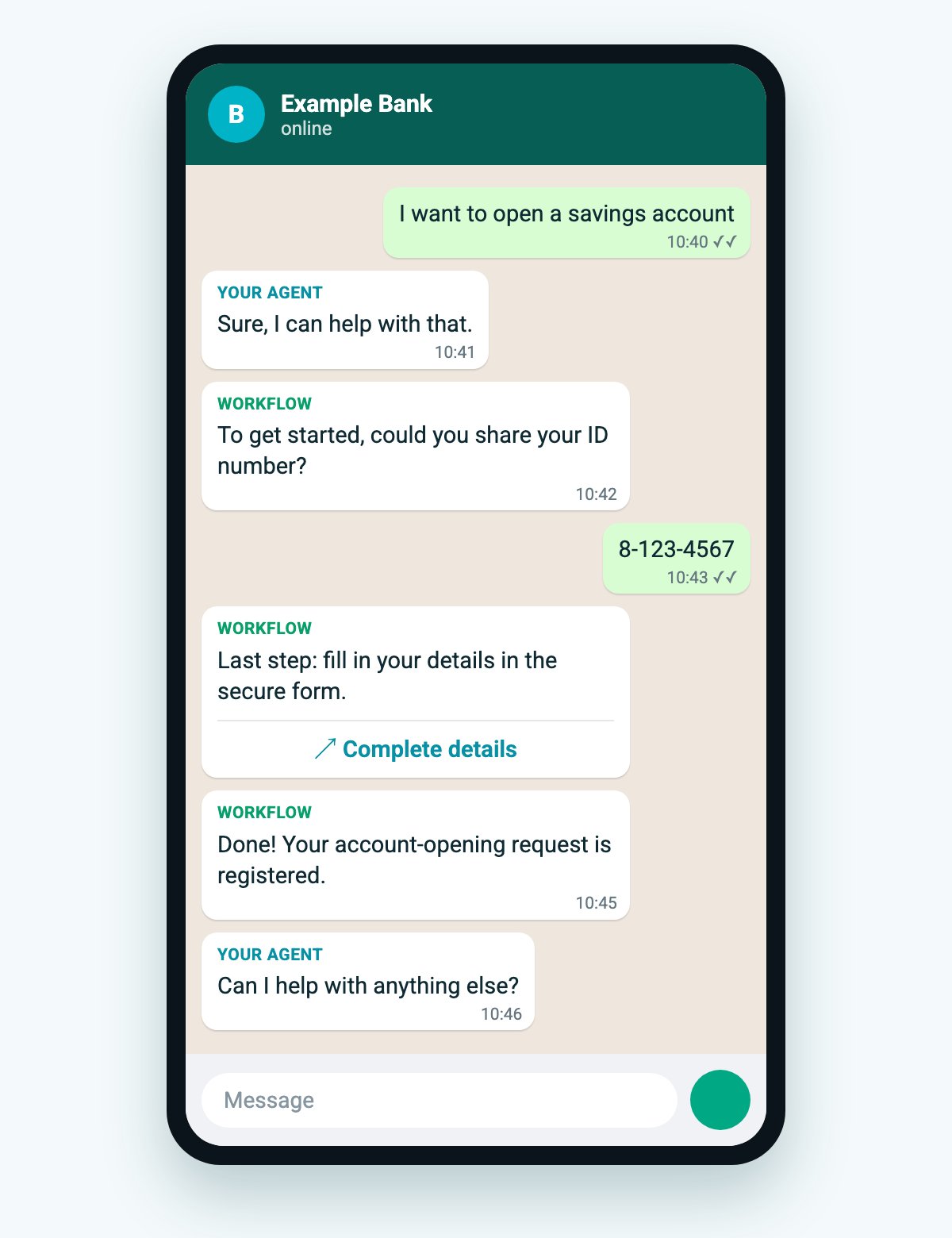
The customer: “I want to open a savings account”
Your agent starts the workflow
_context.referenceId) or REST (POST /v2/skills/{skillId}/execute). The referenceId comes from the server’s session. Mark the conversation as held.The workflow asks for the ID number
The customer answers with their ID number
workflow_reply. Your agent doesn’t store or interpret it.The workflow opens the data form
The workflow finishes
status becomes COMPLETED (REST) or completed (MCP). Your agent takes the conversation back: “Can I help with anything else?”