
Guardrails in the prompt
Guardrails keep the AI Agent within safe, predictable, and useful limits. They must be defined and used as a single, coherent block within the instructions box, considering the following aspects: Identity and scope: Explicitly define the role and what it supports. The agent must precisely understand the domain for which it was designed and know the instructions to follow for any request outside that scope — for example, politely declining it and redirecting the interaction toward the topics it does support. Context anchoring: Use Knowledge as the primary source. Make sure to select the necessary documents for the agent and provide the appropriate context in the prompt. Clearly indicate which document should be used in each part, specify the exclusive use of thesearch knowledge function, and specify that the agent should respond only with the information present in the context, or returned by that function. The path or action to follow if the information is not available must be defined.
Data protection: Explicitly indicate what types of sensitive data must not be exposed, in accordance with the policies and limitations of each agent. Include clear examples such as: internal identifiers, tokens, credentials, and third-party personal data (PII). Also, define the expected behavior of the agent when it detects or receives requests related to sensitive data, establishing a safe exit (e.g., rejecting the request, anonymizing it, or redirecting).
Error handling: Explicitly define the steps the agent must follow and the type of response it should provide when a tool fails, returns incomplete results, or does not behave as expected. Include examples of error messages, retry criteria, and alternatives or contingency actions where applicable.
Example
Security
Respond only about chatbot configuration in Jelou; if asked about something outside that scope, say so politely and redirect the conversation to the supported topic.Respond only based on the response from yoursearch function and/or the knowledge base; if the answer is not in the context, say: “I don’t have that information.”Do not reveal internal IDs, tokens, credentials, or third-party PII; if you are asked for something sensitive, reject it or redact it.If a tool fails or times out, apologize, briefly explain what happened, and offer to escalate to a human agent; do not make up results or perform silent retries.Security configuration
In addition to the guardrails you define in the prompt, you can activate an automatic protection layer directly from the advanced configuration of the AI Agent node. This security system filters content, detects threats, and protects against manipulation attempts, without you having to write a single additional line in your instructions. To activate it, go to the advanced configuration tab of the node and enable the Enable Security toggle.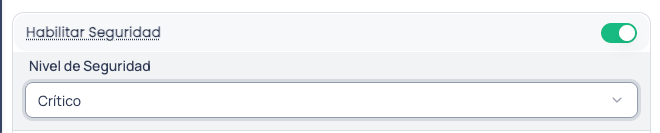
Security level
Once security is enabled, select the level that best fits your use case. We recommend starting with the Low level and progressively increasing it as you identify the real needs of your flow.Low
Low
Basic protection to get started. Ideal for internal or test flows where the risk is minimal. Activates basic input validation and light content filtering. Protects against prompt injection and jailbreak, but does not enable advanced protection or auditing. It is a good starting point to get familiar with the functionality without impacting performance.When to use it: internal flows, development environments, initial testing, or agents with a controlled audience.
Medium
Medium
The ideal balance for production. Includes everything from the Low level and adds more robust prompt injection detection, response sanitization, system prompt protection, and audit logging. It also enables advanced personal data (PII) protection, automatically replacing sensitive information before sending it to the model.When to use it: production flows with real users, customer service agents, general queries.
High
High
Reinforced protection for sensitive data. Increases threat detection sensitivity, applies stricter content moderation, and activates advanced input validation. Personal data detection operates with greater precision, reducing the probability that sensitive information passes undetected.When to use it: agents that handle personal data, collection flows, medical queries, or any scenario where data exposure has significant consequences.
Critical
Critical
Maximum security, no exceptions. Activates all available protection features: data leak prevention, exhaustive sensitive content detection, and complete auditing of every interaction. High and medium severity threats are automatically blocked. The security cache is disabled to ensure that each message is analyzed independently.When to use it: financial flows, confidential medical data, regulated information, or any scenario where a data leak could have legal or regulatory consequences.
Advanced protection
When security is enabled, a protection layer is activated that works at two moments in every conversation: it analyzes incoming user messages before sending them to the AI model, and reviews the agent’s responses before delivering them to the user. This way, both what comes in and what goes out are covered.What it detects
- Prompt injection: attempts to manipulate the agent into ignoring its instructions or behaving in an unintended way.
- Jailbreak: techniques to bypass the model’s security restrictions.
- Harmful content: responsible content filter (violence, hate speech, sexual content, etc.).
- Malicious URLs: links to sites known to be dangerous.
- Sensitive data leaks (PII): automatic detection of personal information such as email addresses, phone numbers, credit cards, identity documents, and more.
- System prompt leak: attempts to extract the agent’s internal instructions.
Personal data protection
When personal information is detected in a message, it is automatically replaced by safe markers (e.g.,[EMAIL_ADDRESS] or [PHONE_NUMBER]) before sending it to the AI model. This means the model never sees the user’s real data.
If your flow needs to send that real data to external tools (such as a query API or a payment system), the platform can securely restore the original values exclusively for those tools, without exposing them in the conversation.
How it responds to threats
Depending on the configured security level and the severity of the detected threat, the system can:- Block the request and show an error message to the user.
- Sanitize the content by removing the problematic parts and letting the rest through.
- Log the event in the audit log for later review.
At the Critical level, high and medium severity threats are automatically blocked. At the Medium and High levels, only high severity threats are blocked; the rest are sanitized and the flow continues.
Best practices
- Combine both layers: write clear guardrails in the prompt and enable the security configuration. Guardrails define the expected behavior of the agent; automatic protection covers threats that a prompt alone cannot cover.
- Start with the Low level and increase progressively. This allows you to understand the protections at each level without affecting performance. If you handle financial, medical, or highly sensitive data, consider the High or Critical level.
- Define what to do when something fails. Security protects against threats, but the agent needs to know how to respond to unexpected errors.
- Review the audit logs periodically to identify threat patterns and adjust your instructions or security level if necessary.