
How to connect Bitrix24 to Brain Studio and create leads from WhatsApp
What Bitrix24 enables
When you connect Bitrix24, you can:- Capture leads from WhatsApp conversations or other channels with enriched data
- Query existing contacts and companies to respond with CRM context
- Update pipeline status based on each conversation’s real progress
- Convert qualified leads into contacts and companies without manual entry
- Schedule sales meetings directly in the Bitrix24 calendar from the flow
Installation
Prerequisites
- An active Bitrix24 account.
- A paid Bitrix24 plan with access to inbound webhooks. This module is not available on the free account.
- Permissions to create or edit integrations from Applications -> Developer resources.
How to get credentials
To connect Bitrix24 in Brain Studio, you need the Webhook URL of an inbound webhook with permissions for the modules used by this integration.Open Applications in Bitrix24
Go to Developer resources
Select Other
Create an inbound webhook
Copy the Webhook URL
Assign required permissions
- CRM (
crm) - Calendar (
calendar)
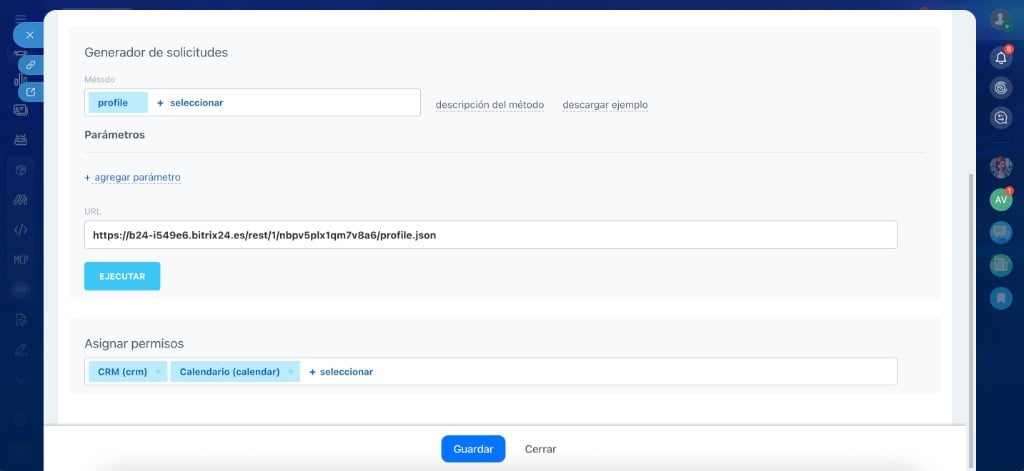
Inbound webhook configuration in Bitrix24 with CRM and Calendar permissions assigned
Save the webhook
How to connect it
The most direct way is to use Jelou Agent: describe what you need and the agent connects Bitrix24 automatically inside the flow. If you prefer manual installation, open Marketplace and follow these steps with the Webhook URL from the previous step.Open Marketplace
Search for Bitrix24
Enter Webhook URL
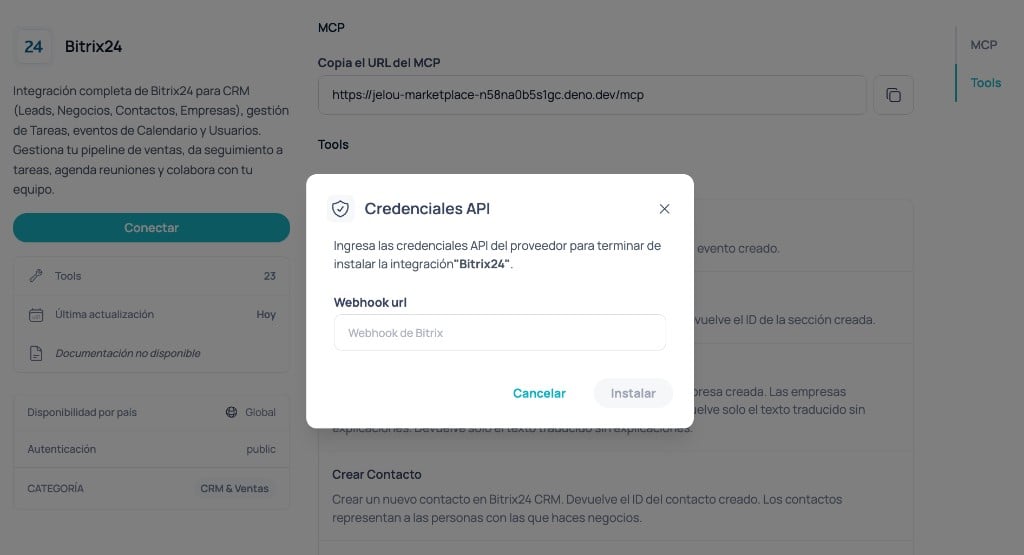
Bitrix24 API credentials modal in Brain Studio Marketplace
Confirm installation
Available tools
At a high level, actions are grouped as:- Create - lead, contact, company, calendar event, calendar section.
- Query - get and list leads, contacts, companies, events, and sections.
- Update - lead, contact, company, calendar section.
- Delete - lead, contact, company, event, and calendar section.
Create Lead
Create Lead
- title (string, required) - Lead title.
- name (optional, string) - Contact first name.
- last_name (optional, string) - Contact last name.
- company_title (optional, string) - Company name.
- phone (optional, string) - Phone number.
- phone_type (optional, string) - Phone type (default
"WORK"). - email (optional, string) - Email address.
- email_type (optional, string) - Email type (default
"WORK"). - status_id (optional, string) - Lead status (for example
"NEW","IN_PROCESS"). - source_id (optional, string) - Lead source (for example
"WEB","CALL"). - opportunity (optional, string) - Estimated deal amount.
- currency_id (optional, string) - Currency code (for example
"USD","EUR"). - assigned_by_id (optional, string) - Responsible user ID.
- comments (optional, string) - Additional comments.
Get Lead
Get Lead
- id (string, required) - Lead ID.
List Leads
List Leads
- status_id (optional, string) - Filter by status (for example
"NEW","IN_PROCESS"). - source_id (optional, string) - Filter by source.
- assigned_by_id (optional, string) - Filter by owner.
- start (optional, string) - Pagination offset.
Update Lead
Update Lead
- id (string, required) - Lead ID to update.
- title (optional, string) - New title.
- phone (optional, string) - New phone number.
- phone_type (optional, string) - Phone type (default
"WORK"). - email (optional, string) - New email.
- email_type (optional, string) - Email type (default
"WORK"). - status_id (optional, string) - New status.
- opportunity (optional, string) - New estimated amount.
- comments (optional, string) - New comments.
Delete Lead
Delete Lead
- id (string, required) - Lead ID to delete.
Create Contact
Create Contact
- name (optional, string) - First name.
- last_name (optional, string) - Last name.
- phone (optional, string) - Phone number.
- phone_type (optional, string) - Phone type (default
"WORK"). - email (optional, string) - Email.
- email_type (optional, string) - Email type (default
"WORK"). - post (optional, string) - Job title or position.
- company_id (optional, string) - Associated company ID.
- source_id (optional, string) - Contact source.
- assigned_by_id (optional, string) - Owner ID.
- comments (optional, string) - Comments.
Get Contact
Get Contact
- id (string, required) - Contact ID.
List Contacts
List Contacts
- company_id (optional, string) - Filter by company.
- source_id (optional, string) - Filter by source.
- assigned_by_id (optional, string) - Filter by owner.
- start (optional, string) - Pagination offset.
Update Contact
Update Contact
- id (string, required) - Contact ID to update.
- name (optional, string) - First name.
- last_name (optional, string) - Last name.
- phone (optional, string) - Phone number.
- phone_type (optional, string) - Phone type (default
"WORK"). - email (optional, string) - Email.
- email_type (optional, string) - Email type (default
"WORK"). - post (optional, string) - Role.
- comments (optional, string) - Comments.
Delete Contact
Delete Contact
- id (string, required) - Contact ID to delete.
Create Company
Create Company
- title (string, required) - Company name.
- company_type (optional, string) - Company type (for example
"CUSTOMER","SUPPLIER"). - industry (optional, string) - Industry code.
- phone (optional, string) - Phone number.
- phone_type (optional, string) - Phone type (default
"WORK"). - email (optional, string) - Email.
- email_type (optional, string) - Email type (default
"WORK"). - web (optional, string) - Website.
- address (optional, string) - Address.
- assigned_by_id (optional, string) - Owner ID.
- comments (optional, string) - Comments.
Get Company
Get Company
- id (string, required) - Company ID.
List Companies
List Companies
- company_type (optional, string) - Filter by type.
- industry (optional, string) - Filter by industry.
- assigned_by_id (optional, string) - Filter by owner.
- start (optional, string) - Pagination offset.
Update Company
Update Company
- id (string, required) - Company ID to update.
- title (optional, string) - Name.
- company_type (optional, string) - Type.
- industry (optional, string) - Industry.
- phone (optional, string) - Phone number.
- phone_type (optional, string) - Phone type (default
"WORK"). - email (optional, string) - Email.
- email_type (optional, string) - Email type (default
"WORK"). - address (optional, string) - Address.
- comments (optional, string) - Comments.
Delete Company
Delete Company
- id (string, required) - Company ID to delete.
Create Event
Create Event
- name (string, required) - Event name.
- from (string, required) - Start date/time (ISO 8601, for example
"2025-06-15T10:00:00"). - to (string, required) - End date/time (ISO 8601).
- section_id (string, required) - Calendar section ID where event is created.
- type (optional, string) - Calendar type (for example
"user","group","company"). - owner_id (optional, string) - Calendar owner ID.
- description (optional, string) - Event description.
- location (optional, string) - Location.
- importance (optional, string) - Event importance (default
"high"). - accessibility (optional, string) - Availability status (default
"busy"). - is_meeting (optional, string) - Whether this is a meeting with attendees.
- attendees (optional, array) - Attendee user IDs.
Get Event
Get Event
- id (string, required) - Event ID.
List Events
List Events
- from (optional, string) - Range start date (ISO 8601).
- to (optional, string) - Range end date (ISO 8601).
- type (optional, string) - Calendar type (for example
"user","group"). - owner_id (optional, string) - Calendar owner ID.
- section (optional, array) - Section IDs to filter.
Delete Event
Delete Event
- id (string, required) - Event ID to delete.
Create Calendar Section
Create Calendar Section
- name (string, required) - Section name.
- type (optional, string) - Calendar type (default
"user"). - owner_id (optional, string) - Owner ID.
- description (optional, string) - Section description.
- color (optional, string) - Background color in hex format (for example
"#9cbeee"). - text_color (optional, string) - Text color in hex format.
List Calendar Sections
List Calendar Sections
- type (optional, string) - Calendar type to query (for example
"user","group"). - owner_id (optional, string) - Calendar owner ID.
Update Calendar Section
Update Calendar Section
- id (string, required) - Section ID to update.
- name (optional, string) - New name.
- type (optional, string) - Calendar type (default
"user"). - owner_id (optional, string) - Owner ID.
- description (optional, string) - New description.
- color (optional, string) - New background color (hex).
- text_color (optional, string) - New text color (hex).
Delete Calendar Section
Delete Calendar Section
- id (string, required) - Section ID to delete.
How to use in Brain
Once connected, you can use Bitrix24 in two surfaces:In AI Agent
Best when users want to create leads, update contacts, or query CRM in natural language.Open the AI Agent node
Open Tools
Add Bitrix24
Configure tools
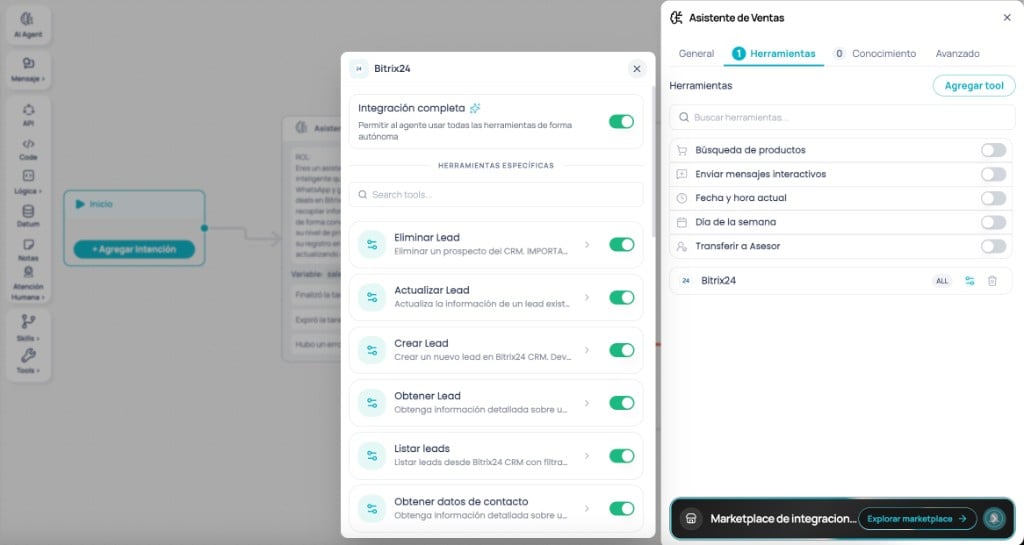
Bitrix24 as a tool in AI Agent - Tools tab and added tool
In Canvas
Best when you need full control of the flow (for example: qualify lead -> create contact -> assign owner -> notify).Drag Bitrix24 into Canvas
Select the tool
Configure body and memory
Connect the flow
title and phone are the minimum recommended fields to identify the prospect.
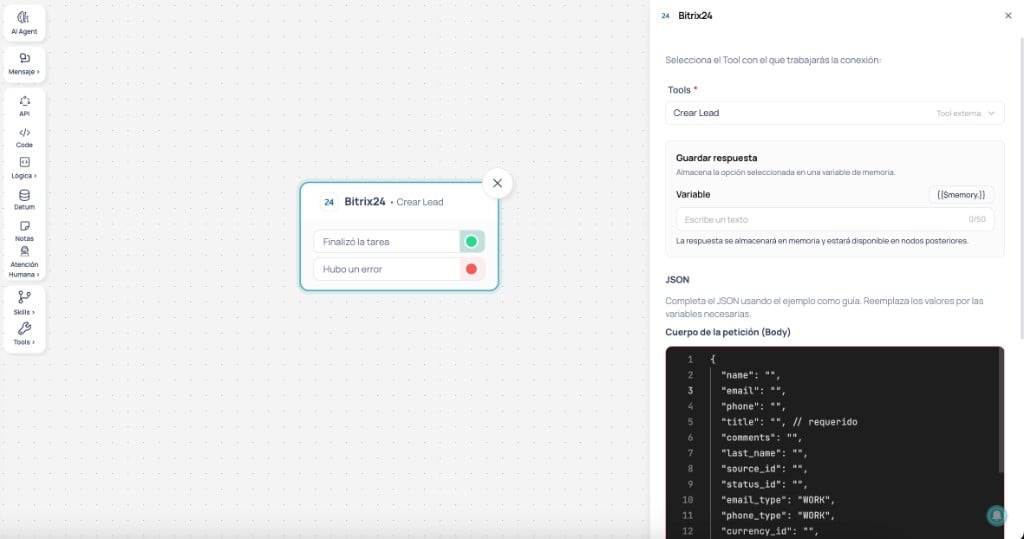
Bitrix24 node in Canvas with Create lead tool - panel with JSON body and save response to memory
Use cases
WhatsApp lead qualification with enriched record in Bitrix24
WhatsApp lead qualification with enriched record in Bitrix24
- Prospect starts conversation on WhatsApp
- The agent goes through qualification questions: need, budget, timeline, and authority
- When qualification is complete, the flow creates the lead with Create Lead, including name, company, estimated amount, source, and comments with conversation summary
- It is automatically assigned to a sales rep based on business criteria
- The lead reaches CRM with full context, not just name and phone
- The sales team receives pre-qualified prospects ready to close
- Reduces risk of losing leads due to delay or forgotten manual entry
Pipeline auto-updated based on conversation progress
Pipeline auto-updated based on conversation progress
- Prospect shows initial interest -> flow updates lead to
IN_PROCESSwith Update Lead - Prospect asks for proposal or demo -> flow updates
status_idand estimated amount - Prospect confirms purchase intent -> flow converts the lead by creating contact with Create Contact and company with Create Company
- Sales rep sees real-time pipeline updates in Bitrix24
- Pipeline always reflects real status without relying on team discipline
- Sales managers get accurate visibility for revenue forecasting
Agent checks Bitrix24 before responding to customers
Agent checks Bitrix24 before responding to customers
- Customer sends a WhatsApp message
- Flow searches Bitrix24 by phone or email with List Contacts
- If found, it retrieves full contact data with Get Contact and company data with Get Company
- Agent responds with personalized context or transfers to assigned rep with a ready briefing
- Agent checks CRM before asking, so customers do not repeat known information
- Rep receives transfer with full context, not just “someone wants to talk”
- Smoother customer experience for recurring accounts
From qualified lead to scheduled meeting in one flow
From qualified lead to scheduled meeting in one flow
- Agent detects close signal in conversation (proposal request, budget confirmation, etc.)
- Flow creates contact with Create Contact and company with Create Company
- It offers available slots and, once confirmed, creates event with Create Event in assigned rep calendar
- Rep receives notification with prospect briefing
- Removes three manual post-qualification steps: create contact, create company, schedule meeting
- Time between qualification and first meeting drops from hours/days to minutes
Automatic briefing for reps before a meeting
Automatic briefing for reps before a meeting
- Rep asks the agent “what do I know about the 3pm customer?”
- Flow queries event with List Events, identifies attendee, and retrieves profile with Get Contact and Get Company
- If there are active related leads, it retrieves them with Get Lead
- Returns structured summary: company, role, contact history, active opportunity, and notes
- Rep enters meetings prepared without spending time navigating CRM
- Fewer mistakes from confusing customers or lacking context across many accounts
Integrations that pair well with Bitrix24
Gmail
Gmail
Google Calendar
Google Calendar
Slack
Slack
Google Sheets
Google Sheets