
What Datil enables
When you connect Datil, you can:- Issue all six SRI document types - invoices, credit notes, debit notes, withholdings, shipping guides, and purchase settlements - from the same conversational flow
- Verify each document status to know whether it was authorized, is pending, or was rejected, without opening the Datil panel
- Validate RUC or national ID before invoicing to reduce rejections due to incorrect data
- Diagnose SRI errors by translating technical codes into concrete actions for your team
- Query tax catalogs (VAT types, payment methods, withholdings) to build consistent documents
Installation
Prerequisites
- An active Datil account.
- A valid account API key.
- The electronic signature password Datil will use to issue documents.
- Issuer data for this integration:
- RUC
- Legal Name
- Establishment
- Emission Point
How to get credentials
To connect Datil in Brain Studio, you need these six values:- API Key
- Signature password
- RUC
- Legal Name
- Establishment
- Emission Point
Get your API Key in Datil
Sign in to app.datil.co, go to Settings, and find the API Key section. There, copy the key you will use to connect the integration.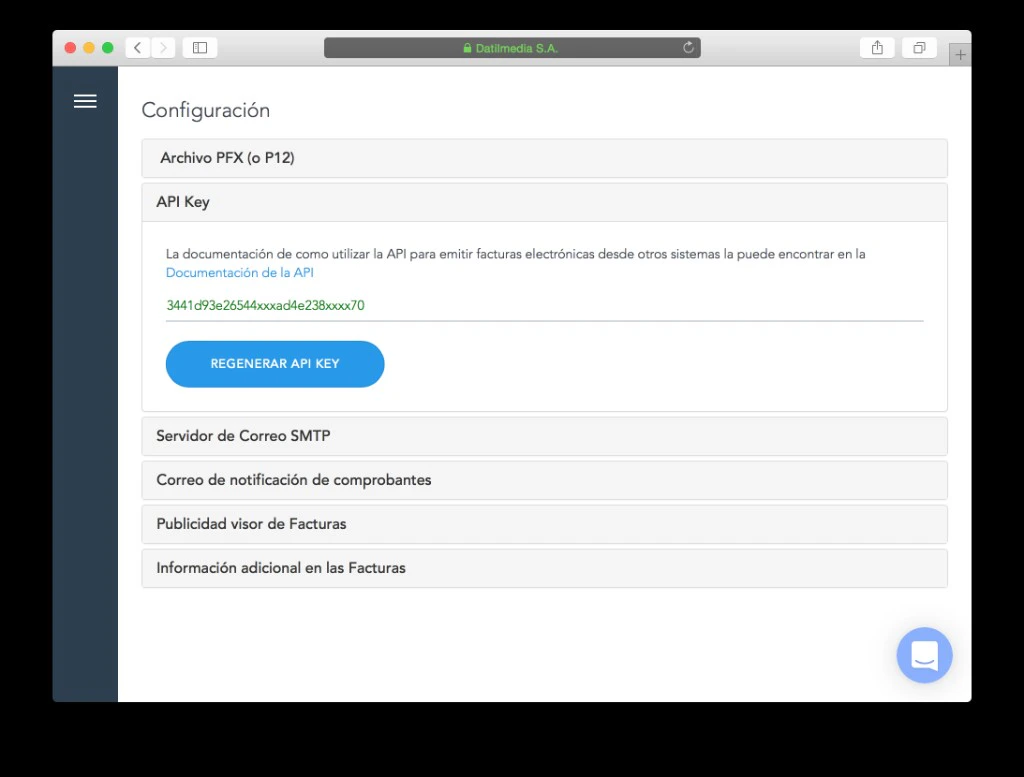
Keep your signature password handy
You will need the electronic signature password Datil uses to issue documents. This is sensitive data, so validate it before starting installation.
Confirm issuer data
Gather the tax information you currently use in Datil:
- RUC
- Legal Name
- Establishment
- Emission Point
RUC and Legal Name identify the issuer. Establishment and Emission Point correspond to the authorized point from which documents are issued.
Establishment and Emission Point are usually 3-digit codes, for example
001.How to connect it
The most direct way is to use Jelou Agent: describe what you need and the agent connects Datil automatically inside the flow. If you prefer manual installation, open the Marketplace and follow these steps with the values from the previous section.Complete the form
Enter the six values requested:
- API Key
- Signature password
- RUC
- Legal Name
- Establishment
- Emission Point
Available tools
The integration exposes 16 tools in Brain Studio. Names match the node editor. Each tool panel contains parameter details; here they are grouped by business function in the SRI + Datil context.Invoicing and main documents
Invoicing and main documents
Covers issuance and follow-up of electronic invoices and collateral operational documents (shipping guide), plus last sequence lookup when the API allows it.Included tools
- Issue invoice
- List Invoices
- Get invoice status
- Get last sequence
- Issue Shipping Guide
- When you need to invoice with tax calculation and numbering aligned with Datil/SRI
- When you need to list issued invoices, verify SRI authorization/rejection, or locate identifiers for next steps
- When the business requires a shipping guide for merchandise transport in Ecuador
Tax adjustments
Tax adjustments
Modifies tax balance of an already issued invoice: credits or charges linked to that document, and query of credit notes you issued.Included tools
- Issue Credit Note
- Issue Debit Note
- List Credit Notes
- Credit note: returns, amount corrections, or post-invoice discounts (requires original invoice and reason)
- Debit note: late interest, extra charges, or other increases over original invoice
- List Credit Notes: review issued notes, filter by customer or dates (
date_rangerecommended when available in editor)
Withholdings and complementary documents
Withholdings and complementary documents
Concentrates withholdings you apply or receive, purchases from third parties, and purchase settlements for suppliers without their own invoice.Included tools
- Incident withholding
- Incident resolution
- List received withholdings
- List received invoices
- List received credit notes
- Incident withholding is the electronic withholding voucher: income tax or VAT withholding to suppliers, with tax type, percentage code, and base
- Incident resolution is the purchase settlement: purchases from someone who cannot invoice you; you act as issuer and retain as needed
- List received invoices and List received credit notes: traceability for purchases and supplier credits
- List received withholdings: withholdings your customers applied to your sales (tax credit and follow-up)
Validation and tax support
Validation and tax support
Reinforces data quality before and after issuance: tax identification, SRI catalogs, and rejection interpretation.Included tools
- Diagnose rejection
- Get Catalog
- Validate Tax Identification
- Validate Tax Identification: verify RUC, national ID, or other accepted types according to SRI rules before invoicing
- Get Catalog: retrieve official codes (ID types, VAT, payment methods, document types, income/VAT withholdings); you can list available catalogs or one specific catalog according to editor parameters
- Diagnose rejection: when SRI rejects a document, translates error code into actionable explanation
Several tools return translated text only (without extra structure): use it exactly as shown in the node for user messages or debugging.
How to use in Brain
Once connected, you can use Datil in two surfaces:In AI Agent
Ideal when a user wants to invoice with Issue invoice, follow a sale with Get invoice status or List Invoices, or validate data with Validate Tax Identification, all in natural language.
The agent will automatically decide when to use Issue invoice, Get invoice status, List Invoices, or other tools according to conversation, including Validate Tax Identification when buyer data must be checked.
In Canvas
Ideal when you need full flow control (for example: Validate Tax Identification -> Issue invoice -> send document to customer).Configure payload and memory
Complete request JSON and, if needed, Save response in a memory variable.
buyer_id, buyer_id_type, buyer_name, and items are required.
Use cases
Automatic invoicing when closing a sale
Automatic invoicing when closing a sale
You close the sale in conversation and the flow leaves tax evidence in Datil without depending on someone opening a separate invoicing system.Typical flow:
- Customer confirms operation and provides RUC or ID, legal name, and sale lines
- You validate ID with Validate Tax Identification and, if needed, align codes with Get Catalog (VAT, payment method, document type)
- You issue with Issue invoice and confirm result with Get invoice status or List Invoices, depending on your follow-up design
- Electronic invoice in the same thread where the sale happened
- Fewer capture errors and less back-and-forth for missing data
Post-issuance adjustments: returns, discounts, and corrections
Post-issuance adjustments: returns, discounts, and corrections
When an invoice is already issued but amount corrections or returns are needed, you use notes linked to original document instead of rebuilding everything from zero.Typical flow:
- Locate invoice (full number or prior context) and review status with Get invoice status
- To credit or reduce amount: Issue Credit Note with original invoice and reason
- For later charges (interest, upward adjustments): Issue Debit Note; for audit of issued notes: List Credit Notes
- Returns and adjustments with SRI traceability
- Post-sales and collection operations aligned with same sale flow
Operational and tax queries from chat
Operational and tax queries from chat
Datil also works for querying real operation without opening panel: issued invoices, received documents, withholdings, authorization statuses, or SRI rejections, all from conversational channels like WhatsApp.Typical flow:
- Owner, accountant, or finance asks about invoice, withholding, or tax status
- Flow uses tools like List Invoices, Get invoice status, List received invoices, List received withholdings, or List received credit notes
- If a problem appears, complement with Diagnose rejection to translate SRI error into concrete action
- Less dependency on panel for daily queries
- Faster responses to customers and internal teams
- Better visibility for business owners, accountants, and admin teams
Tax support and SRI rejection diagnosis
Tax support and SRI rejection diagnosis
Reduce rejections before issuing and, when SRI returns errors, translate technical messages into clear steps for team or customer.Typical flow:
- Before invoicing: Validate Tax Identification and Get Catalog to avoid invalid codes/data
- After failed attempt or uncertain status: Diagnose rejection from SRI error code
- To verify authorization: Get invoice status
- Fewer rejected documents and shorter support times
- Operators resolve issues without opening SRI manuals in parallel
Integrations that pair well with Datil
HubSpot
HubSpot
CRM centralizes commercial context; Datil executes tax step. When a deal closes in HubSpot, flow can take RUC and legal name from contact, validate tax identification, and issue invoice in Datil without data duplication.Combined flow: deal closed -> validate RUC with Datil -> issue invoice -> register tax reference in HubSpot.HubSpot documentation
Gmail
Gmail
After issuing invoice or completing a tax adjustment, flow can email PDF or formal notification to customer, closing tax + communication cycle in same process.Combined flow: issue invoice in Datil -> email customer with authorization number and amount.Gmail documentation
Slack
Slack
Every authorization, SRI rejection, or withholding milestone can trigger an alert for finance/operations, without someone watching Datil panel all day.Combined flow: invoice issued -> notify #accounting with authorization status and document data.Slack documentation
Google Sheets
Google Sheets
For reconciliation, reporting, or sharing with external accountants, flow can push document numbers, amounts, and statuses to control sheets without granting access to Datil or Brain.Combined flow: list monthly invoices in Datil -> update tax control sheet in Sheets.Google Sheets documentation
Related articles
Integrations
Catalog of integrations available in the Marketplace.
How to use integrations in Brain
General flow to install and use integrations in Brain Studio.