
Configuration
General
The button text is fixed: Share contact info.
Advanced
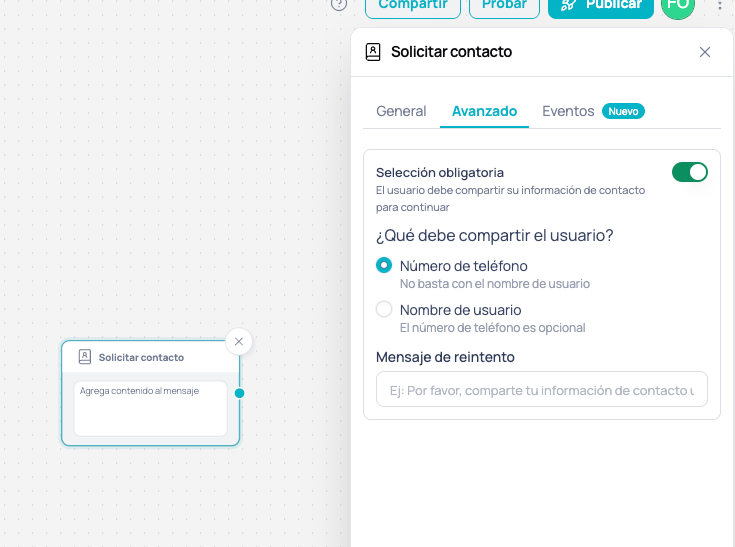
Advanced tab of the Request contact node
What the user must share
WhatsApp lets the user choose which details from their card they share, and the button can’t restrict that. That’s why the node enforces the requirement, with two mutually exclusive options:
With either option, if the user replies with free text instead of tapping the button, they get the Retry message. A contact card sent from the attachments menu doesn’t unblock the node either: the user has to use the button.
Nodes that already had Mandatory selection turned on behave as Phone number without you having to reconfigure or republish them.
Without mandatory selection
With Mandatory selection off, the node works like Buttons or List without mandatory selection: it sends the message and waits for the contact card, but it doesn’t hold the user. The flow only moves on through the node’s output once the contact arrives, so the following nodes can already use what the user shared.
If nothing is connected to the node’s output, the flow ends there, same as before. A card sent from the attachments menu doesn’t resume the flow: the user has to use the button.
Using the captured number
With or without Mandatory selection, when the user shares their number through the button and didn’t have one on record yet, the number is linked to the user and is available in the following nodes of the same execution:Use cases
Banking onboarding with BSUID users
Banking onboarding with BSUID users
A banking workflow that receives users identified only by BSUID needs the phone number to verify their identity: Request contact with Mandatory selection and Phone number keeps the flow from moving on until it has it, and the Retry message tells the user what’s missing.
Frictionless lead capture
Frictionless lead capture
A lead capture workflow wants to save the user’s contact without stopping the conversation: Request contact with Username accepts any shared card and leaves the number optional.
Ask for the phone number without blocking the conversation
Ask for the phone number without blocking the conversation
A sales workflow asks for the contact to register the customer, but the customer may first ask for an agent or a branch: Request contact without Mandatory selection lets the router handle those questions and, once the customer shares their card, the registration continues. Since the card may arrive without a number, a Conditional node checks whether
{{$user.phone}} is empty before saving it and, if it’s missing, asks for it another way.Next steps
Location Request
Ask for the user’s location with an interactive button
Contact
Send a contact card to the user